Active Directory Hardening: Every Step, in the Order to Apply It
Summary
Active Directory hardening closes the defaults, legacy protocols and excess rights that attackers use to take over a domain. Start with an Active Directory security assessment, then apply Active Directory security best practices in five phases: visibility, quick wins, credential protection, Tier 0 and continuous review. Each step below links to its detailed guide.
Quick steps
- Run the read-only assessment script from this guide and keep its CSV as your baseline.
- Phase 0: configure the domain controller audit policy and forward the events before you change anything else.
- Phase 1: set ms-DS-MachineAccountQuota to 0, disable LLMNR and NBT-NS, require SMB and LDAP signing, and deploy Windows LAPS.
- Phase 2: turn on LSA protection and Credential Guard, protect admin accounts from delegation, move services to gMSAs, and retire RC4 and NTLMv1.
- Phase 3: reset krbtgt twice, keep Tier 0 small, and review AdminSDHolder, replication rights and AD CS.
- Phase 4: audit Group Policy, run detections and review attack paths on a schedule.
- Re-run the script after each phase and track how many checks move from REVIEW to PASS.
Applies to: Active Directory Domain Services domains whose domain controllers run Windows Server 2016, 2019, 2022 or 2025, and their Windows 10, Windows 11 and Windows Server member computers (as of November 2026). Each detailed guide lists its own version requirements.
What is Active Directory hardening, and why does the order matter?
Active Directory hardening is the set of configuration changes that removes the defaults, legacy protocols and excess rights an attacker needs to move from one account to control of the domain. It covers the Active Directory security settings of domain controllers, member computers, accounts and the directory's own permissions.
Taking over a domain doesn't require a new vulnerability. The Microsoft Defender for Identity documentation states that most identity attacks use common Active Directory misconfigurations and legacy components such as NTLMv1. A typical chain captures or relays a credential, climbs through a misconfigured right, and ends with directory secrets, for example through DCSync, which MITRE ATT&CK tracks as OS Credential Dumping: DCSync (T1003.006).
Microsoft's best practices for securing Active Directory cover the same ground: reduce the attack surface, avoid excessive privileges, use secure administrative hosts, secure domain controllers, monitor for compromise and plan for it. This guide turns that guidance and our detailed guides into one sequence.
The order follows three rules. Visibility comes first, so you can see what each later change breaks and notice an attacker who reacts. Single settings with an audit mode and a clean rollback come before projects that touch every application. Tier 0 work comes after the cheapest paths into Tier 0 are closed.
How does this plan differ from the beginner checklist?
Our Active Directory security checklist for beginners describes what a secure domain looks like, grouped by area. This guide is the implementation plan: it puts the changes in phases, says what each one can break and links the step-by-step guide for each change. Use the checklist to agree on the goal and this roadmap to schedule the work.
Before you start
Prepare an inventory, a way back and a change process before the first setting moves. Test every change in a lab first, with the operating system versions, applications and network devices you actually run.
- Inventory. List every domain, its domain controllers and their Windows Server versions, its trusts and its domain functional level, which some steps depend on.
- Backups. Microsoft's forest recovery guidance says to back up at least two writable domain controllers in each domain regularly. Keep the DSRM password and a documented recovery plan, and rehearse it in a lab.
- Permissions. Most steps need Domain Admins in the domain you change. Extending the schema for Windows LAPS needs Schema Admins, and creating the KDS root key for gMSAs needs Domain Admins or Enterprise Admins.
- Change process. Make one change per window, start with a pilot OU, and give each change an owner, a success check and a rollback. Tell your security operations center and help desk first: several changes write audit events that look like tampering, and some change how administrators sign in.
The Active Directory hardening roadmap at a glance
The table lists every step in the order to apply it. Effort and break risk are relative ratings; the break risk column names what fails if you skip the audit step of the detailed guide.
| Phase | Step | Why it matters | Effort | Break risk | Detailed guide |
|---|---|---|---|---|---|
| 0 | Configure the audit policy and forward domain controller events | Later changes and attacks leave evidence only if auditing is on | Medium | Low: more events to store | Active Directory audit policy guide |
| 1 | Set ms-DS-MachineAccountQuota to 0 | Any domain user can create up to 10 computer accounts by default | Low | Low: joins that relied on the quota fail until you delegate the right | MachineAccountQuota guide |
| 1 | Disable LLMNR and NBT-NS | Any device on the local network can answer these fallback name queries | Low | Medium: names that exist only in WINS, LMHOSTS or broadcast stop resolving | LLMNR and NBT-NS guide |
| 1 | Require SMB signing and remove SMBv1 | A server that requires signing rejects relayed and altered SMB sessions | Medium | Medium: NAS devices and other SMB servers that can't sign | SMB signing guide |
| 1 | Require LDAP signing and LDAP channel binding | Signing stops tampering on LDAP; channel binding rejects relayed NTLM binds to LDAPS | Medium | Medium: LDAP clients that don't sign or don't send a channel binding token | LDAP signing and channel binding guide |
| 1 | Deploy Windows LAPS | A unique, rotated local administrator password per device stops password reuse | Medium | Low: tasks that sign in with the old local password | Windows LAPS guide |
| 2 | Turn on LSA protection and Credential Guard | Other processes can't read credentials that Windows keeps after sign-in | Medium | Medium: LSA plug-ins that aren't signed; protocols that Credential Guard blocks | LSA protection and Credential Guard guide |
| 2 | Add admins to Protected Users and remove risky delegation | Admin credentials can't be delegated, cached or used with NTLM | Medium | Medium: NTLM, RC4 and delegation stop working for members | Protected Users and delegation guide |
| 2 | Move service accounts to gMSAs | Domain controllers generate and rotate the password | Medium | Low per service when each is tested | gMSA guide |
| 2 | Retire RC4 in Kerberos | RC4 service tickets make Kerberoasting easier | High | High: accounts, keytabs and devices that support only RC4 | RC4 and AES guide |
| 2 | Disable NTLMv1 | Microsoft calls NTLMv1 weak, with no protection against man-in-the-middle attacks | Medium | Medium: clients that can send only LM or NTLMv1 | NTLMv1 guide |
| 3 | Reset the krbtgt password twice | Invalidates forged and stolen ticket-granting tickets | Medium | Low with Microsoft's script and the full wait | krbtgt reset guide |
| 3 | Define Tier 0 and keep it small | Everything that can control Tier 0 is Tier 0 | High | Low for the inventory; moves need planning | What belongs in Tier 0? |
| 3 | Separate admin accounts and use privileged access workstations | Higher-tier credentials never touch lower-tier devices | High | Medium: admin workflows change | Enterprise access model vs tier model |
| 3 | Review AdminSDHolder | Its permissions are copied to every protected account and group | Low | Low | What is AdminSDHolder? |
| 3 | Remove unexpected DCSync rights | The two replication rights expose every password hash in the domain | Low | Medium: synchronization accounts that need the rights | Removing DCSync rights |
| 3 | Harden AD CS | A misconfigured template can let a user request a certificate for another user | Medium | Medium: template changes affect enrollment | ESC15 analysis |
| 4 | Audit Group Policy | Anyone who can edit or link a GPO changes every computer it reaches | Low | Low: the audit itself is read-only | gpresult and RSoP guide |
| 4 | Run detections on the paths that remain | Hardening removes paths; detections catch attempts on the rest | Medium | Low | Detections for the remaining paths |
| 4 | Review attack paths on a schedule | New rights and group changes create new paths | Medium | Low | Attack path management |
| DC | Disable the Print Spooler and harden domain controllers | Any authenticated user can connect to a domain controller's spooler | Low | Low to medium: print pruning and printing from domain controllers | Print Spooler and DC hardening |
Phase 0: Turn on visibility before you change anything
Configure the domain controller audit policy first, because every later phase depends on its events: they show which clients break when you enforce a setting and whether an attacker works around it.
The audit policy guide sets advanced audit subcategories in a dedicated Group Policy Object (GPO) and enables Audit: Force audit policy subcategory settings (Windows Vista or later) to override audit policy category settings so that basic category settings don't override them. It adds SACLs on the domain root and other sensitive objects, so that event 4662 and event 5136 appear. It also enlarges the Security log and forwards events with Windows Event Forwarding or a SIEM agent.
Phase 3 relies on these events directly: replication requests by accounts that aren't domain controllers show up in 4662, and changes to AdminSDHolder in 5136. Run the assessment script now as well, so its first CSV records the state before any change.
Phase 1: Quick wins that close common attack paths
Phase 1 changes are single settings with an audit step and a clean rollback. Each one removes a path that attackers use early, before they hold any privileged account.
Set ms-DS-MachineAccountQuota to 0
ms-DS-MachineAccountQuota sets how many computer accounts a user can create without a delegated permission, and its default is 10. A phished user, or a relayed session that reaches LDAP with a user's rights, can create a computer account that the attacker controls (MITRE ATT&CK T1136.002). Microsoft Defender for Identity's identity infrastructure assessments recommend setting the attribute to 0.
Before you change it, match every way computers join the domain to a named account or group: help desk, imaging, offline domain join, Windows Autopilot hybrid join and failover clusters. Grant those accounts the Create Computer objects permission on their OUs, then set the quota to 0. Afterward, watch event 4741 from accounts outside your provisioning list, which the computer account creation rules flag.
Disable LLMNR and NBT-NS
LLMNR and NBT-NS are fallback name resolution protocols that Windows uses when DNS can't answer, and any device on the local network can answer them. Attackers answer with their own address and collect the authentication that follows, which MITRE ATT&CK tracks as T1557.001, Name Resolution Poisoning and SMB Relay.
Fix the DNS gaps first, because names that exist only in WINS, LMHOSTS or by broadcast stop resolving. Then enable Turn off multicast name resolution in a GPO and disable NetBIOS over TCP/IP through the DHCP option or on each adapter. Proxy auto-discovery that finds wpad only through NetBIOS also needs explicit proxy settings.
Require SMB signing and remove SMBv1
SMB signing adds a signature to every message, computed with a key derived from the session key, so a relayed or altered session can't produce valid signatures. Requiring it on every server and client blocks NTLM relay to SMB. Set both Microsoft network server: Digitally sign communications (always) and Microsoft network client: Digitally sign communications (always), servers first.
Defaults vary by version. Domain controllers require signing for inbound connections through the Default Domain Controllers Policy, and Windows 11 24H2 and later (Enterprise, Pro and Education) require it in both directions. Third-party SMB servers that can't sign and guest-only shares fail once signing is required, and SMBv1-only devices fail once SMBv1 is removed, so find them in the audit step. Audit SMBv1 use, then remove the feature.
Require LDAP signing and LDAP channel binding
LDAP signing protects SASL sessions on port 389 from tampering, but with NTLM it doesn't prevent relay, and it doesn't apply to LDAPS. LDAP channel binding ties authentication to the TLS session of an LDAPS connection, so an enforcing domain controller rejects a relayed NTLM bind. Plan both, and reduce NTLM where you can.
Raise the 16 LDAP Interface Events diagnostic level to 2 so that domain controllers log each unsigned client in event 2889. Fix those clients, then set Domain controller: LDAP server signing requirements to Require signing. Set Domain controller: LDAP server channel binding token requirements to When supported, then to Always after a clean audit window. New Windows Server 2025 deployments already require signing and default channel binding to When supported; domain controllers on Windows Server 2022 and earlier require neither by default.
Deploy Windows LAPS
Windows LAPS gives each device a unique, regularly rotated local administrator password and backs it up to Active Directory or Microsoft Entra ID. A shared local password lets an attacker who steals one hash reuse it on every other device, which is pass-the-hash.
The detailed guide extends the schema, delegates OU rights, applies a policy with encryption and audits who can read passwords. The schema extension is permanent, and password encryption needs a domain functional level of Windows Server 2016 or higher. Treat every account that can read clear-text or decryptable passwords as a local administrator of those devices, or it becomes a shadow admin. Defender for Identity's account assessments list devices that LAPS doesn't protect or that haven't changed their LAPS password in the last 60 days.
Phase 2: Protect credentials
Phase 2 makes stolen or captured credentials harder to obtain and harder to reuse. These steps touch applications and admin workflows, so each one starts with an audit or a pilot.
Turn on LSA protection and Credential Guard
LSA protection runs LSASS as a protected process, so other processes can't read its memory or inject code. Credential Guard moves NTLM hashes and Kerberos ticket-granting tickets into an isolated process. Audit LSA plug-ins first with events 3065 and 3066, and replace any that the audit names.
Enable LSA protection on domain controllers as well; the Windows Server 2025 security baseline expects RunAsPPL set to 1 or 2 there. Keep Credential Guard off domain controllers: Microsoft states that it adds no security there and can cause application compatibility issues. On clients, Credential Guard needs Windows Enterprise or Education, and it ends single sign-on for NTLMv1, MS-CHAPv2, Digest and CredSSP.
Add admins to Protected Users and remove risky delegation
The Protected Users group blocks NTLM, DES and RC4 pre-authentication, Kerberos delegation and credential caching for its members. Pair it with Account is sensitive and cannot be delegated on every admin account, and remove unconstrained delegation from member servers. Defender for Identity warns that a service with unconstrained delegation can act as any user who authenticates to it, including a Domain Admin.
Defender for Identity's account assessments list privileged accounts without the "not delegated" setting, and entities other than domain controllers with unsecure Kerberos delegation. Membership has side effects: no NTLM, no offline sign-in, ticket-granting tickets that can't be renewed beyond four hours, and no delegation. Never add computer accounts or service accounts, keep a tested break-glass account out of the first wave, and add admins in pilots. The domain controller protections need a domain functional level of Windows Server 2012 R2 or higher.
Move service accounts to gMSAs
A user account that runs a service and has an SPN is a Kerberoasting target: anyone with a valid ticket-granting ticket can request a service ticket for it and try to crack it offline. A group managed service account (gMSA) removes the human-chosen password. Its password is a random 240-byte value that Windows changes every 30 days by default.
Create the KDS root key once per forest, then create the gMSA with the host group as the only password reader. Install it on each host, move the SPNs from the old account, and disable the old account. Microsoft warns that deleting and re-creating a KDS root key can leave the old key in use, and the password interval can't be changed after the gMSA exists.
Retire RC4 in Kerberos
Microsoft is phasing RC4 out of Kerberos and notes that the RC4 default can be abused for Kerberoasting, which cracks captured service tickets offline. As of November 2026, Microsoft's KB5073381 describes the change. Windows updates released on and after April 14, 2026, change the KDC default for DefaultDomainSupportedEncTypes, so domain controllers in Enforcement mode assume only AES for accounts without an explicit setting. The KB also schedules the removal of Audit mode for July 2026.
Inventory RC4 use first in event 4769 and event 4768 on domain controllers. The RC4 guide names the main failure points: service accounts with an empty msDS-SupportedEncryptionTypes, old service accounts without AES keys, keytab-based devices that advertise only RC4, and non-Windows services. It also covers the remediation order, the KDCSVC events and the rollback.
Disable NTLMv1
Microsoft describes NTLMv1 as weak and without protection against man-in-the-middle attacks. Setting Network security: LAN Manager authentication level to Send NTLMv2 response only. Refuse LM & NTLM (LmCompatibilityLevel 5) on domain controllers makes them refuse LM and NTLM and accept only NTLMv2. Microsoft's Windows security baseline expects that value on domain controllers and member servers.
Find the clients that still send NTLMv1 before you enforce, because they fail afterward. Without a configured value, Windows Server 2008 R2 and later behave as level 3, which sends NTLMv2 but still accepts LM and NTLM. The NTLMv1 authentication rules find the logons that remain.
Phase 3: Secure Tier 0
Tier 0 is the identity control plane: the systems and accounts that directly or indirectly control the directory. Phase 3 shrinks it, separates its admins and removes the rights that give hidden control over it.
Reset the krbtgt password twice
The krbtgt key encrypts and signs every ticket-granting ticket, so an attacker with its hash can forge tickets for any account, a Golden Ticket attack. Reset the password twice. Microsoft says to wait 10 hours between the resets, the default maximum lifetime of user and service tickets, and longer than that lifetime if your Kerberos policy raises it. Microsoft's reset script checks replication and timing, and each read-only domain controller's krbtgt_<number> account needs its own reset.
Microsoft sets no fixed rotation interval. Defender for Identity's account assessments list krbtgt accounts whose password was set more than 180 days ago, and MITRE ATT&CK suggests considering rotation every 180 days. A reset can't be rolled back, and it doesn't remove an attacker who still holds the path to the new key.
What belongs in Tier 0?
Tier 0 includes every asset and identity that directly or indirectly controls the directory and enterprise-wide permissions. Microsoft's AD DS tier model lists domain controllers, AD FS, AD CS, Microsoft Entra Connect, Tier 0 admin accounts and groups such as Backup Operators and Server Operators, and the systems that manage them. That last group covers backup, monitoring, patching, hypervisor, antivirus and EDR solutions, and any agent with direct operating system-level or directory object-level control.
Defender for Identity puts the consequence plainly: "Every local admin on a Tier-0 system is an indirect Domain Admin from an attacker's point of view." Microsoft's tier model page asks you to keep Tier 0 as small as possible. It gives a common target: fewer than five people with Domain Admins-equivalent access, and no Domain Admins service accounts.
Avoid the anti-patterns Microsoft names: treating every server as Tier 0, daily work with Domain Admins accounts, and agents that run with Domain Admins rights on lower-tier hosts. Shared service accounts across tiers and jump servers treated as a separate tier also collapse the boundary. A jump server used to reach domain controllers is a Tier 0 asset.
Enterprise access model or tier model: which should you use?
Use both: Microsoft positions the enterprise access model as the broader framework and the AD DS tier model as the part that governs Active Directory administration. The enterprise access model builds on the AD tier model and extends it to multiple clouds, internal and external user access, and application access. Tier 0 becomes the control plane, Tier 1 splits into the management plane and the data and workload plane, and Tier 2 splits into user access and app access.
As of November 2026, Microsoft's AD DS tier model page, updated in May 2026, calls the AD DS tier model a component of the enterprise access model. It applies to AD DS and closely related dependencies, and Microsoft publishes deployment scripts for it. The tier model page spells out the practical rules, which the enterprise access model incorporates: separate admin accounts per tier, no higher-tier credentials on lower-tier devices, and privileged sessions that start from a privileged access workstation (PAW) of the same tier.
Review AdminSDHolder
AdminSDHolder is an object in the System container of every domain whose permissions are the template for protected accounts and groups. Every 60 minutes by default, SDProp on the PDC emulator compares the permissions of each protected account and group with AdminSDHolder and resets any that differ. An entry an attacker adds to AdminSDHolder therefore reaches Domain Admins, Enterprise Admins and the other protected groups at the next SDProp run, and SDProp keeps putting it back.
By default, Domain Admins owns AdminSDHolder, and Enterprise Admins, Domain Admins and Administrators can change it, as Appendix C of Microsoft's Active Directory security guidance describes. Defender for Identity lists non-sensitive accounts that hold AdminSDHolder permissions; remove those entries. The assessment script flags broad write rights held by anyone else.
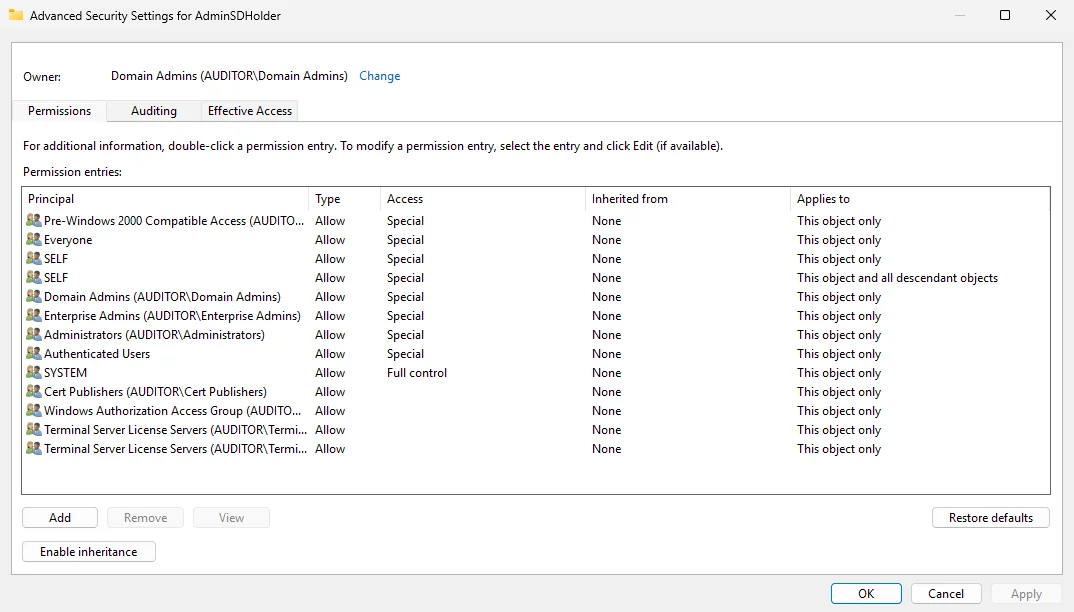
Every entry on AdminSDHolder reaches the protected groups
Remove unexpected DCSync rights
Together, the replication rights Replicating Directory Changes and Replicating Directory Changes All on the domain object let a principal replicate secret domain data, including password hashes. Defender for Identity's account assessments list accounts that hold these rights and aren't domain admins. Forestall documents the combination as the DCSync edge, along with the GenericAll, Owner and AllExtendedRights rights that can grant it.
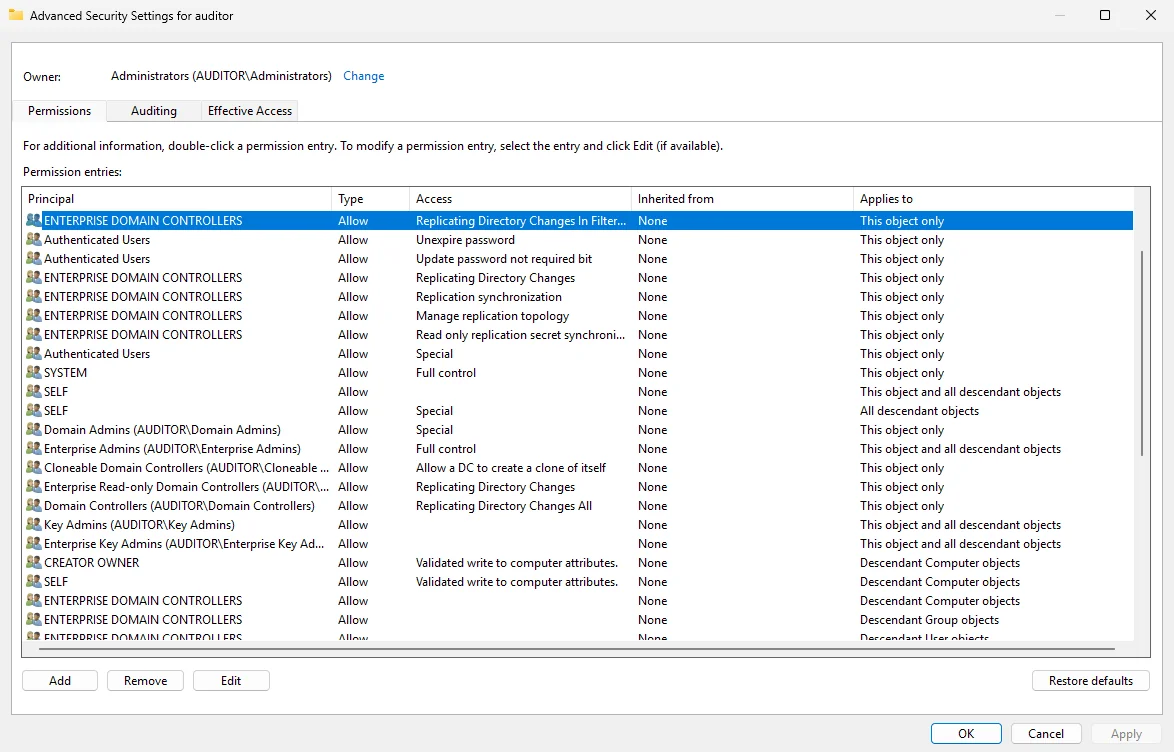
Review who holds both replication rights on the domain object
Some accounts need the rights. Defender for Identity's hybrid security assessments note that the Microsoft Entra Connect AD DS connector account (MSOL_ prefix) has powerful privileges, including replication rights. The rights are necessary when password hash synchronization is configured, so keep them in that case and treat the sync server as Tier 0. When it isn't configured, Defender for Identity recommends removing them from the connector account. Remove every other unexpected holder, and confirm with the assessment script.
Harden AD CS
Active Directory Certificate Services is Tier 0 in Microsoft's tier model. A certificate that's valid for authentication can sign in as the account it names, so a template that lets the requester choose that name hands out other users' identities. Abuse of misconfigured templates and certificate authorities falls under MITRE ATT&CK Steal or Forge Authentication Certificates (T1649).
Defender for Identity's certificate posture assessments give a practical review order. They flag templates with the Supply in the request option (ESC1), overly permissive templates and enrollment agent templates, template ACLs that unprivileged groups can edit (ESC4) and vulnerable certificate authority settings. Fix each template by removing the risky setting, narrowing enrollment rights, requiring manager approval or unpublishing it, then watch the certificate template modification rules.
Phase 4: Keep it hardened
Phase 4 turns the earlier changes into a routine. Configuration drifts as people add rights, link GPOs and install software, so the same checks run on a schedule.
Audit Group Policy
A GPO changes every computer and user it reaches, so the accounts that can edit or link it are as powerful as the settings it holds. The gpresult and RSoP guide shows which GPOs apply and why, finds unexpected editors and accounts that can write gPLink, and finds Group Policy Preferences items that still hold a password in SYSVOL. It then compares your GPOs with a Microsoft security baseline in Policy Analyzer. The GPO modification rules watch for changes between audits.
Run detections on the paths that remain
Hardening removes paths, but not the attempts on the ones left. Our detection rules library holds Sigma rules with Splunk, Sentinel and QRadar conversions, and the detection sources library explains each event they read and the audit setting it needs. Start with the Tier 0 signals in Monitor and detect.
Review attack paths and posture
Every new right, nested group and session can create a path that no single setting shows. Review attack paths on a schedule, and after each change to Tier 0 membership or delegation. Identity security posture management makes this a continuous practice: discovering, assessing and reducing identity risk across human and non-human identities.
Domain controller hardening that the other guides don't cover
Domain controllers need protections beyond the settings in the detailed guides. Microsoft states that a domain controller compromise means the forest can't be trusted again unless you recover it from a known good backup and close the gaps.
Should you disable the Print Spooler on domain controllers?
Yes, unless you rely on domain controllers for printing or print pruning. Defender for Identity's assessment explains why: any authenticated user can connect to a domain controller's Print Spooler remotely and make it send a notification to a system with unconstrained delegation. That exposes the domain controller's computer account credential, a form of authentication coercion. Defender for Identity says domain controllers and Active Directory admin systems need the service disabled, preferably through a GPO.
The trade-off is print pruning. Microsoft's system services guidance for Windows Server 2016 rates the spooler OK to disable only on servers that aren't print servers or domain controllers. The reason: the domain controller role adds a spooler thread that removes stale print queue objects, and without the spooler on at least one domain controller per site, Active Directory can't remove old queues. Defender for Identity calls this a trade-off between security and print pruning, and suggests pruning stale print queue objects periodically instead.
To disable the service, create a GPO linked to the Domain Controllers OU. Open Computer Configuration > Policies > Windows Settings > Security Settings > System Services, set Print Spooler to Disabled, and check the result with the assessment script. To test on one domain controller first, preview the change with PowerShell:
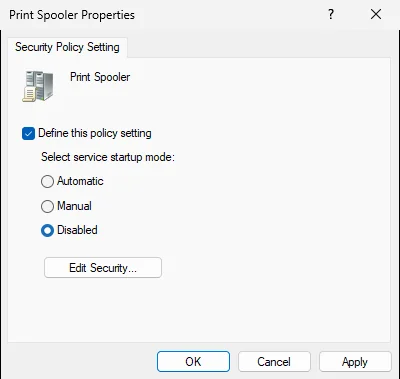
Disable the Print Spooler on domain controllers through a GPO
Invoke-Command -ComputerName 'DC01.corp.example.com' -ScriptBlock {
    Stop-Service -Name 'Spooler' -WhatIf
    Set-Service -Name 'Spooler' -StartupType Disabled -WhatIf
}
What if: Performing the operation "Stop-Service" on target "Print Spooler (Spooler)".
What if: Performing the operation "Set-Service" on target "Print Spooler (Spooler)".
Remove -WhatIf to apply it. To roll back, remove the Print Spooler setting from the GPO, then run Set-Service -Name 'Spooler' -StartupType Automatic and Start-Service -Name 'Spooler' on the domain controller.
Keep domain controllers single-purpose, current and physically protected
Microsoft's guidance on securing domain controllers adds several controls that no other guide in this series covers:
- Run the newest Windows Server version your organization supports, and decommission older domain controllers first.
- Prefer the Server Core installation option, and manage domain controllers remotely from PAWs or secure administrative hosts.
- Use TPM chips and BitLocker Drive Encryption on physical domain controllers, and consider read-only domain controllers in branches without a locked room.
- Patch and manage domain controllers separately from the general server population, so a compromised management tool can't reach them.
- Don't browse the web from domain controllers, and block their outbound internet access at the perimeter firewall.
- Allow RDP to domain controllers only from authorized users and systems, such as jump servers, through user rights and Windows Firewall settings in a GPO.
Software installed on a domain controller runs with Tier 0 reach. Outside a change window, a new service there deserves an alert.
Run the Active Directory security assessment script
The script below is a read-only Active Directory security assessment. It runs the checks behind this roadmap and writes PASS or REVIEW for each one. REVIEW means "look at this", not "broken": each row shows the value found, the value expected and the guide that explains the change.
| Check | PASS when | Basis |
|---|---|---|
| Domain functional level | Windows Server 2016 or higher | Windows LAPS encryption needs it |
| ms-DS-MachineAccountQuota | 0 | MachineAccountQuota guide; Defender for Identity |
| Computers without a LAPS password in AD | None (devices that back up to Microsoft Entra ID also appear here) | Windows LAPS guide |
| Privileged accounts not marked sensitive and cannot be delegated | None | Protected Users guide; Defender for Identity |
| Privileged users outside Protected Users | None, after the pilot; accounts with an SPN and the built-in Administrator are left out | Protected Users guide |
| Unconstrained delegation outside domain controllers | None | Protected Users guide; Defender for Identity |
| Enabled user accounts with an SPN | None; the value also counts accounts set to RC4 without AES | gMSA and RC4 guides |
| krbtgt password age | 180 days or less (-KrbtgtMaxAgeDays) |
Defender for Identity's listing age; Microsoft sets no fixed interval |
| Enabled users in Domain Admins | Fewer than 5, none with an SPN | The common target on Microsoft's AD DS tier model page |
| Members of Account Operators, Server Operators and Backup Operators | None; Microsoft documents no default members | Defender for Identity |
| DCSync rights outside built-in admin and DC groups | None you didn't approve | Defender for Identity |
| Broad write rights on AdminSDHolder | None outside SYSTEM, Administrators, Domain Admins and Enterprise Admins | Appendix C; Defender for Identity |
| Audit: Force audit policy subcategory settings | Not set or 1 | Audit policy guide |
| Success auditing of Directory Service Access, Directory Service Changes and Kerberos Service Ticket Operations | Success is included | Audit policy guide |
| LLMNR turned off by policy | EnableMulticast is 0 |
LLMNR and NBT-NS guide |
| SMB server and client signing, SMBv1 | Signing required on both sides; SMBv1 server off | SMB signing guide |
| LDAP signing and channel binding | LDAPServerIntegrity 2 and LdapEnforceChannelBinding 2 |
LDAP signing guide |
| LSA protection | RunAsPPL 1 or 2 |
LSA protection guide |
| LM and NTLMv1 refused | LmCompatibilityLevel 5 |
NTLMv1 guide; Windows security baseline |
| Print Spooler | Not running and start mode Disabled, or not installed | Defender for Identity |
The script reads no password, hash, key or other secret attribute. It reads timestamps, flags, group membership, access control entries, registry values and service states, and it changes nothing. Run it on a management server with the ActiveDirectory module (RSAT), as a member of Domain Admins, with PowerShell remoting to each domain controller. Run it once per domain; Enterprise Admins and Schema Admins are checked only in the forest root domain.
#Requires -Version 5.1
#Requires -Modules ActiveDirectory

<#
.SYNOPSIS
    Read-only Active Directory security assessment that reports PASS or REVIEW for each hardening check.

.DESCRIPTION
    Runs the checks of the Active Directory hardening roadmap against one domain and its domain
    controllers. Each row has a Status of PASS or REVIEW. REVIEW means "look at this": the row
    names the value found, the value expected and the guide that explains the change.

    Domain checks (directory reads with the ActiveDirectory module):
      - domain functional level
      - ms-DS-MachineAccountQuota
      - enabled computers, other than domain controllers, without a Windows LAPS or legacy
        Microsoft LAPS password expiration time
      - privileged user accounts without "Account is sensitive and cannot be delegated"
      - privileged user accounts outside Protected Users (accounts with an SPN are left
        out, because service accounts shouldn't be members, and so is the built-in
        Administrator, which stays out of the first waves)
      - accounts other than domain controllers with unconstrained delegation
      - enabled user accounts with a service principal name
      - password age of every krbtgt account
      - enabled user accounts in Domain Admins
      - direct members of Account Operators, Server Operators and Backup Operators
      - principals other than the built-in administrator and domain controller groups that hold
        both directory replication rights on the domain object
      - principals other than SYSTEM and the built-in administrator groups with broad write
        rights on AdminSDHolder

    Domain controller checks (read through PowerShell remoting):
      - Audit: Force audit policy subcategory settings (SCENoApplyLegacyAuditPolicy)
      - Success auditing of Directory Service Access, Directory Service Changes and
        Kerberos Service Ticket Operations
      - LLMNR policy value EnableMulticast
      - SMB server signing, SMB client signing and the SMBv1 server
      - LDAPServerIntegrity and LdapEnforceChannelBinding
      - RunAsPPL and LmCompatibilityLevel
      - Print Spooler service state and start mode (Win32_Service)

    The script reads no password, hash, key or other secret attribute. It reads timestamps,
    flags, group membership, access control entries, registry values and service states.
    Results go to one CSV file in OutputFolder, and the rows are returned as objects.

.PARAMETER OutputFolder
    Existing folder for the CSV report, for example 'C:\Reports\ADHardening'.

.PARAMETER Server
    Optional domain controller to query for directory data, for example '<DomainController>'.

.PARAMETER DomainController
    Optional host names of the domain controllers to check remotely, for example
    'DC01.corp.example.com'. By default, every domain controller of the domain is checked.

.PARAMETER KrbtgtMaxAgeDays
    Password age in days above which a krbtgt account is marked REVIEW, from 1 to 3650.
    The default, 180, is the age at which Microsoft Defender for Identity lists a krbtgt
    account. Microsoft sets no fixed rotation interval.

.EXAMPLE
    .\Get-AdHardeningAssessment.ps1 -OutputFolder 'C:\Reports\ADHardening'

.EXAMPLE
    .\Get-AdHardeningAssessment.ps1 -OutputFolder 'C:\Reports\ADHardening' -Server '<DomainController>' -DomainController 'DC01.corp.example.com','DC02.corp.example.com' |
        Where-Object Status -eq 'REVIEW' | Format-Table Phase, Check, Target, Value -AutoSize

.NOTES
    Read-only. Makes no change to Active Directory, Group Policy, the registry, services or
    any computer. Writes only the CSV report file to OutputFolder.
    Requires the ActiveDirectory module (RSAT), PowerShell remoting (WinRM) to each domain
    controller, and an account that can read the directory and the domain controllers'
    registry and audit policy, for example a member of Domain Admins.
    Run it once per domain. Enterprise Admins and Schema Admins are checked only when the
    script runs against the forest root domain. The auditpol check expects English output.
#>
[CmdletBinding()]
param(
    [Parameter(Mandatory = $true)]
    [ValidateScript({ Test-Path -Path $_ -PathType Container })]
    [string]$OutputFolder,

    [string]$Server,

    [string[]]$DomainController,

    [ValidateRange(1, 3650)]
    [int]$KrbtgtMaxAgeDays = 180
)

Set-StrictMode -Version Latest
$ErrorActionPreference = 'Stop'

$adParams = @{}
if ($Server) { $adParams['Server'] = $Server }

$results = New-Object System.Collections.Generic.List[object]
$guideBase = '/resources/blog/'

function Add-Result {
    param([string]$Phase, [string]$Check, [string]$Target, [bool]$Pass, [string]$Value, [string]$Expected, [string]$Guide)
    $results.Add([pscustomobject]@{
        Phase    = $Phase
        Check    = $Check
        Target   = $Target
        Status   = if ($Pass) { 'PASS' } else { 'REVIEW' }
        Value    = $Value
        Expected = $Expected
        Guide    = $guideBase + $Guide
    })
}

function Get-PropertyValue {
    param($InputObject, [string]$Name)
    $property = $InputObject.PSObject.Properties[$Name]
    if ($null -ne $property) { return $property.Value }
    return $null
}

function Test-Flag {
    param($Value, [int64]$Flag)
    if ($null -eq $Value) { return $false }
    return (([int64]$Value -band $Flag) -ne 0)
}

function Test-Right {
    param([System.DirectoryServices.ActiveDirectoryRights]$Rights, [System.DirectoryServices.ActiveDirectoryRights]$Right)
    return (($Rights -band $Right) -eq $Right)
}

function ConvertFrom-FileTimeValue {
    param($Value)
    if ($null -eq $Value) { return $null }
    $ticks = [int64]$Value
    if ($ticks -le 0 -or $ticks -eq [int64]::MaxValue) { return $null }
    return [DateTime]::FromFileTimeUtc($ticks)
}

function ConvertTo-LdapFilterValue {
    param([string]$Value)
    $builder = New-Object System.Text.StringBuilder
    foreach ($character in $Value.ToCharArray()) {
        switch ([int]$character) {
            0x5C { [void]$builder.Append('\5c') }
            0x2A { [void]$builder.Append('\2a') }
            0x28 { [void]$builder.Append('\28') }
            0x29 { [void]$builder.Append('\29') }
            0x00 { [void]$builder.Append('\00') }
            default { [void]$builder.Append($character) }
        }
    }
    return $builder.ToString()
}

function ConvertTo-ShortList {
    param([string[]]$Items, [int]$Max = 10)
    $unique = @($Items | Where-Object { $_ } | Sort-Object -Unique)
    if ($unique.Count -eq 0) { return 'none' }
    $text = ($unique | Select-Object -First $Max) -join '; '
    if ($unique.Count -gt $Max) { $text += ('; and {0} more' -f ($unique.Count - $Max)) }
    return $text
}

function Resolve-SidName {
    param([string]$Sid)
    try { return ([System.Security.Principal.SecurityIdentifier]$Sid).Translate([System.Security.Principal.NTAccount]).Value }
    catch { return $Sid }
}

function Test-AdminSid {
    # SYSTEM, Enterprise Domain Controllers, Administrators, Domain Admins (-512),
    # Domain Controllers (-516) and Enterprise Admins (-519)
    param([string]$Sid)
    return (($Sid -in @('S-1-5-18', 'S-1-5-9', 'S-1-5-32-544')) -or ($Sid -match '^S-1-5-21-[0-9-]+-(512|516|519)$'))
}

function Format-Setting {
    param($Value)
    if ($null -eq $Value) { return 'NotSet' }
    return [string]$Value
}

# userAccountControl: NOT_DELEGATED (0x100000); the filter below leaves out
# SERVER_TRUST_ACCOUNT (8192, writable DCs) and PARTIAL_SECRETS_ACCOUNT (67108864, RODCs)
$UF_NOT_DELEGATED = 0x100000
$notDcFilter = '(!(userAccountControl:1.2.840.113556.1.4.803:=8192))(!(userAccountControl:1.2.840.113556.1.4.803:=67108864))'

# ---------------------------------------------------------------- domain checks
$domain = Get-ADDomain @adParams
$forest = Get-ADForest @adParams
$domainName = $domain.DNSRoot
$domainSid = $domain.DomainSID.Value
$domainDn = $domain.DistinguishedName

# Domain functional level
$dfl2016 = [int][Microsoft.ActiveDirectory.Management.ADDomainMode]::Windows2016Domain
Add-Result -Phase 'Before you start' -Check 'Domain functional level' -Target $domainName `
    -Pass ([int]$domain.DomainMode -ge $dfl2016) -Value ([string]$domain.DomainMode) `
    -Expected 'Windows2016Domain or higher' -Guide 'windows-laps-step-by-step-guide'

# ms-DS-MachineAccountQuota
$domainObject = Get-ADObject @adParams -Identity $domainDn -Properties 'ms-DS-MachineAccountQuota', 'nTSecurityDescriptor'
$quota = Get-PropertyValue -InputObject $domainObject -Name 'ms-DS-MachineAccountQuota'
Add-Result -Phase 'Phase 1' -Check 'ms-DS-MachineAccountQuota' -Target $domainName `
    -Pass ($null -ne $quota -and [int]$quota -eq 0) -Value (Format-Setting -Value $quota) `
    -Expected '0' -Guide 'machineaccountquota-step-by-step-guide'

# Windows LAPS coverage (expiration timestamps only, never passwords)
$schemaNc = (Get-ADRootDSE @adParams).schemaNamingContext
$lapsProperties = @()
foreach ($attribute in 'msLAPS-PasswordExpirationTime', 'ms-Mcs-AdmPwdExpirationTime') {
    if ($null -ne (Get-ADObject @adParams -SearchBase $schemaNc -LDAPFilter "(lDAPDisplayName=$attribute)")) { $lapsProperties += $attribute }
}
if ($lapsProperties.Count -eq 0) {
    Add-Result -Phase 'Phase 1' -Check 'Computers without a LAPS password in AD' -Target $domainName -Pass $false `
        -Value 'Schema has no Windows LAPS or legacy LAPS attributes' -Expected '0' -Guide 'windows-laps-step-by-step-guide'
}
else {
    $computerFilter = '(&(!(userAccountControl:1.2.840.113556.1.4.803:=2))' + $notDcFilter + ')'
    $computers = @(Get-ADComputer @adParams -LDAPFilter $computerFilter -Properties $lapsProperties)
    $missing = 0
    foreach ($computer in $computers) {
        $hasTimestamp = $false
        foreach ($name in $lapsProperties) {
            if ($null -ne (Get-PropertyValue -InputObject $computer -Name $name)) { $hasTimestamp = $true }
        }
        if (-not $hasTimestamp) { $missing++ }
    }
    Add-Result -Phase 'Phase 1' -Check 'Computers without a LAPS password in AD' -Target $domainName -Pass ($missing -eq 0) `
        -Value ('{0} of {1} enabled computers' -f $missing, $computers.Count) `
        -Expected '0 (devices that back up to Microsoft Entra ID also appear here)' -Guide 'windows-laps-step-by-step-guide'
}

# Privileged user accounts of this domain (nested membership)
$privilegedGroupSids = @('S-1-5-32-544', "$domainSid-512")
if ($forest.RootDomain -eq $domainName) { $privilegedGroupSids += "$domainSid-518", "$domainSid-519" }
$privileged = @{}
foreach ($sid in $privilegedGroupSids) {
    $group = Get-ADGroup @adParams -Identity $sid
    $chain = '(&(memberOf:1.2.840.113556.1.4.1941:={0})(!(userAccountControl:1.2.840.113556.1.4.803:=2)))' -f (ConvertTo-LdapFilterValue -Value $group.DistinguishedName)
    foreach ($user in @(Get-ADUser @adParams -LDAPFilter $chain -Properties userAccountControl, servicePrincipalName)) {
        $privileged[$user.DistinguishedName] = $user
    }
}

$protectedGroup = Get-ADGroup @adParams -Identity "$domainSid-525"
$protectedChain = '(memberOf:1.2.840.113556.1.4.1941:={0})' -f (ConvertTo-LdapFilterValue -Value $protectedGroup.DistinguishedName)
$protectedDns = @{}
foreach ($member in @(Get-ADObject @adParams -LDAPFilter $protectedChain)) { $protectedDns[$member.DistinguishedName] = $true }

$notSensitive = @()
$outsideProtected = @()
foreach ($user in $privileged.Values) {
    if (-not (Test-Flag -Value $user.userAccountControl -Flag $UF_NOT_DELEGATED)) { $notSensitive += $user.SamAccountName }
    $spns = @(Get-PropertyValue -InputObject $user -Name 'servicePrincipalName' | Where-Object { $_ })
    $isBuiltInAdmin = $user.SID.Value.EndsWith('-500')
    if (-not $protectedDns.ContainsKey($user.DistinguishedName) -and -not $isBuiltInAdmin -and $spns.Count -eq 0) {
        $outsideProtected += $user.SamAccountName
    }
}
Add-Result -Phase 'Phase 2' -Check 'Privileged accounts not marked sensitive and cannot be delegated' -Target $domainName `
    -Pass ($notSensitive.Count -eq 0) -Value ('{0} of {1}: {2}' -f $notSensitive.Count, $privileged.Count, (ConvertTo-ShortList -Items $notSensitive)) `
    -Expected '0' -Guide 'protected-users-group-step-by-step-guide'
Add-Result -Phase 'Phase 2' -Check 'Privileged users outside Protected Users' -Target $domainName `
    -Pass ($outsideProtected.Count -eq 0) -Value ('{0}: {1}' -f $outsideProtected.Count, (ConvertTo-ShortList -Items $outsideProtected)) `
    -Expected '0 after the pilot (keep a tested break-glass account out)' -Guide 'protected-users-group-step-by-step-guide'

# Unconstrained delegation outside domain controllers
$unconstrainedFilter = '(&(userAccountControl:1.2.840.113556.1.4.803:=524288)' + $notDcFilter + ')'
$unconstrained = @(Get-ADObject @adParams -LDAPFilter $unconstrainedFilter -Properties sAMAccountName)
$unconstrainedNames = @($unconstrained | ForEach-Object { [string](Get-PropertyValue -InputObject $_ -Name 'sAMAccountName') })
Add-Result -Phase 'Phase 2' -Check 'Unconstrained delegation outside domain controllers' -Target $domainName `
    -Pass ($unconstrained.Count -eq 0) -Value ('{0}: {1}' -f $unconstrained.Count, (ConvertTo-ShortList -Items $unconstrainedNames)) `
    -Expected '0' -Guide 'protected-users-group-step-by-step-guide'

# Enabled user accounts with a service principal name
$spnFilter = '(&(objectCategory=person)(objectClass=user)(servicePrincipalName=*)(!(userAccountControl:1.2.840.113556.1.4.803:=2))(!(sAMAccountName=krbtgt)))'
$spnUsers = @(Get-ADUser @adParams -LDAPFilter $spnFilter -Properties 'msDS-SupportedEncryptionTypes')
$rc4Only = 0
foreach ($user in $spnUsers) {
    $etypes = Get-PropertyValue -InputObject $user -Name 'msDS-SupportedEncryptionTypes'
    if ($null -ne $etypes -and (Test-Flag -Value $etypes -Flag 0x4) -and -not (Test-Flag -Value $etypes -Flag 0x18)) { $rc4Only++ }
}
$spnNames = @($spnUsers | ForEach-Object { $_.SamAccountName })
Add-Result -Phase 'Phase 2' -Check 'Enabled user accounts with an SPN' -Target $domainName `
    -Pass ($spnUsers.Count -eq 0) -Value ('{0} ({1} set to RC4 without AES): {2}' -f $spnUsers.Count, $rc4Only, (ConvertTo-ShortList -Items $spnNames)) `
    -Expected '0 (move services to gMSAs)' -Guide 'gmsa-step-by-step-guide'

# krbtgt password age (pwdLastSet timestamp only)
$nowUtc = [DateTime]::UtcNow
$krbtgtExpected = '{0} days or less (Defender for Identity lists krbtgt passwords older than 180 days)' -f $KrbtgtMaxAgeDays
foreach ($account in @(Get-ADUser @adParams -LDAPFilter '(sAMAccountName=krbtgt*)' -Properties pwdLastSet)) {
    $lastSet = ConvertFrom-FileTimeValue -Value (Get-PropertyValue -InputObject $account -Name 'pwdLastSet')
    if ($null -eq $lastSet) {
        Add-Result -Phase 'Phase 3' -Check 'krbtgt password age' -Target $account.SamAccountName -Pass $false `
            -Value 'pwdLastSet not readable' -Expected $krbtgtExpected -Guide 'krbtgt-password-reset-step-by-step-guide'
        continue
    }
    $ageDays = [int][Math]::Floor(($nowUtc - $lastSet).TotalDays)
    Add-Result -Phase 'Phase 3' -Check 'krbtgt password age' -Target $account.SamAccountName -Pass ($ageDays -le $KrbtgtMaxAgeDays) `
        -Value ('{0} days (set {1:yyyy-MM-dd} UTC)' -f $ageDays, $lastSet) -Expected $krbtgtExpected `
        -Guide 'krbtgt-password-reset-step-by-step-guide'
}

# Domain Admins membership
$daGroup = Get-ADGroup @adParams -Identity "$domainSid-512"
$daChain = '(&(memberOf:1.2.840.113556.1.4.1941:={0})(!(userAccountControl:1.2.840.113556.1.4.803:=2)))' -f (ConvertTo-LdapFilterValue -Value $daGroup.DistinguishedName)
$daUsers = @(Get-ADUser @adParams -LDAPFilter $daChain -Properties servicePrincipalName)
$daWithSpn = @($daUsers | Where-Object { @(Get-PropertyValue -InputObject $_ -Name 'servicePrincipalName' | Where-Object { $_ }).Count -gt 0 })
Add-Result -Phase 'Phase 3' -Check 'Enabled users in Domain Admins' -Target $domainName `
    -Pass ($daUsers.Count -lt 5 -and $daWithSpn.Count -eq 0) -Value ('{0} users, {1} with an SPN' -f $daUsers.Count, $daWithSpn.Count) `
    -Expected 'Fewer than 5, none with an SPN' -Guide 'active-directory-hardening-guide'

# Operator groups (default: no members)
foreach ($sid in 'S-1-5-32-548', 'S-1-5-32-549', 'S-1-5-32-551') {
    $group = Get-ADGroup @adParams -Identity $sid -Properties member
    $members = @(Get-PropertyValue -InputObject $group -Name 'member' | Where-Object { $_ })
    Add-Result -Phase 'Phase 3' -Check ('Members of {0}' -f $group.Name) -Target $domainName -Pass ($members.Count -eq 0) `
        -Value ('{0} direct members' -f $members.Count) -Expected '0' -Guide 'active-directory-hardening-guide'
}

# DCSync rights: both replication rights on the domain object
$getChanges = [Guid]'1131f6aa-9c07-11d1-f79f-00c04fc2dcd2'
$getChangesAll = [Guid]'1131f6ad-9c07-11d1-f79f-00c04fc2dcd2'
$grants = @{}
foreach ($rule in $domainObject.nTSecurityDescriptor.GetAccessRules($true, $true, [System.Security.Principal.SecurityIdentifier])) {
    if ($rule.AccessControlType -ne [System.Security.AccessControl.AccessControlType]::Allow) { continue }
    if (-not (Test-Right -Rights $rule.ActiveDirectoryRights -Right ([System.DirectoryServices.ActiveDirectoryRights]::ExtendedRight))) { continue }
    $sid = $rule.IdentityReference.Value
    if (-not $grants.ContainsKey($sid)) { $grants[$sid] = New-Object System.Collections.Generic.List[Guid] }
    if ($rule.ObjectType -eq [Guid]::Empty) { $grants[$sid].Add($getChanges); $grants[$sid].Add($getChangesAll) }
    else { $grants[$sid].Add($rule.ObjectType) }
}
$dcsync = @(foreach ($sid in $grants.Keys) {
    if ($grants[$sid].Contains($getChanges) -and $grants[$sid].Contains($getChangesAll) -and -not (Test-AdminSid -Sid $sid)) { Resolve-SidName -Sid $sid }
})
Add-Result -Phase 'Phase 3' -Check 'DCSync rights outside built-in admin and DC groups' -Target $domainName `
    -Pass ($dcsync.Count -eq 0) -Value ('{0}: {1}' -f $dcsync.Count, (ConvertTo-ShortList -Items $dcsync)) `
    -Expected '0, or only accounts you approved (for example the Microsoft Entra Connect AD DS connector account)' -Guide 'active-directory-hardening-guide'

# AdminSDHolder: broad write rights
$adminSdHolder = Get-ADObject @adParams -Identity ('CN=AdminSDHolder,CN=System,{0}' -f $domainDn) -Properties nTSecurityDescriptor
$broadWriters = @()
foreach ($rule in $adminSdHolder.nTSecurityDescriptor.GetAccessRules($true, $true, [System.Security.Principal.SecurityIdentifier])) {
    if ($rule.AccessControlType -ne [System.Security.AccessControl.AccessControlType]::Allow) { continue }
    $rights = $rule.ActiveDirectoryRights
    $broad = (Test-Right -Rights $rights -Right ([System.DirectoryServices.ActiveDirectoryRights]::GenericAll)) -or
        (Test-Right -Rights $rights -Right ([System.DirectoryServices.ActiveDirectoryRights]::GenericWrite)) -or
        (Test-Right -Rights $rights -Right ([System.DirectoryServices.ActiveDirectoryRights]::WriteDacl)) -or
        (Test-Right -Rights $rights -Right ([System.DirectoryServices.ActiveDirectoryRights]::WriteOwner)) -or
        ((Test-Right -Rights $rights -Right ([System.DirectoryServices.ActiveDirectoryRights]::WriteProperty)) -and $rule.ObjectType -eq [Guid]::Empty)
    if ($broad -and -not (Test-AdminSid -Sid $rule.IdentityReference.Value)) { $broadWriters += Resolve-SidName -Sid $rule.IdentityReference.Value }
}
Add-Result -Phase 'Phase 3' -Check 'Broad write rights on AdminSDHolder' -Target $domainName `
    -Pass ($broadWriters.Count -eq 0) -Value ('{0}: {1}' -f @($broadWriters | Sort-Object -Unique).Count, (ConvertTo-ShortList -Items $broadWriters)) `
    -Expected '0' -Guide 'active-directory-hardening-guide'

# ---------------------------------------------------------------- domain controller checks
if (-not $DomainController) {
    $DomainController = @(Get-ADDomainController @adParams -Filter * | Select-Object -ExpandProperty HostName)
}

# Runs on each domain controller. Every command in this block only reads.
$collect = {
    Set-StrictMode -Version Latest
    $ErrorActionPreference = 'Stop'
    function Get-RegistryValue {
        param([string]$Path, [string]$Name)
        $item = Get-ItemProperty -Path $Path -ErrorAction SilentlyContinue
        if ($null -ne $item -and $null -ne $item.PSObject.Properties[$Name]) { return $item.$Name }
        return $null
    }
    $lsa = 'HKLM:\SYSTEM\CurrentControlSet\Control\Lsa'
    $ntds = 'HKLM:\SYSTEM\CurrentControlSet\Services\NTDS\Parameters'
    $smbServer = Get-SmbServerConfiguration
    $smbClient = Get-SmbClientConfiguration
    $spooler = Get-CimInstance -ClassName Win32_Service -Filter "Name='Spooler'"
    [pscustomobject]@{
        ForceSubcategory   = Get-RegistryValue -Path $lsa -Name 'SCENoApplyLegacyAuditPolicy'
        AuditPolicyCsv     = @(& "$env:SystemRoot\System32\auditpol.exe" /get /category:* /r)
        EnableMulticast    = Get-RegistryValue -Path 'HKLM:\SOFTWARE\Policies\Microsoft\Windows NT\DNSClient' -Name 'EnableMulticast'
        ServerRequireSign  = $smbServer.RequireSecuritySignature
        ClientRequireSign  = $smbClient.RequireSecuritySignature
        Smb1Server         = $smbServer.EnableSMB1Protocol
        LdapSigning        = Get-RegistryValue -Path $ntds -Name 'LDAPServerIntegrity'
        LdapChannelBinding = Get-RegistryValue -Path $ntds -Name 'LdapEnforceChannelBinding'
        RunAsPPL           = Get-RegistryValue -Path $lsa -Name 'RunAsPPL'
        LmCompatibility    = Get-RegistryValue -Path $lsa -Name 'LmCompatibilityLevel'
        SpoolerState       = if ($spooler) { [string]$spooler.State } else { 'NotInstalled' }
        SpoolerStartMode   = if ($spooler) { [string]$spooler.StartMode } else { 'NotInstalled' }
    }
}

$auditTargets = @(
    @{ Guid = '{0CCE923B-69AE-11D9-BED3-505054503030}'; Name = 'Directory Service Access' }
    @{ Guid = '{0CCE923C-69AE-11D9-BED3-505054503030}'; Name = 'Directory Service Changes' }
    @{ Guid = '{0CCE9240-69AE-11D9-BED3-505054503030}'; Name = 'Kerberos Service Ticket Operations' }
)

foreach ($dc in $DomainController) {
    try {
        $data = Invoke-Command -ComputerName $dc -ScriptBlock $collect
    }
    catch {
        Add-Result -Phase 'All' -Check 'Remote checks' -Target $dc -Pass $false -Value ('Unreachable: {0}' -f $_.Exception.Message) `
            -Expected 'Reachable over PowerShell remoting' -Guide 'active-directory-hardening-guide'
        continue
    }

    Add-Result -Phase 'Phase 0' -Check 'Audit: Force audit policy subcategory settings' -Target $dc `
        -Pass ($null -eq $data.ForceSubcategory -or [int]$data.ForceSubcategory -eq 1) -Value (Format-Setting -Value $data.ForceSubcategory) `
        -Expected 'NotSet or 1' -Guide 'active-directory-audit-policy-step-by-step-guide'

    $auditRows = @($data.AuditPolicyCsv | Where-Object { $_ -and $_.Trim() } |
        ConvertFrom-Csv -Header 'MachineName', 'PolicyTarget', 'Subcategory', 'SubcategoryGuid', 'InclusionSetting', 'ExclusionSetting', 'SettingValue' |
        Where-Object { $_.SubcategoryGuid -match '^\{[0-9A-Fa-f-]{36}\}$' })
    foreach ($target in $auditTargets) {
        $row = $auditRows | Where-Object { $_.SubcategoryGuid.ToUpperInvariant() -eq $target.Guid } | Select-Object -First 1
        $setting = if ($row) { $row.InclusionSetting } else { 'NotReported' }
        Add-Result -Phase 'Phase 0' -Check ('Success auditing: {0}' -f $target.Name) -Target $dc `
            -Pass ($setting -match '^Success') -Value $setting -Expected 'Success or Success and Failure' -Guide 'active-directory-audit-policy-step-by-step-guide'
    }

    Add-Result -Phase 'Phase 1' -Check 'LLMNR turned off by policy (EnableMulticast)' -Target $dc `
        -Pass ($null -ne $data.EnableMulticast -and [int]$data.EnableMulticast -eq 0) -Value (Format-Setting -Value $data.EnableMulticast) `
        -Expected '0' -Guide 'disabling-llmnr-nbt-ns-step-by-step-guide'
    Add-Result -Phase 'Phase 1' -Check 'SMB server signing required' -Target $dc -Pass ($data.ServerRequireSign -eq $true) `
        -Value (Format-Setting -Value $data.ServerRequireSign) -Expected 'True' -Guide 'smb-signing-step-by-step-guide'
    Add-Result -Phase 'Phase 1' -Check 'SMB client signing required' -Target $dc -Pass ($data.ClientRequireSign -eq $true) `
        -Value (Format-Setting -Value $data.ClientRequireSign) -Expected 'True' -Guide 'smb-signing-step-by-step-guide'
    Add-Result -Phase 'Phase 1' -Check 'SMBv1 server disabled' -Target $dc -Pass ($data.Smb1Server -eq $false) `
        -Value (Format-Setting -Value $data.Smb1Server) -Expected 'False' -Guide 'smb-signing-step-by-step-guide'
    Add-Result -Phase 'Phase 1' -Check 'LDAP signing required (LDAPServerIntegrity)' -Target $dc `
        -Pass ($null -ne $data.LdapSigning -and [int]$data.LdapSigning -eq 2) -Value (Format-Setting -Value $data.LdapSigning) `
        -Expected '2 (on Windows Server 2025, also check the enforcement policy)' -Guide 'ldap-signing-channel-binding-step-by-step-guide'
    Add-Result -Phase 'Phase 1' -Check 'LDAP channel binding (LdapEnforceChannelBinding)' -Target $dc `
        -Pass ($null -ne $data.LdapChannelBinding -and [int]$data.LdapChannelBinding -eq 2) -Value (Format-Setting -Value $data.LdapChannelBinding) `
        -Expected '2 (Always); 1 is the When supported phase' -Guide 'ldap-signing-channel-binding-step-by-step-guide'
    Add-Result -Phase 'Phase 2' -Check 'LSA protection (RunAsPPL)' -Target $dc `
        -Pass ($null -ne $data.RunAsPPL -and @(1, 2) -contains [int]$data.RunAsPPL) -Value (Format-Setting -Value $data.RunAsPPL) `
        -Expected '1 or 2' -Guide 'lsa-protection-credential-guard-step-by-step-guide'
    Add-Result -Phase 'Phase 2' -Check 'LM and NTLMv1 refused (LmCompatibilityLevel)' -Target $dc `
        -Pass ($null -ne $data.LmCompatibility -and [int]$data.LmCompatibility -eq 5) -Value (Format-Setting -Value $data.LmCompatibility) `
        -Expected '5 (NotSet behaves as 3)' -Guide 'disabling-ntlmv1-step-by-step-guide'
    Add-Result -Phase 'DC' -Check 'Print Spooler disabled' -Target $dc `
        -Pass ($data.SpoolerState -eq 'NotInstalled' -or ($data.SpoolerState -ne 'Running' -and $data.SpoolerStartMode -eq 'Disabled')) `
        -Value ('{0}, {1}' -f $data.SpoolerState, $data.SpoolerStartMode) -Expected 'Stopped, Disabled' -Guide 'active-directory-hardening-guide'
}

# ---------------------------------------------------------------- report
$reportPath = Join-Path -Path $OutputFolder -ChildPath ('ad-hardening-assessment-{0}-{1}.csv' -f $domainName, (Get-Date -Format 'yyyyMMdd-HHmm'))
$results | Export-Csv -Path $reportPath -NoTypeInformation -Encoding UTF8
$results
Run it and show only the rows that need attention:
.\Get-AdHardeningAssessment.ps1 -OutputFolder 'C:\Reports\ADHardening' |
    Where-Object Status -eq 'REVIEW' | Format-Table Phase, Check, Target, Value -AutoSize
Example output (the values are illustrative):
Phase    Check                                                  Target                Value
-----    -----                                                  ------                -----
Phase 1  ms-DS-MachineAccountQuota                              corp.example.com      10
Phase 1  Computers without a LAPS password in AD                corp.example.com      37 of 412 enabled computers
Phase 2  Privileged users outside Protected Users               corp.example.com      3: adm-alice; adm-bob; adm-carol
Phase 2  Enabled user accounts with an SPN                      corp.example.com      4 (1 set to RC4 without AES): svc-app; svc-backup; svc-sql; svc-web
Phase 3  krbtgt password age                                    krbtgt                412 days (set 2025-10-12 UTC)
Phase 3  DCSync rights outside built-in admin and DC groups     corp.example.com      1: CORP\MSOL_0a1b2c3d4e5f
Phase 1  LDAP channel binding (LdapEnforceChannelBinding)       DC01.corp.example.com NotSet
Phase 2  LM and NTLMv1 refused (LmCompatibilityLevel)           DC01.corp.example.com NotSet
DC       Print Spooler disabled                                 DC01.corp.example.com Running, Auto
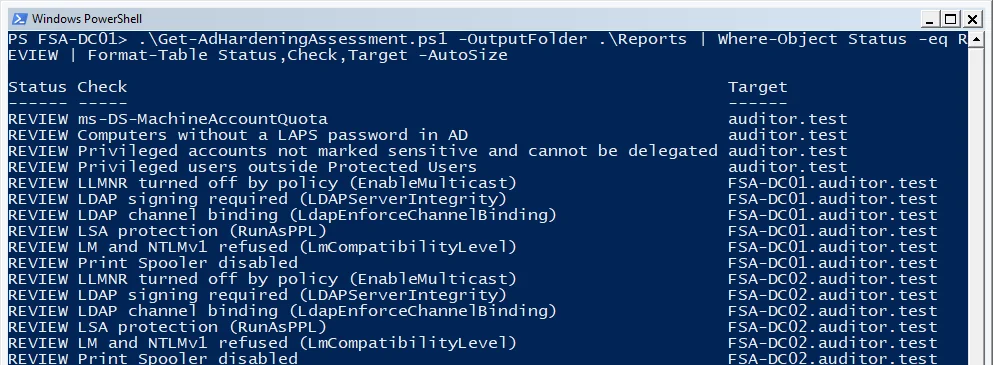
The assessment script lists every check that needs attention
How to read the results:
- Domain rows (Target is the domain name) come from directory reads. Fix them in roadmap order, not report order.
- Domain controller rows (Target is a host name) come from each domain controller's registry, audit policy and services; a
Remote checksrow marks one the script couldn't reach. - DCSync rights that belong to the Microsoft Entra Connect AD DS connector account are expected when password hash synchronization is configured. Record them as approved and keep the REVIEW in mind when the sync server changes.
- auditpol rows match each subcategory by GUID but read the English Success and Failure text. On a domain controller with another display language, the row shows REVIEW; check the subcategory by hand with
auditpol /get /subcategory:and the GUID from the script.
How to measure progress
Measure progress with the same script, the same scope and a fixed schedule, for example after each phase and then monthly. Keep every CSV, and compare the latest run with the previous one:
$before = Import-Csv -Path 'C:\Reports\ADHardening\ad-hardening-assessment-corp.example.com-20261101-0900.csv'
$after = Import-Csv -Path 'C:\Reports\ADHardening\ad-hardening-assessment-corp.example.com-20261201-0900.csv'
Compare-Object -ReferenceObject $before -DifferenceObject $after -Property Check, Target, Status |
    Sort-Object -Property Check, Target, SideIndicator
Check                                        Target                Status SideIndicator
-----                                        ------                ------ -------------
LDAP signing required (LDAPServerIntegrity)  DC01.corp.example.com REVIEW <=
LDAP signing required (LDAPServerIntegrity)  DC01.corp.example.com PASS   =>
ms-DS-MachineAccountQuota                    corp.example.com      REVIEW <=
ms-DS-MachineAccountQuota                    corp.example.com      PASS   =>

Compare two runs to see what moved from REVIEW to PASS
=> marks the new state and <= the old one. A check that moves from PASS back to REVIEW is drift; find the change that caused it before you continue.
Configuration checks show what you set, not what still depends on the old behavior. Track these event trends as well, each covered in its detailed guide:
| Signal | What progress looks like | Detailed guide |
|---|---|---|
| Event 2889 on domain controllers | Fewer unsigned LDAP clients, then none | LDAP signing guide |
| SMBv1 audit event 3000 on SMB servers | No SMBv1 connections before removal | SMB signing guide |
| Event 4769 with ticket encryption type 0x17 (RC4) | RC4 service tickets fall to zero | RC4 and AES guide |
Event 4624 with NTLM V1 as the NTLM package name |
No NTLMv1 logons before you refuse them | NTLMv1 guide |
| Protected Users failure events 100 and 104 | Failures only from accounts you're still fixing | Protected Users guide |
If you license Microsoft Defender for Identity, its identity security posture assessments appear as recommended actions in Microsoft Secure Score. A rising score and a shorter list of exposed entities give a second, independent view of the same work.
Verify and roll back
Verify each change with the commands in its detailed guide, then re-run the assessment script for the domain-wide view. Most changes in this roadmap can be reversed; the table lists the exceptions and the conditions.
| Change | Can you roll it back? | What to know |
|---|---|---|
| Audit policy | Yes | Events that weren't recorded while auditing was off can't be recovered |
| ms-DS-MachineAccountQuota | Yes | Rolling back doesn't remove computer accounts created in the meantime |
| LLMNR and NBT-NS | Yes | LLMNR returns after the next policy refresh |
| SMB signing | Yes, without a restart | Reinstalling SMBv1 needs a restart, and Microsoft strongly recommends against it |
| LDAP signing and channel binding | Yes | On Windows Server 2025, also set the signing enforcement policy to Disabled, or signing stays required |
| Windows LAPS | Mostly | The schema extension can't be rolled back |
| LSA protection and Credential Guard | Yes, by policy and a restart | With a UEFI lock, rollback needs hands-on work at each device |
| Protected Users and delegation | Yes | A user removed from the group signs out and back in |
| gMSA | Mostly | The password interval can't be changed; don't delete the KDS root key |
| krbtgt reset | No | The old key is gone after the second reset |
| Print Spooler | Yes | Set the startup type back and start the service |
| Removed permissions (AdminSDHolder, DCSync, AD CS templates) | Yes, if you recorded them | Export the ACL before you change it, so you can restore a single entry |
Monitor and detect
Monitor the events that show someone undoing the hardening or attacking Tier 0. Domain controllers write them once the Phase 0 audit policy is in place; event 4662 also needs an audit entry on the domain object.
| Event | What it tells you | Related rules |
|---|---|---|
| 4662 (Security) | A directory operation; with the replication rights' GUIDs and an account that isn't a domain controller, a possible DCSync | DCSync detection rules |
| 5136 (Security) | A directory object changed, including the security descriptor of AdminSDHolder | AdminSDHolder modification rules |
| 4728, 4732, 4756 (Security) | A member was added to a security-enabled global, local or universal group | Privileged group membership change rules |
| 4769 (Security) | A Kerberos service ticket was requested | Kerberoasting detection rules |
| 7045 (System) | A service was installed | Rules for services installed on a domain controller |
| 4719 (Security) | The system audit policy changed | Audit policy tampering rules |
| 1102 (Security) | The Security log was cleared | Security log cleared rules |
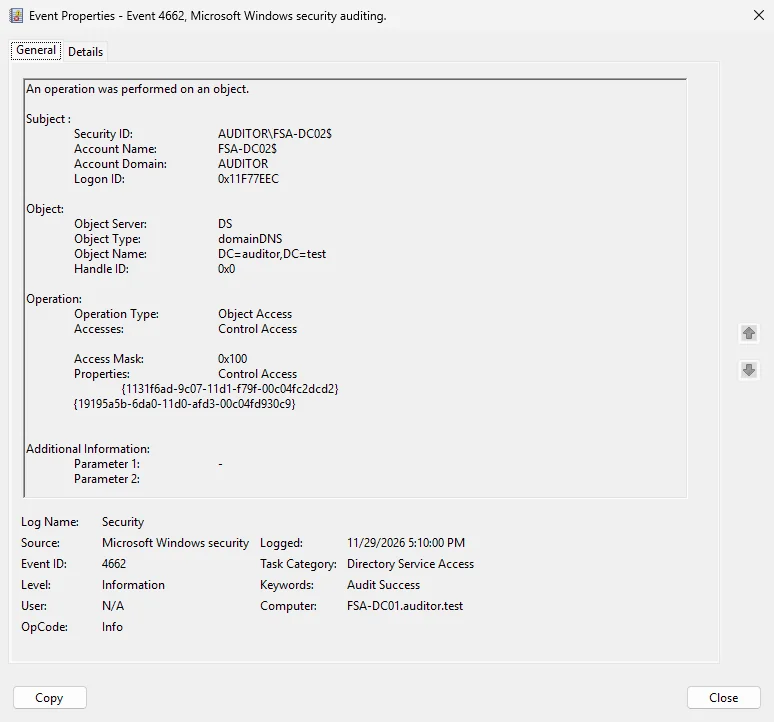
Event 4662 records a replication request
The query below gives one daily view of the Tier 0 tampering signals in Microsoft Sentinel or a Log Analytics workspace that receives domain controller Security events in the SecurityEvent table. It counts audit policy changes, cleared logs, additions to the built-in admin and operator groups, and replication requests by accounts that aren't computers.
// Tier 0 tampering signals from domain controllers, per day (SecurityEvent table).
// Needs the Phase 0 audit policy, and an audit entry on the domain object for event 4662.
SecurityEvent
| where TimeGenerated > ago(7d)
| where EventID in (1102, 4719)
    or (EventID in (4728, 4732, 4756)
        and (TargetSid endswith "-512" or TargetSid endswith "-518" or TargetSid endswith "-519"
             or TargetSid in ("S-1-5-32-544", "S-1-5-32-548", "S-1-5-32-549", "S-1-5-32-551")))
    or (EventID == 4662 and SubjectUserName !endswith "$"
        and (Properties contains "1131f6aa-9c07-11d1-f79f-00c04fc2dcd2" or Properties contains "1131f6ad-9c07-11d1-f79f-00c04fc2dcd2"))
| summarize Events = count(), Accounts = make_set(SubjectUserName, 20) by EventID, Activity, Day = bin(TimeGenerated, 1d)
| order by Day desc, EventID asc
Expect events during your own change windows, and match each one to a ticket. Outside a window, a replication request by a user account or a new member of Domain Admins needs an answer the same day.
Troubleshooting
Most hardening problems come from a dependency that the audit step would have shown. Each detailed guide has a full troubleshooting table; these symptoms span several phases.
| Symptom | Cause | Fix |
|---|---|---|
| A domain join fails after the quota change with "You have exceeded the maximum number of computer accounts you are allowed to create in this domain" (status 0x216d) | The account that joins has no delegated permission on the target OU | Grant Create Computer objects on the OU, or pre-stage the computer account (MachineAccountQuota guide) |
| Short names stop resolving | The name exists only in WINS, LMHOSTS or by broadcast | Register it in DNS (LLMNR and NBT-NS guide) |
A NAS share fails with STATUS_INVALID_SIGNATURE |
The device can't sign SMB traffic | Enable signing on the device, update it or replace it (SMB signing guide) |
| An application can't bind to LDAP after Require signing | It uses an unsigned SASL bind or a simple bind without TLS | Configure signing or move it to LDAPS; event 2889 names the client (LDAP signing guide) |
A service ticket fails with KDC_ERR_ETYPE_NOTSUPP (failure code 0xE in event 4769) |
The account or device supports only RC4 | Set AES on the account, reset its password or regenerate the keytab (RC4 and AES guide) |
| An admin can't sign in offline, or must sign in again after four hours | Protected Users membership: no cached logon, and the ticket-granting ticket can't be renewed beyond four hours | Expected; sign in again, and keep the break-glass account out of the group (Protected Users guide) |
The assessment shows Remote checks with Unreachable |
WinRM is blocked, or the account isn't an administrator on that domain controller | Run from a management host that can reach the domain controller over PowerShell remoting |
| Stale printer objects remain in Active Directory | The spooler is disabled on every domain controller, so print pruning stopped | Prune stale print queue objects periodically |
How Forestall helps
Forestall's Tier0 Analysis draws the direct and indirect relationships from Tier 2 objects to Tier 0, which can point to privilege escalation paths. GPO Audit compares the settings of each GPO with Microsoft, CIS, STIG, Forestall and custom baselines. The Issues page lists the findings of each scan by severity, and a remediation scan re-checks only the issues you queue after fixing them. Forestall Identity Risk Assessment scores findings like these by exploitation certainty, required privilege and ease of mitigation.
Frequently Asked Questions
What is Active Directory in cybersecurity?
Active Directory Domain Services is Microsoft's directory service: it stores information about users, computers and groups, and its domain controllers authenticate them. In cybersecurity, it's a high-value target, because privileged access to a domain controller lets an attacker change every system and account the directory manages. That's why Microsoft treats domain controllers and their administrators as Tier 0, and why hardening focuses on them.
How do you perform an Active Directory security assessment?
An Active Directory security assessment starts with a read-only inventory of settings and rights, like the assessment script in this guide. Keep its output as a baseline. Review privileged groups, delegation, replication rights, AdminSDHolder, krbtgt age, LAPS coverage and protocol settings on every domain controller. Add an attack path review for indirect rights, then repeat the same assessment after each change to measure progress.
What are the most important Active Directory security best practices?
Apply the most important Active Directory security best practices in order. Turn on auditing first, then close the easy paths: set ms-DS-MachineAccountQuota to 0, disable LLMNR and NBT-NS, require SMB and LDAP signing, and deploy Windows LAPS. Next, protect credentials with LSA protection, Protected Users, gMSAs and AES-only Kerberos. Finally, keep Tier 0 small, separate admin accounts, reset krbtgt, remove unexpected DCSync rights and review AD CS.
Should the Print Spooler be disabled on domain controllers?
Yes, disable the Print Spooler on domain controllers unless you rely on them for printing or print pruning. Microsoft Defender for Identity recommends disabling it on domain controllers, because any authenticated user can make a domain controller's spooler connect to a system with unconstrained delegation and expose its computer account credential. The trade-off is print pruning, which removes stale print queue objects from Active Directory. If you disable the spooler on every domain controller, prune those objects periodically.
What is Tier 0 in Active Directory?
Tier 0 is the identity control plane: every asset and identity that directly or indirectly controls the directory. Microsoft lists domain controllers, AD FS, AD CS, Microsoft Entra Connect, Tier 0 admin accounts and groups, and the backup, monitoring, patching and security tools that manage them. Microsoft recommends keeping Tier 0 as small as possible; its tier model page gives a common target of fewer than five people with Domain Admins-equivalent access.
Is the Active Directory tier model still recommended?
Yes, the Active Directory tier (or tiering) model is still recommended, as part of a broader model. Microsoft's enterprise access model builds on the AD tier model and extends it to cloud and application access, expanding Tier 0 into the control plane. As of November 2026, Microsoft's AD DS tier model page describes the tier model as a component of the enterprise access model for Active Directory administration, with separate admin accounts and privileged access workstations per tier.
Related guides
Every detailed guide in this series is linked from the roadmap table. These existing posts cover related ground:
- How to secure Active Directory service accounts: the wider service account program behind the gMSA step.
- How to secure the Kerberos authentication protocol: Kerberos settings and attacks behind Phases 2 and 3.
- Combined attack path analysis with BloodHound and Kangal: how individual rights combine into paths to Tier 0.
References
- Best practices for securing Active Directory (Microsoft Learn)
- AD DS tier model for privileged access security (Microsoft Learn)
- Enterprise access model (Microsoft Learn)
- Securing domain controllers against attack (Microsoft Learn)
- Appendix C: Protected accounts and groups in Active Directory (Microsoft Learn)
- Identity infrastructure security assessments, Microsoft Defender for Identity (Microsoft Learn)
- Account security posture assessments, Microsoft Defender for Identity (Microsoft Learn)
- Certificate security posture assessments, Microsoft Defender for Identity (Microsoft Learn)
- Security guidelines for system services in Windows Server 2016 (Microsoft Learn)
- How to manage Kerberos KDC usage of RC4 for service account ticket issuance changes related to CVE-2026-20833 (Microsoft Support)
- OS Credential Dumping: DCSync, T1003.006 (MITRE ATT&CK)
- Steal or Forge Authentication Certificates, T1649 (MITRE ATT&CK)
See your identity exposure clearly.
Start with a 1-day Proof of Value in your own environment.