Increasing Identity Resilience: Disabling RC4 and Enforcing AES with a Step-by-Step Guide
Summary
- RC4 is a weak and undesirable encryption type that can still show up in some legacy scenarios inside Kerberos. One of its most important risks is that it makes offline password cracking attacks like Kerberoasting easier.
- In Kerberos, which encryption type is used to create a service ticket depends largely on the target account's
msDS-SupportedEncryptionTypesvalue. When this value is empty, historically an RC4 fallback can be seen. - Microsoft's current direction is clear: the 13 January 2026 updates started the audit / preparation phase, the April 2026 updates moved the default behavior to AES-SHA1 only (
0x18) in the enforcement phase, and the July 2026 updates are planned to remove support for the temporary rollback keyRC4DefaultDisablementPhase. - The most critical failure points are:
- Service accounts with an SPN whose
msDS-SupportedEncryptionTypesis empty - Old service accounts that have no AES key
- Devices / systems that use a keytab and advertise RC4 only
- Non-Windows services, NAS devices, Samba, NetApp CIFS, older applications
- Service accounts with an SPN whose
- The safe approach is not to "disable RC4" in a single step. The correct order to follow is:
- Discovery
- Remediation
- Pilot enforcement
- Wave-by-wave expansion
- Continuous monitoring
- The goal for the organization is not only to "bring RC4 events to zero"; it is to create an AES-compatible, sustainable state on the Kerberos ticket encryption, session key, device advertised etype, and service account key material side.
Introduction
In modern Active Directory environments, Kerberos is the main component of the enterprise authentication architecture. However, even when Kerberos is used, some service tickets or session keys can still be produced with RC4. The main reasons for this are: the target service account does not have msDS-SupportedEncryptionTypes defined, the account never had AES keys created, the client/application advertises only RC4, or legacy keytab / non-Windows dependencies.
Microsoft has made it clear that RC4 is no longer an acceptable default from a security standpoint. As of the 2026 timeline, the focus is to move RC4 away from being a "legacy fallback" and make AES the default and expected behavior.
For this reason, what organizations need to do is not just apply a registry or GPO change; it is to find out which services, which accounts, which clients, and which devices depend on RC4 and move them to AES in a controlled way.
How Kerberos Chooses Between RC4 and AES
The topic of "disabling RC4" in Kerberos is often misunderstood. The problem is not only what the client wants; it is also determined by what the target service account supports and which key material actually exists on that account.
Basic Logic
In Kerberos, two events in particular are critical:
- 4768 -> TGT (authentication ticket) request
- 4769 -> Service ticket request
According to Microsoft's current guidance:
- The Advertized Etypes field seen in
4768is critical for understanding which encryption types the client supports. - The Ticket Encryption Type in
4769shows which etype the service ticket produced for the target service was actually created with. - The
Available Keysfield shows which keys actually exist on the account.
Historical RC4 Behavior
The following facts explain why RC4 dependency lasted so long:
- The target account's
msDS-SupportedEncryptionTypesvalue directly affects the etype selection of the service ticket. - When this value is empty, the KDC could historically fall back to an RC4 assumption.
- By default, many user accounts do not have the
msDS-SupportedEncryptionTypesvalue defined. - Even if AES flags are defined on an account, if the password is very old or has not been reset, that account may not contain AES key material.
Simplified Flow
Client -> advertises the etypes it supports in the AS-REQ / TGS-REQ
KDC -> looks at the target service account's msDS-SupportedEncryptionTypes and existing key material
Result -> the Ticket Encryption Type and Session Encryption Type are selected
For this reason, the following four combinations are especially important:
| Case | Result |
|---|---|
| The client advertises only RC4 | An error may occur when the session key / ticket is forced to AES |
The service account's msDS-SupportedEncryptionTypes value is empty |
Historically an RC4 fallback may be seen |
| The service account has AES flags but no AES key | Produces a failure during the enforcement stage |
| Both the client and the service are AES compatible | The expected target state |
How to Read Encryption Type Values
In RC4/AES work, the most common source of confusion is that the same hex value means different things in two different places. Separating these two systems is critical for correctly interpreting all the event and configuration values in this guide.
1. Ticket / session encryption type (etype number): seen in the Ticket Encryption Type and Session Encryption Type fields inside 4768 / 4769. It shows the actual encryption algorithm of the produced ticket:
| Value | Algorithm |
|---|---|
0x1 / 0x3 |
DES (CBC-CRC / CBC-MD5) |
0x11 |
AES128-CTS-HMAC-SHA1-96 |
0x12 |
AES256-CTS-HMAC-SHA1-96 |
0x17 |
RC4-HMAC |
0x18 |
RC4-HMAC-EXP |
2. Supported encryption types (bitmask): used in the msDS-SupportedEncryptionTypes and DefaultDomainSupportedEncTypes values. Each bit represents a behavior and the values are added together:
| Bit | Meaning |
|---|---|
0x1 |
DES-CBC-CRC |
0x2 |
DES-CBC-MD5 |
0x4 |
RC4-HMAC |
0x8 |
AES128 |
0x10 |
AES256 |
0x20 |
AES session key behavior |
For this reason, on the bitmask side the values are resolved like this:
0x18=0x8 + 0x10= AES128 + AES256 (no RC4)0x1C=0x4 + 0x8 + 0x10= RC4 + AES128 + AES2560x24=0x4 + 0x20= RC4 ticket + AES session key
Caution:
0x18is two different things in the two systems. In an etype field (Ticket Encryption Type),0x18means RC4-HMAC-EXP; in a bitmask field (msDS-SupportedEncryptionTypes),0x18means AES128 + AES256. Before interpreting a value, always check which field it came from.
Common Mistake
The following assumption is wrong:
"We checked the AES boxes on the account, so the problem is solved."
No. For AES enforcing, two things are usually needed together:
- The account must be configured to support AES
- The account's password must be reset or the related key material must be regenerated
Example Attack Scenario
The RC4 risk shows up most concretely with Kerberoasting: the attacker requests a service ticket (TGS) for service accounts carrying an SPN, and if RC4 is enabled in the environment the KDC produces this ticket with RC4, the attacker cracks the ticket offline and takes over the service account with a weak/old password. If the compromised account is privileged (local administrator, delegation, application pool, database access), lateral movement and privilege escalation grow quickly.
Note: RC4 usage alone does not mean a breach; but combined with weak passwords, old key material, and an empty
msDS-SupportedEncryptionTypes, it significantly increases the Kerberoasting risk.
Impact and Risk Summary
The enterprise risks of using RC4 are not limited to the heading of "using an old algorithm." In AD environments in particular, the following impacts stand out:
- Increases the Kerberoasting risk
- Makes offline password cracking attacks easier
- Wastes service account hardening efforts
- Keeps legacy dependencies hidden
- Raises the risk of a service outage during the April / July 2026 changes
- Can cause large-scale compatibility problems in non-Windows services and keytab-based services
In short, keeping RC4 in the environment is no longer a "compatibility convenience"; it means a measurable identity and operational risk.
Key Points Before You Start
1. msDS-SupportedEncryptionTypes may be empty
This is one of the most common causes of RC4 dependencies. It is especially widespread on user service accounts that carry an SPN.
2. The AES flag may be set, but the AES key may be missing
Looking at an account's attribute value and concluding that it is AES compatible is not enough. For a real decision, you need extra checks such as Available Keys or the password reset date.
3. The client side must also be compatible
If a client or device only advertises RC4, making the service side AES-only is not enough on its own.
4. Non-Windows devices are a critical failure point
Microsoft clearly stresses that even the absence of audit events for non-Windows devices does not guarantee success. For this reason, you must test.
5. Windows Server 2025 DC special case
Windows Server 2025 domain controllers do not issue RC4 TGTs. This can be a very important failure point for legacy devices. Before making such an architectural decision, all dependencies must be verified.
6. The phrase "RC4 disable" can mean two different things
In an enterprise environment, "disabling RC4" can point to two separate topics:
- Kerberos ticket encryption / service ticket side
- Schannel / TLS cipher suite side
The main body of this document focuses on Kerberos RC4 elimination. The Schannel side is covered separately in the appendix.
7. Scope clarity: what this work does not cover
The following are separate work items. Kerberos RC4 elimination does not automatically solve them:
- kpasswd (password change): The Kerberos password change flow is an RC4 surface separate from ticket issuance and must be handled separately.
- NTLM: Retiring NTLM, which uses RC4/HMAC-MD5, is an independent project. Disabling Kerberos RC4 does not solve NTLM fallback.
- Credential Guard: This relates to credential protection. It has no direct configuration dependency on the AES transition and is evaluated separately.
Microsoft's 2026 RC4 Timeline
Microsoft's current documentation and communications show that organizations now have a clear time window ahead of them.
Official timeline
| Phase | Date | Description |
|---|---|---|
| Initial Deployment Phase | 13 January 2026 | KDCSVC 201-209 events arrive. Support for RC4DefaultDisablementPhase is added. The goal is audit and preparation. |
| Enforcement Phase with manual rollback | 14 April 2026 | The default DefaultDomainSupportedEncTypes behavior changes to AES-SHA1 only (0x18). The manual rollback option temporarily remains available. |
| Enforcement Phase | July 2026 | Support for RC4DefaultDisablementPhase is removed. The rollback option narrows. |
What this means in practice for organizations
- After 13 January 2026, the groundwork needed to produce audit data is now in place.
- As of April 2026, the approach of "empty service accounts get by with RC4" starts to break in practice.
- After July 2026, relying on the temporary registry rollback mechanism is not a sustainable strategy.
Compliance note: Removing RC4 and enforcing AES directly aligns with the strong cryptography requirements of standards such as CIS Benchmarks, Microsoft Security Baselines, NIST SP 800-53 (SC-12/SC-13), ISO 27001:2022 (A.8.24), and PCI-DSS v4.0. For an inventory of systems that depend on RC4 and a "which one breaks and why" mapping, see After Enforcement: What Breaks and How to Diagnose It.
Microsoft's Key Messages
The clear messages that stand out from Microsoft's current documentation about RC4 are:
- RC4 is no longer the default. After CVE-2022-37966 (November 2022), the default was already largely moved to AES-SHA1; the 2026 changes remove RC4 entirely from being an "assumed default".
- Kerberoasting is the main motivation. Microsoft states the offline crackability of RC4 service tickets and the Kerberoasting risk as the core reason for this change.
msDS-SupportedEncryptionTypesis a "processed" value. In Windows Server 2022 and earlier, this field always shows DES and RC4 for compatibility; starting from Windows Server 2025, only AES-SHA1 and stronger algorithms are shown. So the raw attribute in AD and the value shown in the event may not be exactly the same.- A special channel for non-Windows devices. If you have a third-party device that does not support AES-SHA1, Microsoft recommends reporting it to
[email protected]with the device and scenario details.
Safe Transition Model
Disabling RC4 and enforcing AES is not a single-step security setting. For this reason, organizations are advised to follow the model below:
- Discovery: Detecting RC4 usage and systems that depend on RC4
- Remediation: Fixing account, service, device, and application dependencies
- Pilot Enforcement: Controlled activation on a small scope
- Wider Enforcement: Rolling out across production in waves
- Monitor: Ongoing observation, exception review, and config drift tracking
Implementation Steps
The following steps cover the core stages you should follow to carry out the RC4 disablement process in a controlled and safe way.
1. Discovery
Before you disable RC4, you must find out which systems, which accounts, and which services use RC4.
Recommended actions:
1.1 Verify the update level of your Domain Controllers
The first step is to make sure every domain controller has received the relevant updates released after at least 13 January 2026. Because:
- KDCSVC 201-209 events become visible only after these updates
RC4DefaultDisablementPhaseis meaningful only after these updates- To safely simulate the April 2026 behavior, you first need an audit phase
OS visibility note: RC4 audit fields are built in on Windows Server 2019 and later. They were added to Windows Server 2016 with the January 2025 cumulative update. On WS2016 DCs that are not up to date, this audit data may not appear, which can create a false sense that "the environment is clean".
1.2 Start collecting 4768 and 4769 events
To find RC4 usage, it is not enough to look only at general authentication failures. At a minimum, the following events should be collected centrally from the domain controller Security logs:
- 4768
- 4769
In these events, pay special attention to the following fields:
| Field | Where | What it is for |
|---|---|---|
Advertized Etypes |
4768 / 4769 | Shows what the client supports |
MSDS-SupportedEncryptionTypes |
4768 / 4769 | Shows the support declaration of the account / service |
Available Keys |
4768 / 4769 | Lets you see whether real key material exists |
Ticket Encryption Type |
4769 | Shows the actual etype of the service ticket that was issued |
Session Encryption Type |
4768 / 4769 | Lets you see compatibility with the client |
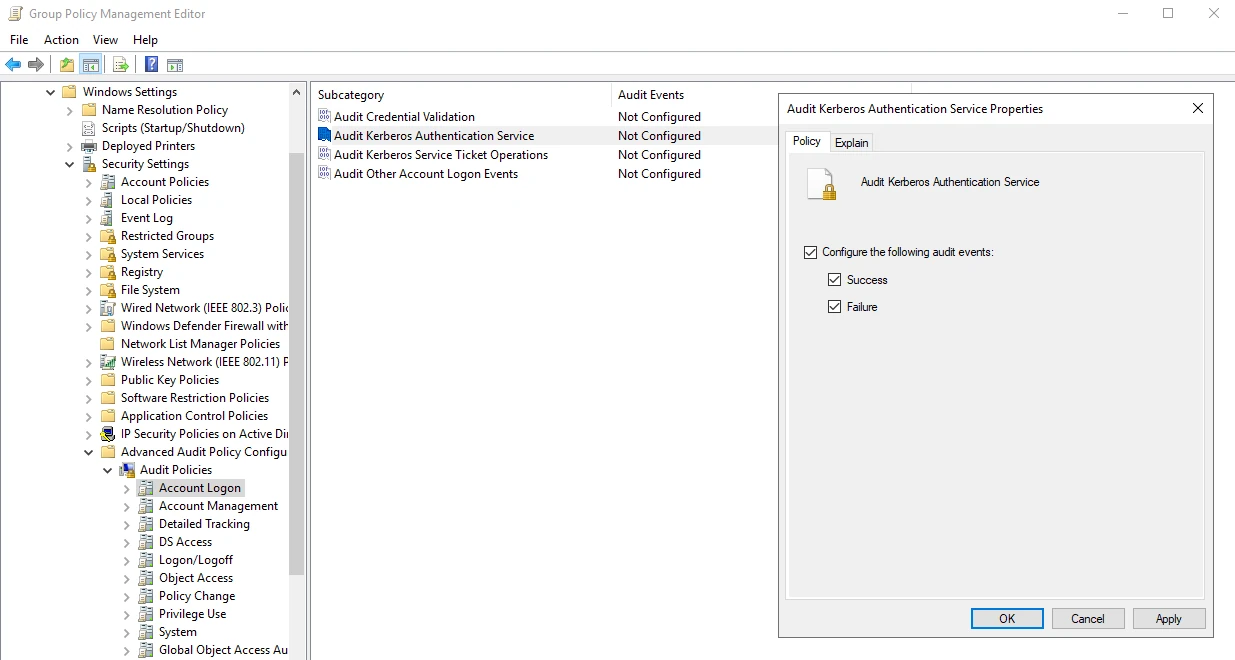
To produce 4768 and 4769 logs, you must enable the policies whose locations are shown below:
| Event ID | Description | Required Policy |
|---|---|---|
| 4768 | Kerberos Authentication Service (AS-REQ / TGT Request) | Computer Configuration > Policies > Windows Settings > Security Settings > Advanced Audit Policy > Account Logon > Audit Kerberos Authentication Service |
| 4769 | Kerberos Service Ticket (TGS Request) | Computer Configuration > Policies > Windows Settings > Security Settings > Advanced Audit Policy > Account Logon > Audit Kerberos Service Ticket Operations |
Capacity warning: In large environments, turning on Success auditing for 4768/4769 can produce a very high event volume. Review your SIEM license and storage sizing in advance. If needed, turn auditing on gradually or within a specific time window.
- Seeing an RC4 session key on 4768 most often means the client only advertised RC4.
- Seeing
0x17on 4769 shows that the target service ticket was issued with RC4. - If there is no AES in
Available Keys, it means a password reset will be needed even if the account has the AES flag set.
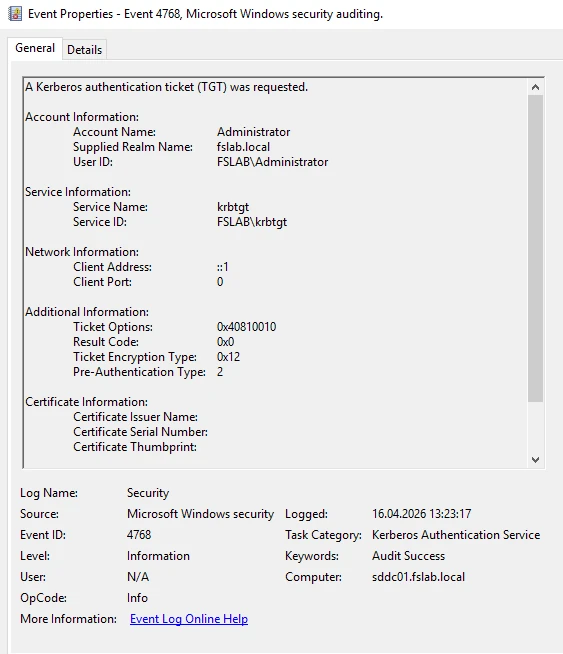
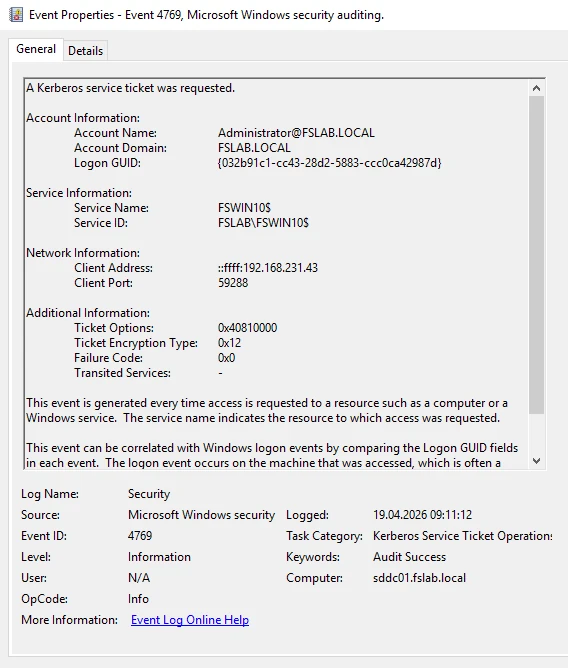
With the help of a SIEM solution, 4768 and 4769 events can be collected centrally, and rules can be written to detect Ticket requests made with RC4. This way you can centrally analyze which systems, applications, or service accounts use RC4. The SIGMA rule below can be used for this purpose.
title: Kerberos TGT Request (AS-REQ) with RC4 Encryption (Possible malicious tool usage Mimikatz/Rubeus etc)
name: kerberos_tgt_request_with_rc4_encryption
description: Alert triggers when the Kerberos AS-REQ request is made with insecure RC4 encryption, it mostly triggered by Mimikatz or Rubeus
version: 0.1
ttp: Multiple
stage:
  - Exploitation
status: test
performance: high
author:
  - linkedin: serdal-tarkan-altun
  - twitter: TarkanSerdal
date: 18.04.2026
references:
  - https://docs.microsoft.com/en-us/windows/security/threat-protection/security-policy-settings/network-security-configure-encryption-types-allowed-for-kerberos
  - https://docs.microsoft.com/en-us/windows/security/threat-protection/auditing/event-4768
  - https://docs.microsoft.com/en-us/windows/security/threat-protection/auditing/audit-kerberos-authentication-service
tags:
    - attack.credential_access
    - attack.t1558.004
logsource:
  product: windows
  service: security
  definition: Enable required policy - Computer Configuration > Policies > Windows Settings > Security Settings > Advanced Audit Policy > Audit Policy > Account Logon > Audit Kerberos Authentication Service
detection:
  selection:
    EventID: 4768
    Ticket_Encryption_Type:
      - "0x17" # RC4-HMAC
      - "0x18" # RC4-HMAC-EXP
  condition: selection
falsepositives:
  - Legacy systems (before Win2008/WinVista) or applications (Medium)
  - Ticket requests for inter domain or inter forest services (High if trusts enabled)
weaknesses:
  - Attackers can bypass this rule with using AES or another secure supported encryption
fine-tune:
  - Rule should be combined with Kerberos TGT Request with DES Encyption rule
  - Rule precision can be improved by excluding known old/legacy systems/apps and users
  - Rule can also applied with count-based correlation for the same host
level: high

---

# Correlation based on event count for the same host
# You need to change timespan and condition values according the your environment
action: correlation
name: multiple_kerberos_tgt_request_with_rc4_encryption_by_same_host
type: event_count
rule: kerberos_tgt_request_with_rc4_encryption
group-by:
  - Client Address
timespan: 5s
condition:
  gte: 5
weaknesses:
  - Attackers can bypass this correlation by slowing down their requests and changing the host
title: Kerberos TGS Request (TGS-REQ) with RC4 Encryption (Possible malicious tool usage Mimikatz/Rubeus etc)
description: Alert triggers when the Kerberos TGS-REQ request is made with insecure RC4 encryption, it mostly triggered by Mimikatz or Rubeus
version: 0.1
ttp: Kerberoasting
stage:
  - Exploitation
status: test
performance: high
author:
  - linkedin: serdal-tarkan-altun
  - twitter: TarkanSerdal
date: 18.04.2026
references:
  - https://docs.microsoft.com/en-us/windows/security/threat-protection/auditing/event-4769
  - https://docs.microsoft.com/en-us/windows/security/threat-protection/auditing/audit-kerberos-service-ticket-operations
tags:
    - attack.credential_access
    - attack.t1558.003
logsource:
  product: windows
  service: security
  definition: Enable required policy - Computer Configuration > Policies > Windows Settings > Security Settings > Advanced Audit Policy > Audit Policy > Account Logon > Audit Kerberos Service Ticket Operations
detection:
  selection:
    EventID: 4769
    Ticket_Encryption_Type:
      - "0x17" # RC4-HMAC
      - "0x18" # RC4-HMAC-EXP
  reduction:
    Account_Name|endswith: "$" # Exclude machine accounts, especially DCs
  condition: selection and not reduction
falsepositives:
  - Legacy systems (before Win2008/WinVista) or applications (Medium)
level: medium
Important: The encryption type of the service ticket (
Ticket Encryption Type) is clearly visible only in the 4769 event. For this reason, collecting 4769 centrally from the Domain Controllers in addition to 4768 is critical for RC4 dependency analysis.
Warning (be careful when interpreting):
Ticket Encryption Typeon its own is not enough to make a firm decision.0x17records do not always mean a vulnerability (test systems, isolated legacy applications, deliberate temporary RC4).0xFFFFFFFFmeans the etype could not be parsed or is unknown. Always correlate your findings with the KDCSVC 201-209 events, the account'smsDS-SupportedEncryptionTypesconfiguration, the password age / AES key state, and business criticality. Detection must answer not only "is there RC4" but also why it is there (the root cause).
SIEM query examples (Sentinel / Splunk)
In addition to the SIGMA rules, here are directly copyable queries for different SIEMs that hunt for RC4 (0x17) service tickets:
Microsoft Sentinel (KQL):
SecurityEvent
| where EventID == 4769
| where TicketEncryptionType == "0x17"          // RC4-HMAC
| where TargetUserName !endswith "$"            // exclude machine accounts
| summarize Count = count(), Services = make_set(ServiceName)
    by TargetUserName, IpAddress, bin(TimeGenerated, 1h)
| order by Count desc
Splunk (SPL):
index=wineventlog EventCode=4769 Ticket_Encryption_Type="0x17"
NOT Account_Name="*$"
| stats count values(Service_Name) as services by Account_Name, Client_Address
| sort - count
Note: The field names (
TicketEncryptionType/Ticket_Encryption_Type) can differ depending on the collection method and the connector. Verify with a sample in your own environment.
1.3 Turning on and monitoring KDCSVC events 201-209
For the April / July 2026 transition, the main source of operational signals is the Kdcsvc events in the System log.
These events answer the following questions:
- Why is the client being forced to RC4?
- Why can AES not be used on the target service account?
- Is there an insecure
DefaultDomainSupportedEncTypessetting on the domain controller? - After enforcement, which calls will actually be blocked?
KDCSVC Event IDs 201-209 Explained
| Event ID | What It Means |
|---|---|
| 201 | The client asks only for RC4, and the service encryption type is not defined |
| 202 | The service account has no AES key (only RC4 is available) |
| 203 | The 201 scenario was blocked during the enforcement phase |
| 204 | The 202 scenario was blocked during the enforcement phase |
| 205 | The domain encryption policy allows insecure algorithms such as RC4 |
| 206 | The service asks for AES, but the client does not support AES |
| 207 | The service asks for AES, but the account has no AES key |
| 208 | The 206 scenario was blocked during the enforcement phase |
| 209 | The 207 scenario was blocked during the enforcement phase |
- 201-202-206-207 → Warning (Audit)
- 203-204-208-209 → Blocked (Enforcement)
- 205 → Configuration problem
Important:
These events should not be interpreted on their own.
They should be analyzed together with 4769 (Ticket Encryption Type) and the account configuration.
Important: The absence of KDCSVC events does not mean the environment is completely clean. Especially for non-Windows devices, Microsoft states that you must test even if there are no events.
1.4 Building an inventory of service accounts with SPNs
User-based service accounts that carry an SPN are the riskiest category in the RC4 transition.
First, list the following types:
- User-based service accounts
- Custom application accounts that carry an SPN
- SQL, IIS, ADFS, web service, and middleware service accounts
- keytab-based accounts used for non-Windows services
Example PowerShell - user service accounts with an SPN
# Find users with a ServicePrincipalName set and an empty msDS-SupportedEncryptionTypes value
Get-ADUser -Filter { servicePrincipalName -like "*" -and SamAccountName -ne "krbtgt" } `
-Properties servicePrincipalName,msDS-SupportedEncryptionTypes,PasswordLastSet |
Where-Object {
    $null -eq $_.'msDS-SupportedEncryptionTypes' -or $_.'msDS-SupportedEncryptionTypes' -eq 0
} |
Select-Object `
    SamAccountName,
    PasswordLastSet,
    msDS-SupportedEncryptionTypes,
    @{Name="servicePrincipalName";Expression={ $_.servicePrincipalName -join "; " }} |
Export-Csv -Path "ServicePrincipalName_and_msDS-SupportedEncryptionTypes_users.csv" -NoTypeInformation -Encoding UTF8
This output will highlight the following accounts:
- Accounts where
msDS-SupportedEncryptionTypesis empty - Service accounts sorted by password date
- Critical accounts with SPNs that should be prioritized
1.5 Classifying empty or risky msDS-SupportedEncryptionTypes values
The table below summarizes the bitmask values used most often in practice (for bit details, see How to Read Encryption Type Values):
| Value | Meaning | Typical use |
|---|---|---|
0x18 |
AES128 + AES256 | Target state for an AES-only service account; the DefaultDomainSupportedEncTypes value that Microsoft documents for disabling RC4 on the DC side |
0x1C |
RC4 + AES128 + AES256 | Temporary transition / exception scenario |
0x24 |
RC4 ticket + AES session key | Configuration used for a controlled transition in a non-Windows exception scenario |
0x38 |
AES128 + AES256 + AES session key bit (0x18 + 0x20) |
Gives the same result as 0x18; the extra 0x20 only forces the AES session key behavior explicitly (the standard choice is 0x18) |
Note:
0x24and similar exception bitmasks are not a permanent target state. They should only be considered for a controlled transition when vendor remediation is delayed.
These steps often require manual effort, so they cannot be done quickly and cannot cover all systems.
Besides these operations, by using Forestall ISPM's Search & Report and GPO Audit modules, the status of msDS-SupportedEncryptionTypes, which is the main indicator of RC4 dependency, can be reported quickly and across the whole environment.
Note: RC4 dependency is read directly from the
msDS-SupportedEncryptionTypesvalue of accounts and devices. For this reason, the main RC4 discovery mechanism on the ISPM side is the Search & Reports (attribute-based query) and GPO Audit (baseline comparison) modules. The DES-based vulnerability check is a complementary signal (explained below).
Reporting
msDS-SupportedEncryptionTypeswith Search & Reports. By going to theSearch & Reportspage, you can filter themsDS-SupportedEncryptionTypesattribute on users and computers, and report the encryption type status per user and computer. You find out which users and computers it is applied to. To make this detection, follow the steps below to write the required query.On the
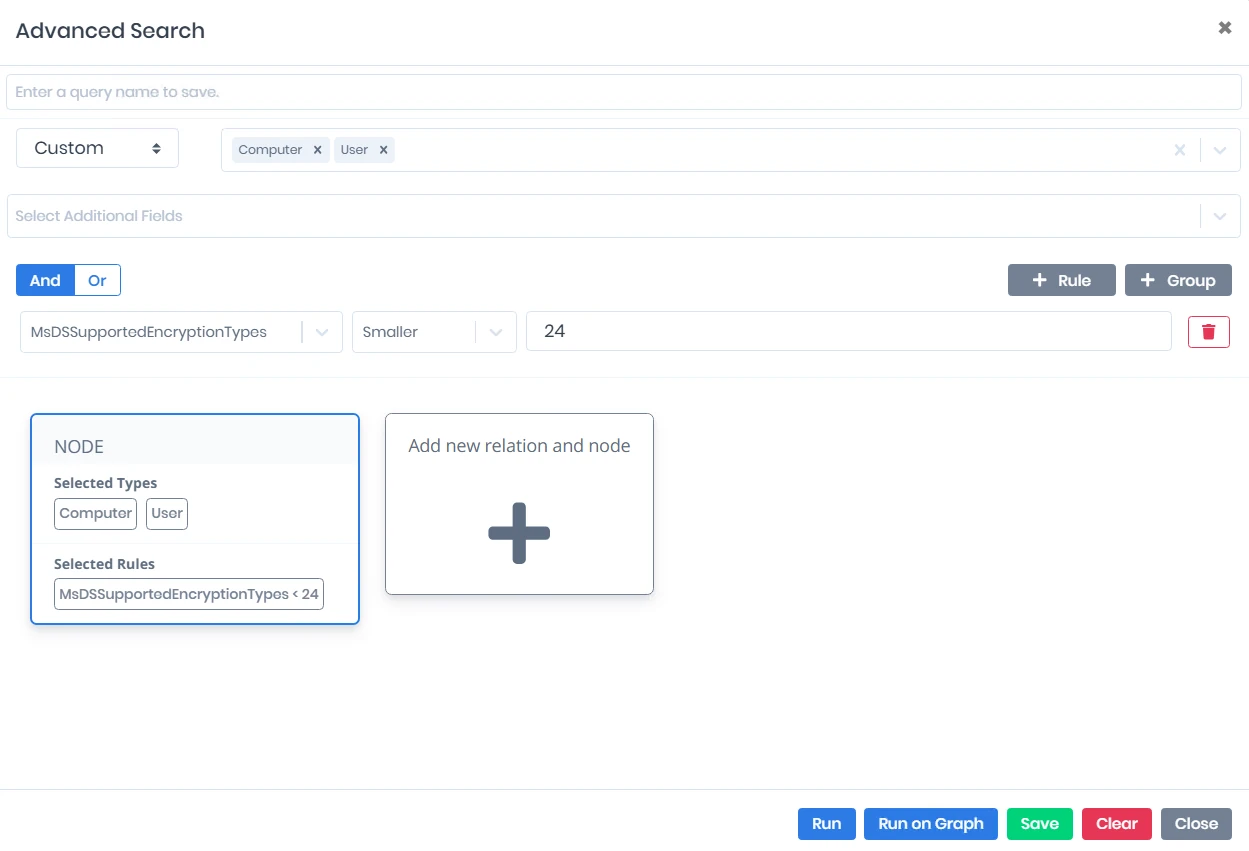
Search & Reportsscreen, click the New Query button at the top right. On the screen that opens, setSelect Entity Typeto Users and Computers.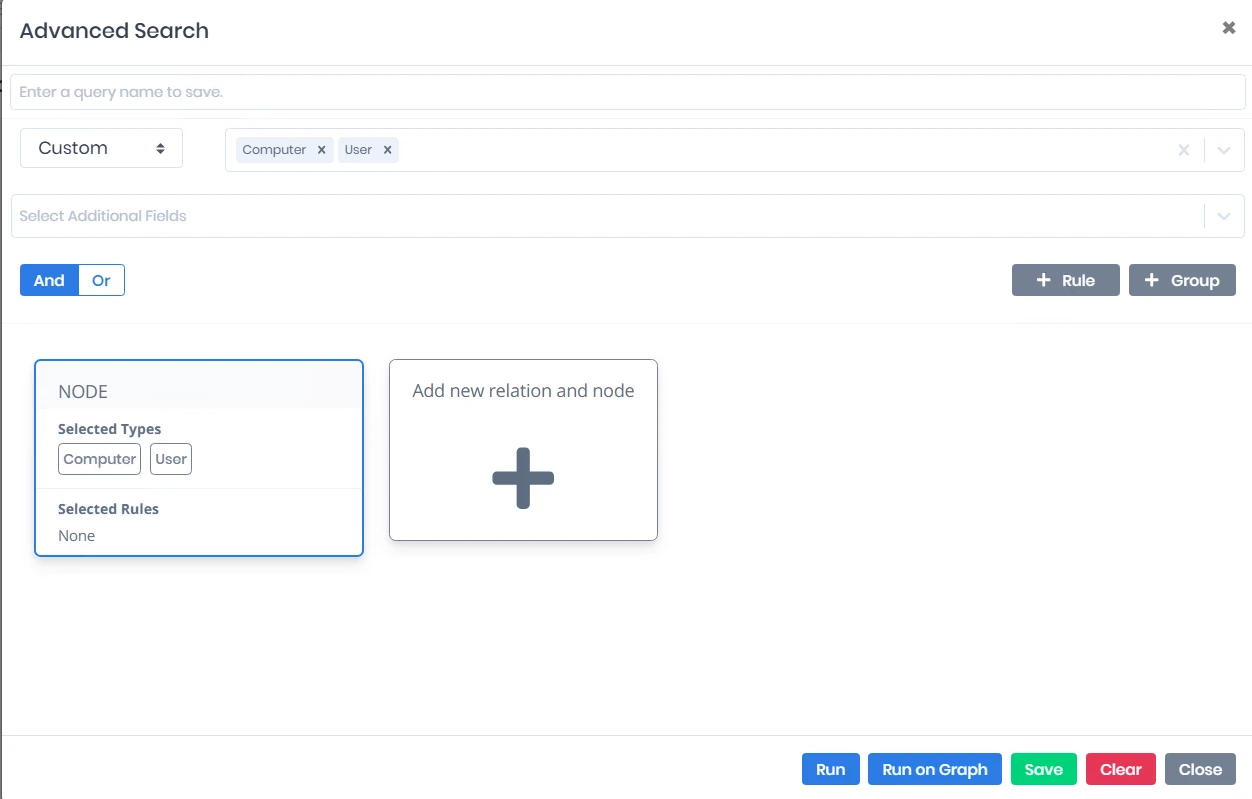
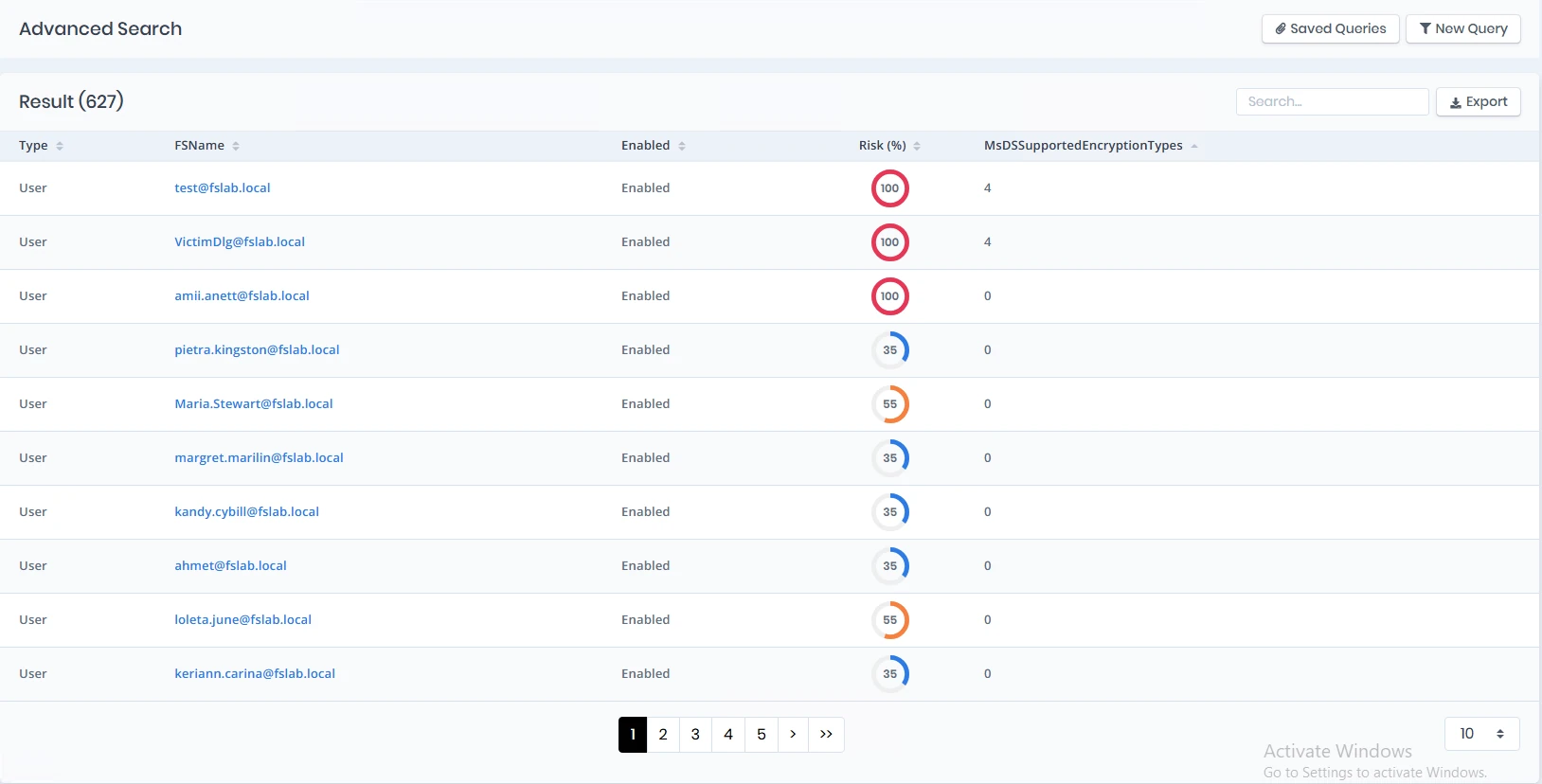
Then click the +Rule area and, from the Select Your Option screen that opens, choose the msDS-SupportedEncryptionTypes filter. Then choose the Smaller operator, type the value 24, and click the Run button to run the query. This way the query is completed so that it shows the target systems where the vulnerable GPOs are applied, per user and computer.
Watch the query logic:
msDS-SupportedEncryptionTypesis a bitmask; the numeric "Smaller 24" filter only catches accounts that are missing the AES bits (for example RC4-only, DES-only, or undefined). By contrast, accounts such as0x1C(28 = RC4 + AES128 + AES256) or0x1F(31), whose numeric value is greater than 24 even though they include RC4, are not caught by this filter. For this reason, use the "Smaller 24" query together with the GPO Audit baseline comparison below, which also catches combinations that explicitly include the RC4 bit (0x4).Baseline comparison with GPO Audit. In the
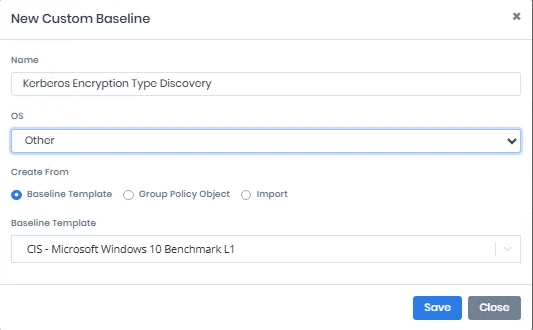
GPO Auditmodule, create aBaselinethat checks only the status of theSupportedEncryptionTypessetting. Then go to theRSOP Auditpage and compare thisBaselineagainst all computers and users to find the computers that hold an insecure configuration. This interface also lets you see which Group Policy object the insecure configuration comes from.Go to the Custom Baselines page under the GPO Audit module. Click the New Baseline button and give the new baseline a name (Kerberos Encryption Type Discovery). Since the OS field does not matter in this scenario, choose Other. To make the process easier, choose CIS - Microsoft Windows 10 Benchmark L1 as the Baseline Template. Click the Save button to create the new baseline.
From the Custom Baselines page, click the newly created baseline to go to its detail page. First, increase the number of rows shown in the table, then check the select-all box in the leftmost column. Then clear the box only for the
SupportedEncryptionTypessetting. From Bulk Actions at the top right, choose the Delete option and click the Apply button. After this operation, this baseline will check only theSupportedEncryptionTypessetting.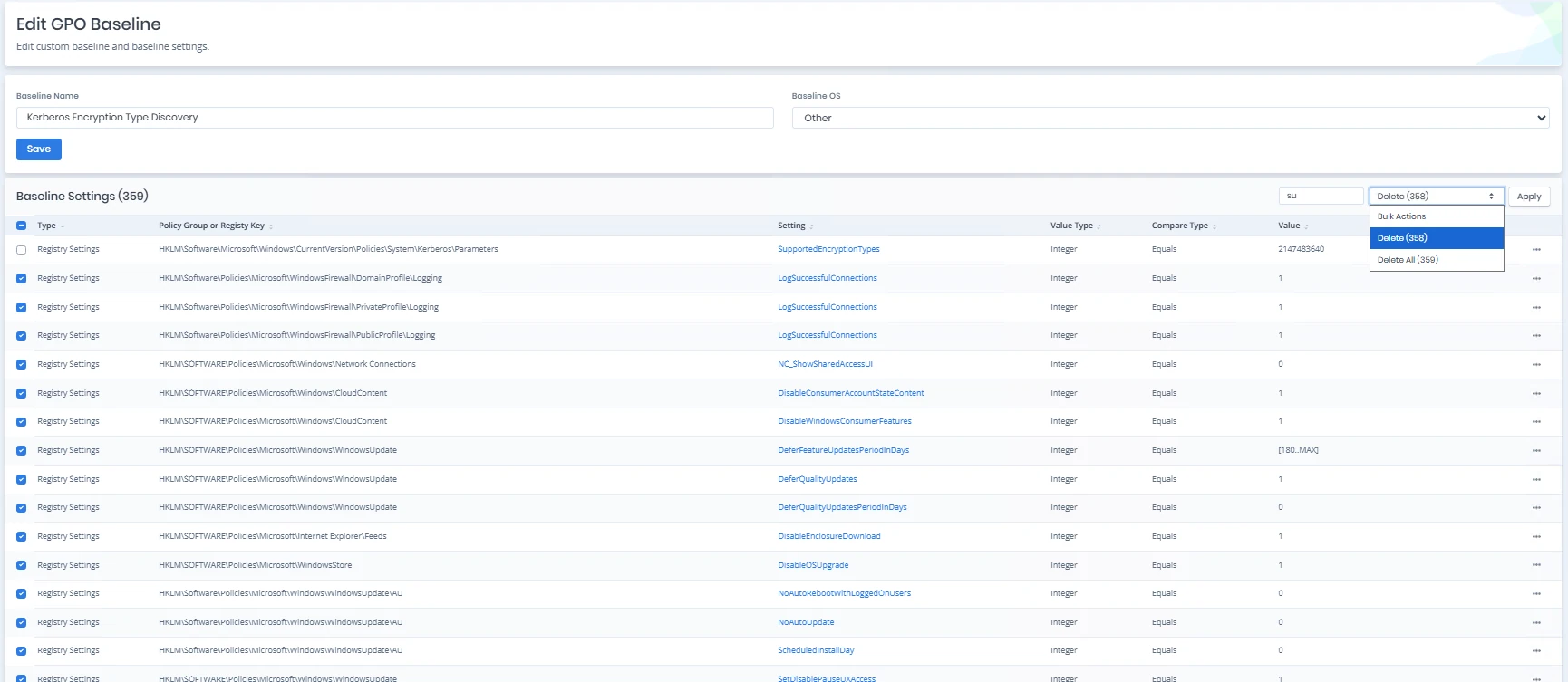
To find the computers and users where the
SupportedEncryptionTypessetting is defined as AES128 and AES256, click the three dots on the far right of the relevant row, then click the Edit button. On the page that opens, enter the value24in the Value field. Click the Save button to save the setting. You can also run different checks by entering different values in the Value field.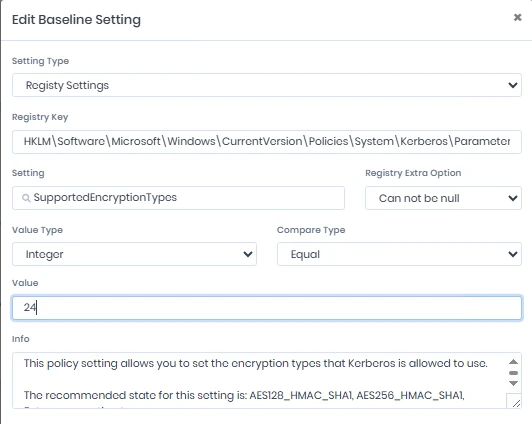
To run the comparison, go to the RSOP Comparison page. From the Baseline option at the top right, choose the newly created baseline. As soon as the baseline is chosen, the check runs automatically, and for computers that are not compliant with the created baseline, the Uncompatible column can be seen as 1.
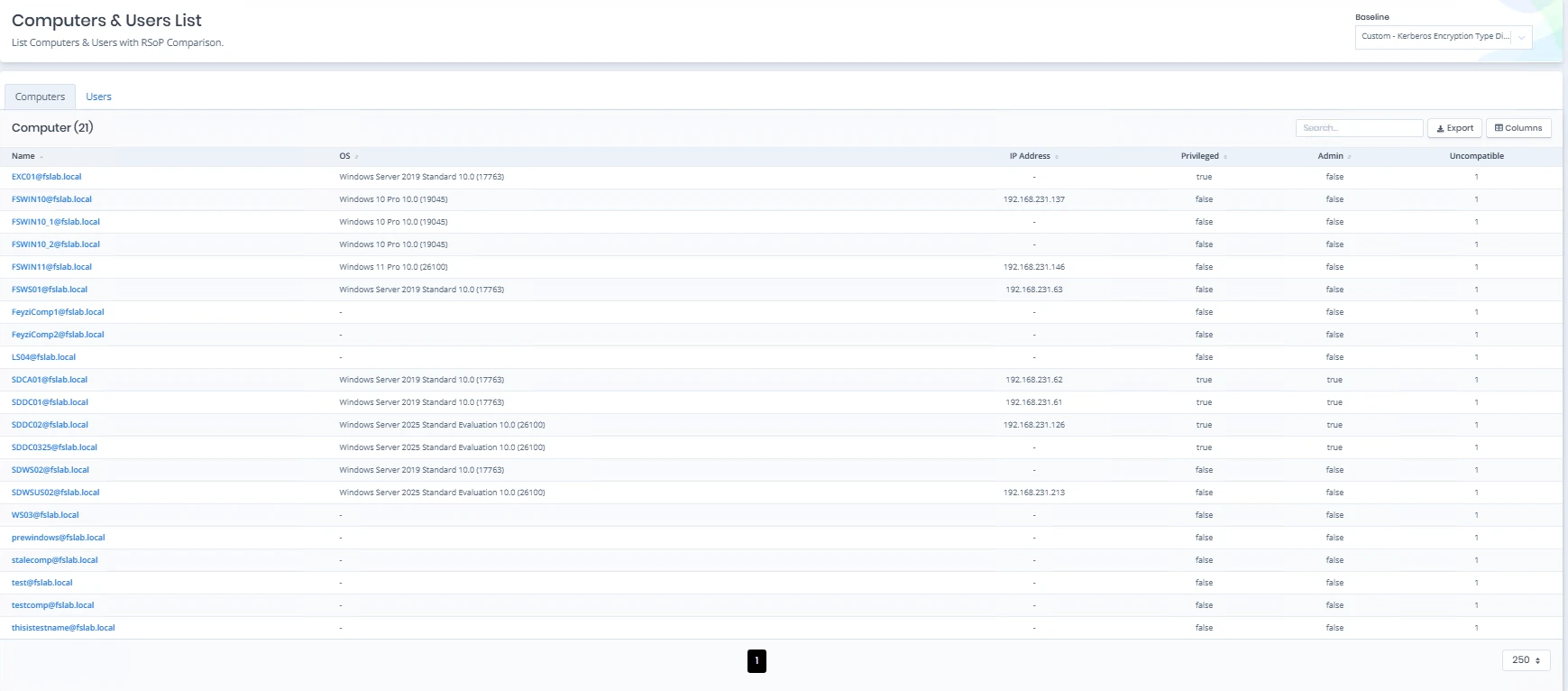
To see the details, click the detail of a user or computer you want. Click the Uncompatible filter marked in red at the top right; as a result of this filter, you can see how the
SupportedEncryptionTypesvalue is configured in the GPO Value column, and which GPO delivered it to this computer in the Winning GPO column.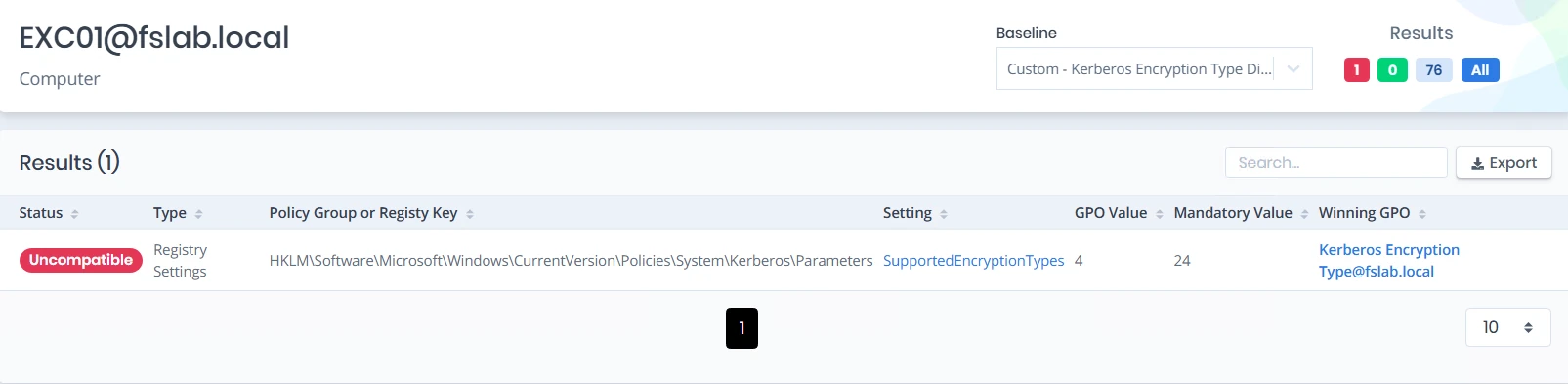
Extra signal: accounts using DES. On the ISPM
Issuespage, theUnsecure Hashing Algorithm (DES) Usage for UsersandUnsecure Hashing Algorithm (DES) Usage for Computersvulnerabilities list the accounts that have the DES encryption type enabled.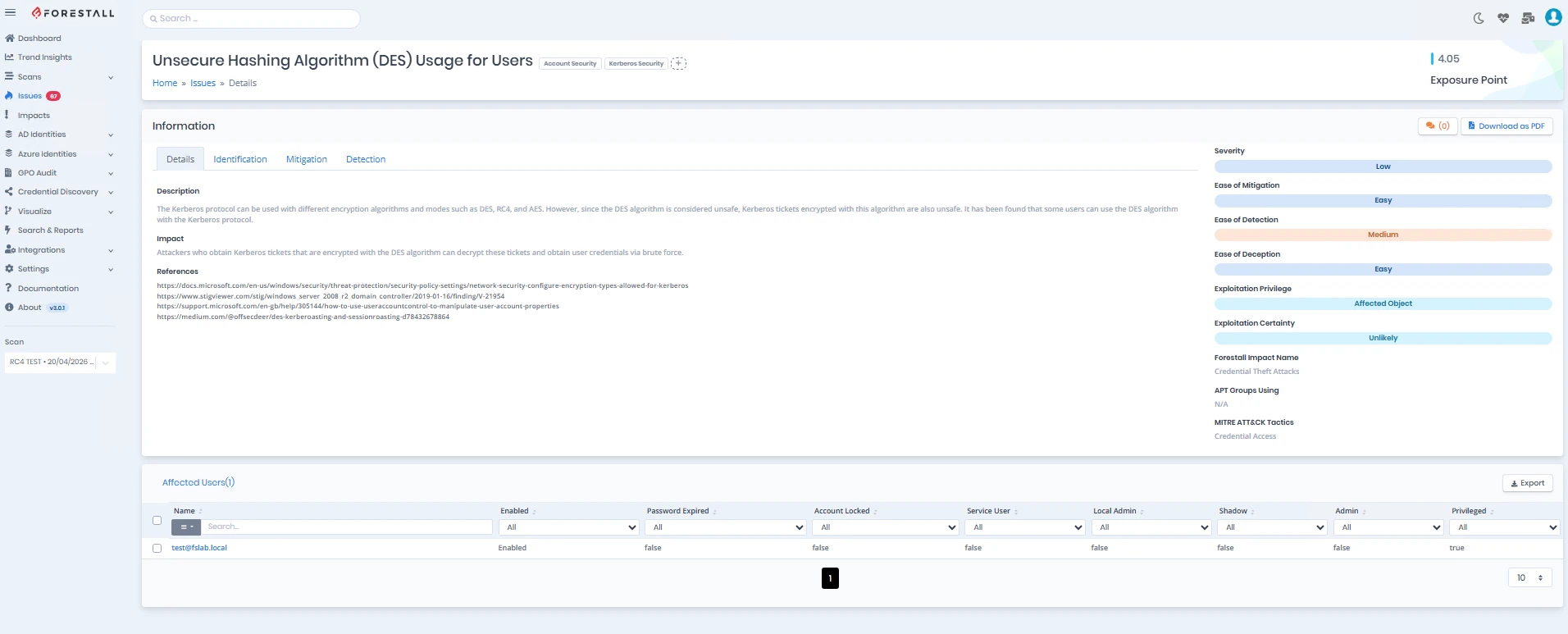
Important: DES is not the same thing as RC4. These two vulnerabilities show accounts that carry the DES bit (
0x1/0x2), not the RC4 bit (0x4). An account can be fully RC4-dependent even without a DES flag. For this reason, the DES vulnerability is not enough on its own for RC4 discovery; it should only be used as a neighboring "weak Kerberos cryptography" signal, to complement themsDS-SupportedEncryptionTypes-based discovery above.
You can perform detection with these methods through Forestall ISPM.
1.6 Hunting RC4 service tickets in the event log
The following example can be used to extract RC4 tickets from 4769 events:
$start = (Get-Date).AddDays(-7)

Get-WinEvent -FilterHashtable @{
    LogName   = 'Security'
    Id        = 4769
    StartTime = $start
} | ForEach-Object {
    $xml = [xml]$_.ToXml()
    $data = @{}
    foreach ($d in $xml.Event.EventData.Data) {
        $data[$d.Name] = $d.'#text'
    }

    if ($data['TicketEncryptionType'] -eq '0x17') {
        [PSCustomObject]@{
            TimeCreated          = $_.TimeCreated
            AccountName          = $data['TargetUserName']
            ServiceName          = $data['ServiceName']
            ClientAddress        = $data['IpAddress']
            TicketEncryptionType = $data['TicketEncryptionType']
            AdvertizedEtypes     = $data['AdvertizedEtypes']
            ServiceSupportedET   = $data['ServiceSupportedEncryptionTypes']
            ServiceAvailableKeys = $data['ServiceAvailableKeys']
        }
    }
} | Sort-Object TimeCreated -Descending | Format-Table -AutoSize
Note: Event field names may vary slightly depending on the operating system version and update level. The script should be tested in a lab environment and adapted to your organization.
Microsoft's official tools: Microsoft has published two open source PowerShell scripts to extract RC4 usage and account keys from event logs:
List-AccountKeys.ps1(lists the current encryption keys of accounts) andGet-KerbEncryptionUsage.ps1(reports the Kerberos encryption types used, with filters such as-Encryption RC4). Both are available in the microsoft/Kerberos-Crypto repository and can be run on a domain controller.
1.7 Handling non-Windows and NAS / keytab dependencies separately
The following environments should be handled as separate workstreams during discovery:
- Linux / Samba services
- Java / keytab applications
- NAS devices
- NetApp CIFS
- Printers / MFP devices that scan to folder
- Embedded devices and appliances
For these categories, two questions should be asked:
- Can the device accept the AES ticket?
- Does the device / service actually advertise AES?
Special note on NetApp
The community has especially pointed out that, for NetApp CIFS, the lack of an AES advertised encryption type can lead to an RC4 TGS appearance. In such a scenario, the following checks may be useful:
vserver cifs security show -vserver <netappserver> -fields advertised-enc-types
vserver cifs security modify -vserver <netappserver> -advertised-enc-types aes-128, aes-256
Before applying these commands in production, they should be verified with the relevant vendor documentation and the change management process.
2. Remediation
After discovery is complete, remediation actions must be planned for each category that has an RC4 dependency.
2.1 Moving service accounts to an AES-only target state
For service accounts that carry an SPN, the recommended order of operations is:
- Identify the account
- Define AES support (
0x18/ ADUC AES boxes) - Reset the password
- Wait for replication
- Validate with the 4769 / Available Keys fields
- Run a pilot test
- Confirm that no RC4 ticket is produced
Example approach through ADUC
- Open Active Directory Users and Computers
- Find the relevant service account
- Go to the Account tab
- Check the following options:
- This account supports Kerberos AES 128 bit encryption
- This account supports Kerberos AES 256 bit encryption
- Then reset the password of that service account
- Test the application / service again
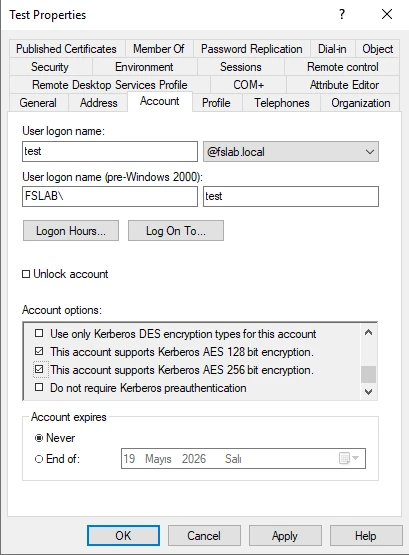
Critical point: Checking the AES boxes alone may not be enough. In most cases, a password reset is required to generate an AES key on the account.
Copyable command (bulk remediation). Instead of the GUI, you can set the msDS-SupportedEncryptionTypes value directly to 0x18 (24 in decimal = AES128 + AES256):
# User-based service account
Set-ADUser svc_app -Replace @{'msDS-SupportedEncryptionTypes'=24}
# Computer account
Set-ADComputer WEB01 -Replace @{'msDS-SupportedEncryptionTypes'=24}
# Standalone / group MSA
Set-ADServiceAccount gmsa_app -KerberosEncryptionType AES128,AES256
Why reset the password twice? On old accounts or accounts that went through a migration, reset the password twice with replication happening in between: the first reset generates the AES key material; the second reset (after replication is complete) guarantees that the new key has spread to all domain controllers. A single reset is often enough, but two resets are the safe path against 207/209 ("no AES key") errors.
2.2 Prioritizing accounts that need a password reset
The following accounts should be evaluated first:
- Service accounts with a very old
pwdLastSetvalue - Accounts moved after a domain migration / password sync
- Service accounts that run with a keytab
- Application accounts that have been "untouched" for a long time
2.3 Regenerating services that use a keytab
One of the most critical lessons Steve Syfuhs shared from the field is this: some keytab setups that cause no problem while RC4 is running can break when AES is enforced, because of a salt / principal / realm mismatch.
For this reason, the keytab must be regenerated in the following cases:
- If the UPN suffix has changed
- If the account name / realm setup is custom
- If the keytab was generated with an old tool
- If the application has been running on RC4 for a long time
On the Linux / Java (Tomcat, JBoss, WebLogic) side, define the AES enctypes explicitly in krb5.conf:
[libdefaults]
    default_tkt_enctypes = aes256-cts-hmac-sha1-96 aes128-cts-hmac-sha1-96
    default_tgs_enctypes = aes256-cts-hmac-sha1-96 aes128-cts-hmac-sha1-96
    permitted_enctypes   = aes256-cts-hmac-sha1-96 aes128-cts-hmac-sha1-96
Timing trap: If the keytab was generated before the account password was reset to produce an AES key, it contains only the RC4 hash. For this reason, always re-export the keytab after the password reset.
2.4 Fixing devices that only advertise RC4
For devices that only advertise RC4 on 4768 / 4769, consider the following actions:
- Apply Kerberos encryption types via GPO to the relevant device or server
- Upgrade the operating system / firmware
- Fix the keytab or krb5.conf side
- Enable AES support according to the vendor documentation
- Replace the device if necessary
2.5 Keeping temporary exceptions narrow in scope
If remediation cannot be completed right away, a temporary exception approach can be used. However, the following principle must be preserved:
- Re-enabling RC4 across the whole domain should be the last resort
- If possible, use only an explicit bitmask on the relevant service account
- The exception list must be recorded with a date, owner team, and removal plan
2.6 Old operating systems and non-supported devices
In practice, the following categories should be treated as "incompatible":
- Windows Server 2003 / XP and older systems
- Non-Windows appliances that do not support AES
- Embedded services that do not accept AES tickets
The recommended approach for these systems:
- Isolate
- Replace / upgrade
- Move the service flow to a modern system
- If that is not possible, define a narrow-scoped temporary exception
- Create a removal timeline
2.7 AES validation of the krbtgt account and the TGT
Even if you move service accounts to AES, the encryption type of TGTs (4768) is determined not by msDS-SupportedEncryptionTypes but by the stored keys of the krbtgt account. In old environments or those that went through a domain migration, the AES key of krbtgt may be missing; in that case you end up with the picture of "we made the service accounts AES, but we still see RC4 TGTs".
First, confirm that the TGT really is AES:
klist tgtIn the
KerbTicket Encryption Typefield you should seeAES-256-CTS-HMAC-SHA1-96; if you seeRC4-HMAC, krbtgt remediation is required.If needed, rotate the krbtgt password twice, 24 hours apart (allow time for replication and for the lifetime of existing tickets in between). For this job you can use
New-KrbtgtKeys.ps1under the Microsoft org (microsoftarchive) or theReset-KrbTgt-Password-For-RWDCs-And-RODCs.ps1script written by the community (MVP Jorge de Almeida Pinto).For RODCs: each RODC has its own krbtgt account (
krbtgt_<number>); evaluate these separately as well.
Warning: Do not rush the krbtgt double rotation. Not leaving enough time between the two resets (on the safe side, ~24 hours) invalidates all existing tickets at once and causes a domain-wide authentication outage.
2.8 Permanent solution: moving service accounts to gMSA
For classic service accounts that carry an SPN, the most sustainable target is the use of a group Managed Service Account (gMSA). A gMSA's password is rotated automatically and regularly by AD, and it always produces AES key material; this way the double-reset and keytab maintenance burden, and the offline-crackability against Kerberoasting, practically disappear.
Note: Do not apply a password reset to a gMSA; password management belongs to AD (managed password). The transition requires moving the account's SPNs and application configuration to the gMSA.
2.9 Trust (TDO) and cross-forest remediation
In multi-domain / multi-forest environments, trusts are both a failure point and a source of unnecessary panic:
- Scope: The CVE-2026-20833 change affects only the KDC behavior of Windows domain controllers. The trust / referral flow with third-party (non-Windows) KDCs is not directly affected by this change.
- Remediation: Set the
msDS-SupportedEncryptionTypesvalue of the trust'strustedDomain(TDO) object to include AES. In Active Directory Domains and Trusts, you can check the "The other domain supports Kerberos AES Encryption" option for the relevant trust (in both the incoming and outgoing direction), or you can add AES withksetupwithout disabling RC4. - Important: trusts still default to RC4. CVE-2022-37966 (November 2022) changed the default only for normal accounts whose
msDS-SupportedEncryptionTypesis empty (and even that default,0x27, still includes RC4). On trust (TDO) objects, ifmsDS-SupportedEncryptionTypesis undefined, the behavior is still RC4 (Microsoft KB4492348, February 2026 update). For this reason, the AES checkbox /ksetupremediation above is still necessary in most environments. Before disabling RC4, validate each trust direction separately and add AES; otherwise cross-forest authentication is cut off withKDC_ERR_ETYPE_NOTSUPP (0xE).
3. Pilot Enforcement
You should not enforce domain wide before remediation is complete.
3.1 Defining the pilot scope
The pilot group should include the following:
- Low risk application servers
- Clients whose AES compatibility has been verified
- NAS / appliances that have vendor approval
- Non critical service accounts
The following should be left out of the pilot:
- Critical workloads such as finance / production / SAP / MES
- Widely used shared service accounts
- Keytab based services with missing documentation
- Third party device clusters
3.2 Controlled trial with RC4DefaultDisablementPhase
After the January 2026 updates, the temporary key that arrives is this:
- Registry key:
HKEY_LOCAL_MACHINE\SOFTWARE\Microsoft\Windows\CurrentVersion\Policies\System\Kerberos\Parameters - Value:
RC4DefaultDisablementPhase
Values
| Value | Meaning |
|---|---|
0 |
No audit, no behavior change |
1 |
Warning events are logged (phase 1 default) |
2 |
The KDC starts to assume that RC4 is not the default (phase 2 / enforcement) |
To apply the value 2 on a pilot DC:
New-ItemProperty -Path 'HKLM:\SOFTWARE\Microsoft\Windows\CurrentVersion\Policies\System\Kerberos\Parameters' -Name 'RC4DefaultDisablementPhase' -Value 2 -PropertyType DWord -Force
Note: For this registry change to take effect, the domain controller must be restarted (in the Microsoft KB, "Restart required: Yes").
Recommended use in the pilot
- All pilot DCs are updated
- The KDCSVC 201-209 events are observed for a while
- If the events are clean,
RC4DefaultDisablementPhase=2is applied on the pilot DCs - Service tests are run
- Check whether there are any 203 / 204 / 208 / 209 error events
Note: This registry value is temporary. It is planned to be removed with the July 2026 updates.
3.3 Logging validation
The following validations should be done in the pilot:
- Are 4768 and 4769 really coming in?
- Are the Kdcsvc 201-209 events really coming in?
- On the pilot services, is the 4769
Ticket Encryption Typenow AES? - Are the exception accounts that use RC4 limited to the expected scope?
3.4 Privileged account hardening with Protected Users
For members of the Protected Users security group, RC4 is already fully disabled (only AES is used). This is a two way tool:
- Leverage: By adding privileged accounts (for example Domain Admins) to this group, you get a controlled "early AES-only pilot" before domain wide enforcement.
- Failure point: If an account that is a member of the group tries to authenticate to a service that only supports RC4, this operation fails. Before you expand membership, verify that the accounts in question work in AES-only flows.
4. Wider Enforcement
After the pilot completes successfully, the rollout across production should be done wave by wave.
Recommended order
- The domain controller update level is verified
- The service accounts are moved to the AES-only target
- The client / server devices are fixed so they advertise AES
- Pilot enforcement is done
- Production wide is moved to enforcement wave by wave
- The number of exceptions is minimized before the April 2026 / July 2026 timeline
Enforcing AES on the device side with GPO
To reduce Windows devices advertising RC4, the following policy can be used:
The Group Policy Management Console (GPMC) is opened with administrator privileges. Computer Configuration > Policies > Windows Settings > Security Settings > Local Policies > Security Options > Network security: Configure encryption types allowed for Kerberos
Recommended approach
- During transition:
- If needed, first AES128 + AES256 + RC4
- In the target state:
- AES128_HMAC_SHA1
- AES256_HMAC_SHA1
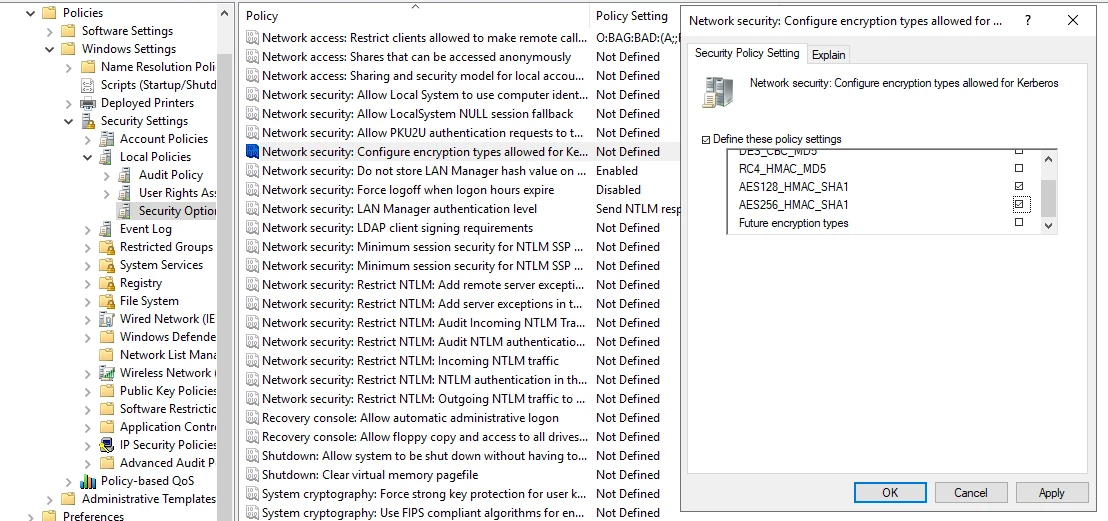
Step by step
- GPMC is opened
- A new GPO is created
- Go to the relevant policy setting
- Link it to the pilot OU
- First apply the transition profile, then the AES-only profile
- The devices are restarted
- Validation is done with the 4768 / 4769 logs
AES-only registry approach on the domain controller side
In the Microsoft Learn documentation, the following registry approach is also shared to limit or turn off RC4 on the domain controller side:
- Key:
HKEY_LOCAL_MACHINE\System\CurrentControlSet\Services\KDC - Value:
DefaultDomainSupportedEncTypes - Type:
REG_DWORD - Value data:
0x18(only AES128 + AES256; the value Microsoft Learn documents for turning off RC4 on the DC side)
New-ItemProperty -Path 'HKLM:\SYSTEM\CurrentControlSet\Services\KDC' -Name 'DefaultDomainSupportedEncTypes' -Value 0x18 -PropertyType DWord -Force
Note: For the change to take effect, the domain controller must be restarted.
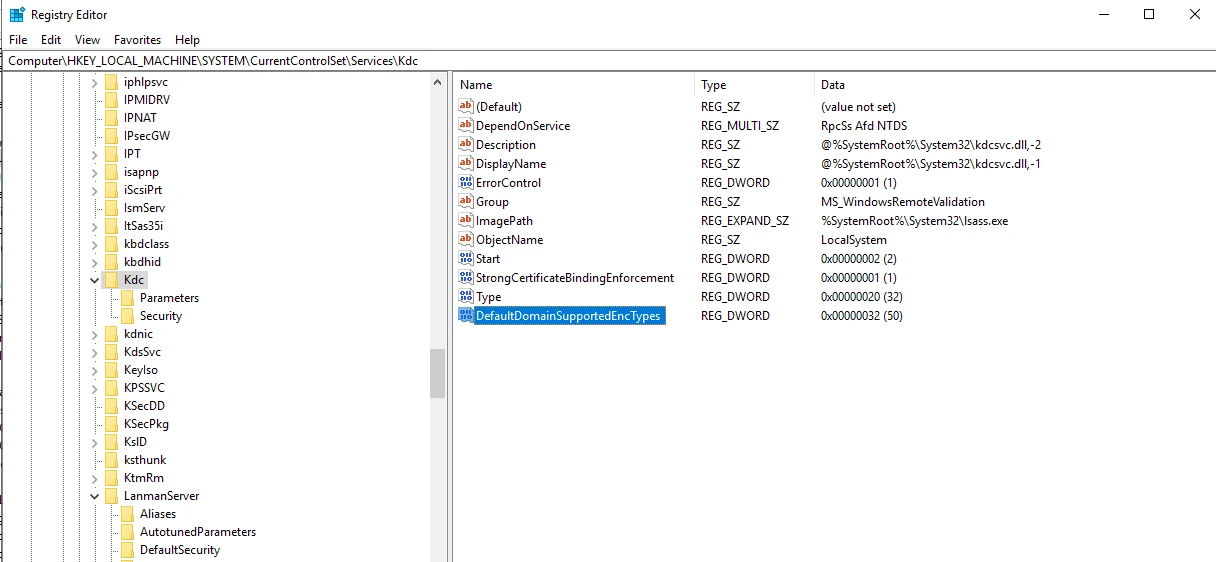
This approach lets you limit RC4 more strictly on the domain controller side. However, applying it before service account remediation is complete is not recommended.
0x18or0x38? The value Microsoft officially documents for turning off RC4 on the DC side is0x18(AES128 + AES256), and this is also the defaultDefaultDomainSupportedEncTypesbehavior after April 2026. In some environments the value0x38(0x18 + 0x20) is also used; the extra0x20bit here only explicitly enforces the AES session key behavior. Since the AES bits are already set, the practical difference is small; the standard and least surprising choice is0x18.
Important:
DefaultDomainSupportedEncTypesis a setting with domain wide effect. Applying it domain wide before service account based remediation is complete can cause large scale outages.
Context (legacy default): When this value is not defined, the legacy behavior the KDC assumes includes DES + RC4 + AES session key (
0x27). With the April 2026 updates, this default moves to AES-SHA1 only (0x18) behavior. So even for organizations that never touched the setting, the default changes in April 2026.
After Enforcement: What Breaks and How to Diagnose It
After RC4 is disabled (or after RC4DefaultDisablementPhase=2 / DefaultDomainSupportedEncTypes=0x18 is applied), clients and services that have no AES key or that advertise only RC4 cannot authenticate. This section gives you concrete signatures, a step-by-step triage flow, and a root cause to action mapping so you can quickly tie any failures to RC4 enforcement.
Typical failure signatures seen by the user or operator
| Symptom | Where it shows up | Likely root cause |
|---|---|---|
| Network error when accessing an SMB share | Client (file sharing) | The target account's msDS-SupportedEncryptionTypes value is RC4 only |
New-PSSession / WinRM: 0x80090342 "An unknown security error" |
Remote PowerShell / WMI | No AES on the target, RC4 blocked |
| Application/service login error, or a nightly batch / file-transfer job failing silently | Service account context | The service account has no AES key, or the keytab is RC4 only |
klist / ticket request: KDC_ERR_ETYPE_NOTSUPP |
Client | The KDC does not support the requested etype (RC4) |
Step-by-step triage
Reproduce the problem. From the affected client, request a ticket directly to the target service:
klist get HOST/hedefsunucu.contoso.comTypical error:
Error calling API LsaCallAuthenticationPackage (GetTicket substatus): 0x80090342
klist failed with 0xc00002fd/-1073741059: The encryption type requested is not supported by the KDC.
Open the relevant 4769 event on the DC and look at these fields:
Failure Code: 0xE→KDC_ERR_ETYPE_NOTSUPP(the KDC does not support the requested etype)Ticket Encryption Type: 0xFFFFFFFF→ the ticket could not be issuedAvailable Keys: -andMSDS-SupportedEncryptionTypes: -→ the account has no suitable (AES) key
Identify the root cause and take action based on the table below.
What breaks → how to fix it
| Problem area / root cause | Typical symptom | Fix |
|---|---|---|
| The service account has no AES key (old password / pre-2008R2 account) | 4769 Available Keys: -, KDCSVC 207/209 |
Set the AES flag and reset the password twice (see 2.1); move to a gMSA if possible (2.8) |
msDS-SupportedEncryptionTypes is empty, the DC was lowered to 0x18 |
RC4-only account cannot connect | Set an explicit 0x18 on the account (do not leave it to fallback) |
| The client / device advertises only RC4 | KDCSVC 201/203, 206/208 | Upgrade the device / use AES via GPO; if that is not possible, a narrowly scoped 0x1C / 0x24 exception |
| The keytab was generated before the password reset → RC4 only | Java / Linux service login error | Regenerate the keytab with AES enctypes after the reset (2.3) |
| The krbtgt AES key is missing | RC4 TGT despite an AES service account | Rotate krbtgt twice, 24 hours apart (2.7) |
| Trust / TDO still uses RC4 | Cross-forest access error | Move the TDO msDS-SET to AES (2.9) |
| Legacy service account / third-party application / SQL / IIS app pool | Has an SPN but msDS-SET is empty |
Inventory it (1.4 / 1.5), set AES + reset |
| NAS / NetApp CIFS does not advertise AES | RC4 TGS | advertised-enc-types aes-128,aes-256 (1.7) |
| VDI profile container (FSLogix / AVD / Citrix) cannot connect | User profile does not load / session error | These containers authenticate with the computer account identity; verify that not only the user but also the related computer account supports AES |
Detection blindness after enforcement
After RC4 is disabled, the assumption that "Kerberoasting is over" is wrong: an attacker can also request an AES ticket and try to crack it offline (just harder). SIGMA rules that only look at the RC4 etype (0x17) go blind at this stage. For this reason, extend your detection to a behavioral rule that is independent of etype (for example, a large number of ticket requests to many different SPNs from a single account in a short time); in an AES-only environment, a sudden RC4 request should also be watched as a downgrade signal.
Honeypot (decoy) SPN. An etype-independent, high-fidelity detection technique with low false positives: create a "decoy" service account that has no legitimate purpose and is assigned an attractive-looking SPN; keep its password strong and do not connect it to any real service. Because the account is never used, any 4769 service ticket request that comes to it can be treated as a true positive without needing a threshold; this rule keeps working after RC4 is disabled too (including AES Kerberoasting).
KDCSVC Event IDs 201-209 Explained
The table below summarizes the most critical events in the 2026 transition.
| Event ID | Level | What it tells you | Typical root cause |
|---|---|---|---|
| 201 | Warning | The client advertises only RC4, and msDS-SupportedEncryptionTypes is not set on the service account |
RC4-only client / blank msds-SET |
| 202 | Warning | The service account has no AES key, and msDS-SupportedEncryptionTypes is not set |
Old password / blank msds-SET |
| 203 | Error | The 201 scenario, now blocked after enforcement | RC4-only client |
| 204 | Error | The 202 scenario, now blocked after enforcement | No AES key |
| 205 | Warning | DefaultDomainSupportedEncTypes is explicit but set to an insecure value |
RC4 enabled via DC registry |
| 206 | Warning | The service is set to AES-only but the client does not advertise AES | RC4-only client |
| 207 | Warning | The service is set to AES-only but the account has no AES key | Missing password reset |
| 208 | Error | The 206 scenario, now blocked after enforcement | RC4-only client |
| 209 | Error | The 207 scenario, now blocked after enforcement | No AES key |
Event interpretation logic
- 201 / 203 → The problem is usually on the client side
- 202 / 204 → The problem is usually on the service account key material side
- 206 / 208 → The account was made AES-only but the client side is behind
- 207 / 209 → The account was made AES-only but the AES key was not created because the password was not reset
- 205 → There is an insecure DDSET definition on the domain controller
Rollback Plan
As with any hardening effort, you must have a rollback plan ready during the RC4 disable / AES enforcing process.
1. Pilot rollback
If a problem occurs during the pilot:
- Set the
RC4DefaultDisablementPhasevalue back to its previous state - Remove the pilot GPO scope
- Add the affected service account to the exception list
- Analyze the application logs and DC events together
2. Service account rollback
If a specific service breaks after AES-only:
- If needed, temporarily move the affected account to
0x1Cor to the exception model Microsoft recommends - Perform a password reset / regenerate the keytab
- Remove the exception once the vendor remediation is complete
3. Domain-wide rollback
A domain-wide rollback should be the last choice. For the following reasons:
- The problem usually appears not across the whole domain, but in a narrow group of services / devices
- A domain-wide rollback hides again the RC4 dependencies you gained visibility into
- After July 2026 the temporary rollback option will narrow
Implementation Checklist
Audit Phase
- Did all domain controllers receive the relevant updates after 13 January 2026?
- Are 4768 and 4769 events collected centrally?
- Are Kdcsvc 201-209 events monitored from the System log?
- Was an inventory of user service accounts with SPNs created?
- Were accounts with an empty
msDS-SupportedEncryptionTypesidentified? - Were old accounts without an AES key identified?
- Were non-Windows / NAS / Samba / keytab dependencies listed?
Remediation Phase
- Was AES support defined on service accounts with SPNs?
- Was a password reset done on the accounts that need it?
- Was the keytab regenerated on services that use a keytab?
- Was it verified that devices advertise AES?
- Were systems that require vendor remediation recorded?
- Was a temporary exception list created?
Enforcement Phase
- Was a pilot OU / pilot service group selected?
- Was
RC4DefaultDisablementPhase=2tested in the pilot? - Were error sources fixed by monitoring 203 / 204 / 208 / 209 events?
- Were Kerberos encryption types hardened on devices with a GPO?
- If a
DefaultDomainSupportedEncTypeschange is needed on the DC side, was it planned in a controlled way?
Stabilization Phase
- Did the RC4 ticket trend in 4769 events approach zero?
- Are exception accounts reviewed periodically?
- Were alarms and dashboards created for new RC4 dependencies?
- Was the rollback dependency removed before July 2026?
Validation and Success Criteria
For the RC4 disable effort to count as technically successful, the following validation criteria should be tracked:
| Criterion | Expected state |
|---|---|
RC4 (0x17) ticket ratio within 4769 |
Trend approaching zero |
Number of SPN accounts carrying a blank msDS-SupportedEncryptionTypes |
Decreasing trend |
| Number of service accounts missing an AES key | Trend approaching zero |
| Number of active exception accounts | Decreasing trend |
| Critical service outages after enforcement | 0 |
| Number of KDCSVC 203 / 204 / 208 / 209 (blocked) events | Trend approaching zero |
Important: The final criterion is not only "the event count dropped." The real goal is to reach a repeatable, documented, AES-compatible state with minimized exceptions for service accounts and devices.
Appendix: Disabling RC4 on the Schannel / TLS Side
This section describes disabling RC4 on the TLS / Schannel cipher suite side, not Kerberos ticket encryption.
Microsoft's old but still reference-worthy support advisory describes disabling RC4 cipher suites through the SCHANNEL registry keys. This is different from Kerberos RC4 elimination; however, organizations often treat both tasks within the same "RC4 hardening" project.
Registry example
[HKEY_LOCAL_MACHINE\SYSTEM\CurrentControlSet\Control\SecurityProviders\SCHANNEL\Ciphers\RC4 128/128]
"Enabled"=dword:00000000

[HKEY_LOCAL_MACHINE\SYSTEM\CurrentControlSet\Control\SecurityProviders\SCHANNEL\Ciphers\RC4 40/128]
"Enabled"=dword:00000000

[HKEY_LOCAL_MACHINE\SYSTEM\CurrentControlSet\Control\SecurityProviders\SCHANNEL\Ciphers\RC4 56/128]
"Enabled"=dword:00000000
Warning
- This setting affects TLS/Schannel connections
- It can completely cut off connectivity with old clients / servers that require RC4
- Even if the RC4 remediation on the Kerberos side is complete, separate testing is needed on the Schannel side
In short: Kerberos RC4 disabling and Schannel RC4 disabling are two complementary but technically different efforts.
References
- https://techcommunity.microsoft.com/blog/coreinfrastructureandsecurityblog/active-directory-hardening-series---part-4-%E2%80%93-enforcing-aes-for-kerberos/4114965
- https://support.microsoft.com/en-us/topic/microsoft-security-advisory-update-for-disabling-rc4-479fd6f0-c7b5-0671-975b-c45c3f2c0540
- https://learn.microsoft.com/en-us/windows-server/security/kerberos/detect-remediate-rc4-kerberos
- https://support.microsoft.com/en-us/topic/how-to-manage-kerberos-kdc-usage-of-rc4-for-service-account-ticket-issuance-changes-related-to-cve-2026-20833-1ebcda33-720a-4da8-93c1-b0496e1910dc
- https://learn.microsoft.com/en-us/troubleshoot/windows-server/windows-security/unsupported-etype-error-accessing-trusted-domain
- https://syfuhs.net/lessons-in-disabling-rc4-in-active-directory
- https://learn.microsoft.com/en-us/openspecs/windows_protocols/ms-kile/6cfc7b50-11ed-4b4d-846d-6f08f0812919
- https://www.microsoft.com/en-us/windows-server/blog/2025/12/03/beyond-rc4-for-windows-authentication/
- https://www.linkedin.com/posts/jerry-devore-3035b722_we-are-just-over-a-month-away-from-the-april-activity-7437253915307405312-k91n
Authors
- Serdal Tarkan Altun
See your identity exposure clearly.
Start with a 1-day Proof of Value in your own environment.