Protected Users Group and Delegation Controls: A Step-by-Step Guide
Summary
The Protected Users group is a built-in Active Directory security group that blocks NTLM, DES and RC4 pre-authentication, Kerberos delegation and credential caching for its members. Pair it with the "Account is sensitive and cannot be delegated" flag and remove unconstrained delegation from member servers, so a compromised server can't collect and reuse your administrators' tickets.
Quick steps
- Run the read-only audit script to list every account with unconstrained, constrained or resource-based delegation, every privileged account and every Protected Users member.
- Confirm that the domain functional level is Windows Server 2012 R2 or higher.
- Replace unconstrained delegation on servers with constrained or resource-based constrained delegation, then clear it.
- Set "Account is sensitive and cannot be delegated" on every administrative account.
- Turn on the Protected Users failure log on every domain controller.
- Add one pilot administrator to Protected Users, test every daily task, then add the rest in waves.
- Alert on NTLM refusal event 100, DES or RC4 refusal event 104 and any change to delegation flags.
Applies to: Active Directory domains at the Windows Server 2012 R2 domain functional level or higher for the domain controller protections, and member devices that run Windows 10, Windows 11 or Windows Server 2012 R2 and later for the device protections (as of November 2026).
What are the Protected Users group and delegation controls?
The Protected Users group is a global security group, with the well-known relative identifier (RID) 525, whose members get protections against credential theft that they can't switch off while they stay in the group. Delegation controls are the account settings that decide whether a service may reuse a user's identity when it connects to another service on that user's behalf. Together they decide how far one stolen credential can travel.
Active Directory delegation in this guide means Kerberos authentication delegation, not the delegation of administrative rights over OUs. It exists so that a front-end service, such as a web server, can reach a back-end service, such as a database, as the signed-in user.
Why does unconstrained delegation matter to attackers?
With unconstrained delegation, the user's ticket-granting ticket (TGT) travels to the server, and the server can then reach any other service on the user's behalf. Microsoft calls it the least secure option. Its Defender for Identity assessment gives the example of a Domain Admin who browses to such a server: the server can then get tickets to any service as that admin, and attackers can force the application to misuse that trust.
Attackers combine this with forced authentication, which MITRE ATT&CK tracks as T1187, to make a domain controller connect to the server they control; the authentication coercion rules watch for that step. A captured TGT is then reused, which falls under Steal or Forge Kerberos Tickets (T1558). The "Account is sensitive and cannot be delegated" flag and Protected Users membership both stop an account's tickets from being delegated, so they limit what this attack yields.
What are the three types of Kerberos delegation?
| Delegation type | Where it is configured | What it allows | Risk |
|---|---|---|---|
| Unconstrained | TRUSTED_FOR_DELEGATION flag (0x80000) in userAccountControl of the service account |
The service gets users' TGTs and can impersonate them to any service | Highest: Microsoft calls it the least secure option |
| Constrained, Kerberos only | msDS-AllowedToDelegateTo on the front-end account (a list of service principal names, or SPNs) |
Impersonation only to the listed services | Abused if a listed service is sensitive |
| Constrained, any protocol (protocol transition) | msDS-AllowedToDelegateTo plus TRUSTED_TO_AUTH_FOR_DELEGATION (0x1000000) |
As above, and the user doesn't have to authenticate with Kerberos first | Microsoft calls the flag security-sensitive |
| Resource-based constrained delegation (RBCD) | msDS-AllowedToActOnBehalfOfOtherIdentity on the back-end account |
The resource lists which front-end accounts may impersonate users to it | Abused if the resource is sensitive, or by anyone who can write that attribute |
The NOT_DELEGATED flag (0x100000) works from the user's side: when it's set, the user's security context isn't delegated even to a service that is trusted for delegation. The values come from Microsoft's UserAccountControl flags reference.
What changes when an account joins Protected Users?
Microsoft's Protected Users security group page splits the protections into two sets: those the member's device applies and those domain controllers apply.
| Protection | Enforced by | Requirement |
|---|---|---|
| CredSSP doesn't cache plaintext credentials, even with Allow delegating default credentials enabled | The member's device | Windows 10, Windows 11, or Windows Server 2012 R2 or later |
| Windows Digest doesn't cache plaintext credentials | The member's device | Same |
| NTLM doesn't cache plaintext credentials or the NT one-way function (NTOWF) | The member's device | Same |
| Kerberos creates no DES or RC4 keys and doesn't cache long-term keys after the first TGT | The member's device | Same |
| No cached logon verifier, so no offline sign-in | The member's device | Same |
| No NTLM authentication | Domain controllers | Domain functional level Windows Server 2012 R2 or higher |
| No DES or RC4 in Kerberos pre-authentication | Domain controllers | Same |
| No unconstrained or constrained delegation of the account | Domain controllers | Same |
| TGT can't be renewed beyond its initial four-hour lifetime | Domain controllers | Same |
Device protections start the next time the member signs in. The four-hour limit replaces the domain's Maximum lifetime for user ticket and Maximum lifetime for user ticket renewal settings with 240 minutes. Only an authentication policy can set a different TGT lifetime for a member; without one, the member gets four hours.
The domain controller protections are features of the Windows Server 2012 R2 domain functional level, and that level ensures every domain controller runs Windows Server 2012 R2 or later. Microsoft's functional levels page also shows that Windows Server 2025 domain controllers need at least the Windows Server 2016 level, which already includes these protections.
Before you start
Plan who goes into the group, what each member still depends on, and how you will get back in if a change locks someone out. Test the whole sequence in a lab first: Protected Users restrictions have no workaround, and a mistake on every administrator at once can lock all of them out.
Who should and should not be a member?
| Account | Protected Users | "Sensitive and cannot be delegated" | Reason |
|---|---|---|---|
| Named administrator accounts (Domain Admins, Enterprise Admins, other Tier 0 admins) | Yes, after a pilot | Yes | Microsoft says a high-value administrative account should be a member |
| Computer accounts | Never | Only if no service needs to delegate the computer's own identity | The password or certificate is always on the host, so membership gives no local protection, and authentication fails |
| Service accounts, including managed service accounts and group managed service accounts (gMSAs) | Never | Yes for privileged service accounts that no service delegates | Microsoft warns that all incoming authentication fails; CISA notes that adding managed service accounts breaks Kerberos constrained delegation |
| The built-in Administrator (RID 500) | Not in the first wave | Yes | It's the account Microsoft's forest recovery guidance relies on, and it has no AES key unless its password was changed on a Windows Server 2008 or later domain controller |
| A tested emergency (break-glass) account | Not until the group is proven in your domain | Yes | It's your way back in if the pilot locks other administrators out |
| Accounts that still need NTLM, RC4 or delegation | Not until the dependency is gone | Depends on the dependency | The group blocks each of these without exception |
Appendix D of Microsoft's Active Directory security guidance asks you to set "Account is sensitive and cannot be delegated" on the built-in Administrator of every domain. Microsoft's Protected Users page adds that the built-in Administrator is always exempt from authentication policies, even when it is assigned to a silo.
What side effects does Protected Users membership have?
- NTLM stops working for members. An application or script that connects by IP address falls back to NTLM, because Windows doesn't try Kerberos for an IP address by default. The NTLMv1 guide shows how to find NTLM use before you cut it off.
- AES keys are required. An account whose password was last set on a domain controller older than Windows Server 2008, or that was migrated from another domain, has no AES keys; reset its password first. The RC4 and AES guide covers how to check AES readiness.
- No offline sign-in. A member's laptop can't sign in without reaching a domain controller, because no cached verifier exists.
- Shorter sessions. The member's TGT is acquired at sign-in and can't be renewed beyond four hours or acquired again automatically, so after four hours the user must authenticate again.
- No delegation. Any application that delegated an administrator's identity, such as a web console that connects onward to a database as the admin, fails for that account.
Permissions you need
- Domain Admins membership, or delegated rights, to change membership of Protected Users. Microsoft marks the group as not safe to delegate to non-service administrators, and AdminSDHolder doesn't protect it.
- The Enable computer and user accounts to be trusted for delegation user right (SeEnableDelegationPrivilege) on domain controllers to set delegation; by default only Administrators hold it there.
- Write access to
userAccountControlon the accounts you change, and the right to change event log settings on every domain controller.
Step 1: Audit the current state
Start with a read-only inventory of every account that can delegate, every privileged account and every member of Protected Users. The script below reads directory attributes only. It never reads a password or a secret and writes nothing except three CSV reports.
It uses the LDAP bitwise AND matching rule (OID 1.2.840.113556.1.4.803) to find accounts by userAccountControl flag, and the in-chain rule (OID 1.2.840.113556.1.4.1941) to resolve nested group membership. Run it on a management server or admin workstation with the ActiveDirectory module (RSAT), as an account that can read the delegation attributes; Domain Admins can.
#Requires -Version 5.1
#Requires -Modules ActiveDirectory

<#
.SYNOPSIS
    Read-only audit of Kerberos delegation, Protected Users membership and the "Account is
    sensitive and cannot be delegated" flag in one Active Directory domain.

.DESCRIPTION
    The script reads directory data only and reports three things:
      1. Every account with unconstrained delegation (TRUSTED_FOR_DELEGATION, 0x80000),
         constrained delegation with protocol transition (TRUSTED_TO_AUTH_FOR_DELEGATION,
         0x1000000), constrained delegation (msDS-AllowedToDelegateTo) or resource-based
         constrained delegation (msDS-AllowedToActOnBehalfOfOtherIdentity). Domain controllers
         are marked, because their default userAccountControl value includes
         TRUSTED_FOR_DELEGATION.
      2. Every user account with adminCount = 1 (krbtgt accounts are left out), whether it has NOT_DELEGATED (0x100000) and
         whether it is a direct member of Protected Users.
      3. Every direct or nested member of Protected Users. Computer accounts, managed service
         accounts and accounts with a service principal name are flagged for review, and
         nested members are flagged to be added directly.
    Results go to three CSV files in OutputFolder. A summary object is returned.

.PARAMETER OutputFolder
    Existing folder for the CSV reports, for example 'C:\Reports\Delegation'.

.PARAMETER Server
    Optional domain controller to query, for example '<DomainController>'.

.PARAMETER SearchBase
    Optional distinguished name that limits the delegation and adminCount searches, for
    example 'OU=Servers,DC=corp,DC=example,DC=com'. The default is the whole domain.

.EXAMPLE
    .\Get-DelegationAndProtectedUsersAudit.ps1 -OutputFolder 'C:\Reports\Delegation'

.EXAMPLE
    .\Get-DelegationAndProtectedUsersAudit.ps1 -OutputFolder 'C:\Reports\Delegation' -Server '<DomainController>'

.NOTES
    Read-only. Makes no change to Active Directory or to any computer.
    Writes only the three CSV report files to OutputFolder.
    Requires the ActiveDirectory module (RSAT). Run it as an account that can read the
    delegation attributes; members of Domain Admins can.
    Run it once per domain. adminCount can stay at 1 after an account leaves a protected group,
    so the privileged list can include former administrators.
#>
[CmdletBinding()]
param(
    [Parameter(Mandatory = $true)]
    [ValidateScript({ Test-Path -Path $_ -PathType Container })]
    [string]$OutputFolder,

    [string]$Server,

    [string]$SearchBase
)

Set-StrictMode -Version Latest
$ErrorActionPreference = 'Stop'

$adParams = @{}
if ($Server) { $adParams['Server'] = $Server }

# userAccountControl flags (Microsoft: Use the UserAccountControl flags, KB 305144)
$UF_ACCOUNTDISABLE = 0x2
$UF_SERVER_TRUST_ACCOUNT = 0x2000
$UF_TRUSTED_FOR_DELEGATION = 0x80000
$UF_NOT_DELEGATED = 0x100000
$UF_TRUSTED_TO_AUTH_FOR_DELEGATION = 0x1000000
$UF_PARTIAL_SECRETS_ACCOUNT = 0x4000000

$serviceAccountClasses = @('msDS-ManagedServiceAccount', 'msDS-GroupManagedServiceAccount', 'msDS-DelegatedManagedServiceAccount')

function Get-PropertyValue {
    param($InputObject, [string]$Name)
    $property = $InputObject.PSObject.Properties[$Name]
    if ($null -ne $property) { return $property.Value }
    return $null
}

function Test-Flag {
    param($Value, [int]$Flag)
    if ($null -eq $Value) { return $false }
    return (([int64]$Value -band $Flag) -ne 0)
}

function ConvertFrom-FileTimeValue {
    param($Value)
    if ($null -eq $Value) { return $null }
    $ticks = [int64]$Value
    if ($ticks -le 0 -or $ticks -eq [int64]::MaxValue) { return $null }
    return [DateTime]::FromFileTimeUtc($ticks)
}

function ConvertTo-LdapFilterValue {
    param([string]$Value)
    $builder = New-Object System.Text.StringBuilder
    foreach ($character in $Value.ToCharArray()) {
        switch ([int]$character) {
            0x5C { [void]$builder.Append('\5c') }
            0x2A { [void]$builder.Append('\2a') }
            0x28 { [void]$builder.Append('\28') }
            0x29 { [void]$builder.Append('\29') }
            0x2F { [void]$builder.Append('\2f') }
            0x00 { [void]$builder.Append('\00') }
            default { [void]$builder.Append($character) }
        }
    }
    return $builder.ToString()
}

# 1. Domain, functional level and the Protected Users group (well-known RID 525)
$domain = Get-ADDomain @adParams
if (-not $SearchBase) { $SearchBase = $domain.DistinguishedName }
$dcSideProtections = ([int]$domain.DomainMode -ge [int][Microsoft.ActiveDirectory.Management.ADDomainMode]::Windows2012R2Domain)

$protectedUsers = $null
try {
    $protectedUsers = Get-ADGroup @adParams -Identity ('{0}-525' -f $domain.DomainSID.Value) -Properties member
}
catch {
    $protectedUsers = $null
}

$directMembers = @{}
$protectedDns = @{}
$memberRows = @()
if ($null -ne $protectedUsers) {
    foreach ($dn in @(Get-PropertyValue -InputObject $protectedUsers -Name 'member' | Where-Object { $null -ne $_ })) { $directMembers[[string]$dn] = $true }
    $chainFilter = '(memberOf:1.2.840.113556.1.4.1941:={0})' -f (ConvertTo-LdapFilterValue -Value $protectedUsers.DistinguishedName)
    $members = @(Get-ADObject @adParams -SearchBase $domain.DistinguishedName -LDAPFilter $chainFilter -Properties sAMAccountName, servicePrincipalName)
    $memberRows = @(foreach ($member in $members) {
        $isDirect = $directMembers.ContainsKey($member.DistinguishedName)
        if ($isDirect) { $protectedDns[$member.DistinguishedName] = $true }
        $spns = @(Get-PropertyValue -InputObject $member -Name 'servicePrincipalName' | Where-Object { $null -ne $_ })
        $class = [string]$member.ObjectClass
        if ($class -eq 'computer' -or $serviceAccountClasses -contains $class -or $spns.Count -gt 0) {
            $review = 'Remove: computer and service accounts must not be members'
        }
        elseif ($class -eq 'group') { $review = 'Group: review its members' }
        elseif (-not $isDirect) { $review = 'Nested: add the account to the group directly' }
        else { $review = 'OK' }
        [pscustomobject]@{
            Name              = $member.Name
            SamAccountName    = Get-PropertyValue -InputObject $member -Name 'sAMAccountName'
            ObjectClass       = $class
            Membership        = if ($directMembers.ContainsKey($member.DistinguishedName)) { 'Direct' } else { 'Nested' }
            HasSpn            = ($spns.Count -gt 0)
            Review            = $review
            DistinguishedName = $member.DistinguishedName
        }
    })
}

# 2. Every account with any kind of Kerberos delegation
$delegationFilter = '(|(userAccountControl:1.2.840.113556.1.4.803:=524288)(userAccountControl:1.2.840.113556.1.4.803:=16777216)(msDS-AllowedToDelegateTo=*)(msDS-AllowedToActOnBehalfOfOtherIdentity=*))'
$delegationProperties = @('sAMAccountName', 'userAccountControl', 'msDS-AllowedToDelegateTo', 'msDS-AllowedToActOnBehalfOfOtherIdentity', 'servicePrincipalName')
$delegated = @(Get-ADObject @adParams -SearchBase $SearchBase -SearchScope Subtree -LDAPFilter $delegationFilter -Properties $delegationProperties)

$delegationRows = @(foreach ($account in $delegated) {
    $uac = Get-PropertyValue -InputObject $account -Name 'userAccountControl'
    $targets = @(Get-PropertyValue -InputObject $account -Name 'msDS-AllowedToDelegateTo' | Where-Object { $null -ne $_ })
    $hasRbcd = ($null -ne (Get-PropertyValue -InputObject $account -Name 'msDS-AllowedToActOnBehalfOfOtherIdentity'))
    $isDc = (Test-Flag -Value $uac -Flag $UF_SERVER_TRUST_ACCOUNT) -or (Test-Flag -Value $uac -Flag $UF_PARTIAL_SECRETS_ACCOUNT)
    $unconstrained = Test-Flag -Value $uac -Flag $UF_TRUSTED_FOR_DELEGATION
    $protocolTransition = Test-Flag -Value $uac -Flag $UF_TRUSTED_TO_AUTH_FOR_DELEGATION
    $class = [string]$account.ObjectClass

    $rbcdPrincipals = $null
    if ($hasRbcd) {
        try {
            if ($serviceAccountClasses -contains $class) {
                $resolved = Get-ADServiceAccount @adParams -Identity $account.DistinguishedName -Properties PrincipalsAllowedToDelegateToAccount
            }
            elseif ($class -eq 'computer') {
                $resolved = Get-ADComputer @adParams -Identity $account.DistinguishedName -Properties PrincipalsAllowedToDelegateToAccount
            }
            else {
                $resolved = Get-ADUser @adParams -Identity $account.DistinguishedName -Properties PrincipalsAllowedToDelegateToAccount
            }
            $rbcdPrincipals = (@(Get-PropertyValue -InputObject $resolved -Name 'PrincipalsAllowedToDelegateToAccount' | Where-Object { $null -ne $_ }) | ForEach-Object { [string]$_ }) -join '; '
        }
        catch {
            $rbcdPrincipals = 'Could not resolve; read msDS-AllowedToActOnBehalfOfOtherIdentity directly'
        }
    }

    $types = @()
    if ($unconstrained) { $types += 'Unconstrained' }
    if ($targets.Count -gt 0 -and $protocolTransition) { $types += 'ConstrainedAnyProtocol' }
    elseif ($targets.Count -gt 0) { $types += 'ConstrainedKerberosOnly' }
    elseif ($protocolTransition) { $types += 'ProtocolTransitionFlagOnly' }
    if ($hasRbcd) { $types += 'ResourceBased' }

    if ($isDc -and $unconstrained -and $types.Count -eq 1) { $review = 'Expected: domain controller default' }
    elseif ($unconstrained -and -not $isDc) { $review = 'Remove unconstrained delegation or replace it' }
    elseif ($hasRbcd) { $review = 'Confirm each principal allowed to delegate' }
    else { $review = 'Confirm the service list is still needed' }

    [pscustomobject]@{
        Name                  = $account.Name
        SamAccountName        = Get-PropertyValue -InputObject $account -Name 'sAMAccountName'
        ObjectClass           = $class
        Enabled               = -not (Test-Flag -Value $uac -Flag $UF_ACCOUNTDISABLE)
        IsDomainController    = $isDc
        DelegationType        = $types -join ', '
        AllowedToDelegateTo   = $targets -join '; '
        PrincipalsAllowedToDelegateToAccount = $rbcdPrincipals
        AccountNotDelegated   = Test-Flag -Value $uac -Flag $UF_NOT_DELEGATED
        InProtectedUsers      = $protectedDns.ContainsKey($account.DistinguishedName)
        Review                = $review
        DistinguishedName     = $account.DistinguishedName
    }
})

# 3. Privileged users (adminCount = 1, without the krbtgt accounts) and their delegation safeguards
$privileged = @(Get-ADObject @adParams -SearchBase $SearchBase -SearchScope Subtree -LDAPFilter '(&(objectCategory=person)(objectClass=user)(adminCount=1)(!(sAMAccountName=krbtgt*)))' -Properties sAMAccountName, userAccountControl, servicePrincipalName, objectSid, pwdLastSet, lastLogonTimestamp)

$privilegedRows = @(foreach ($user in $privileged) {
    $uac = Get-PropertyValue -InputObject $user -Name 'userAccountControl'
    $spns = @(Get-PropertyValue -InputObject $user -Name 'servicePrincipalName' | Where-Object { $null -ne $_ })
    $sid = [string](Get-PropertyValue -InputObject $user -Name 'objectSid')
    $isBuiltIn = $sid.EndsWith('-500')
    $notDelegated = Test-Flag -Value $uac -Flag $UF_NOT_DELEGATED
    $inProtected = $protectedDns.ContainsKey($user.DistinguishedName)

    $actions = @()
    if (-not $notDelegated) { $actions += 'Mark sensitive and cannot be delegated' }
    if ($isBuiltIn) { $actions += 'Built-in Administrator: keep out of the first Protected Users wave' }
    elseif ($spns.Count -gt 0) { $actions += 'Has an SPN: treat as a service account, not a Protected Users candidate' }
    elseif (-not $inProtected) { $actions += 'Candidate for a Protected Users pilot' }
    if ($actions.Count -eq 0) { $actions += 'None' }

    [pscustomobject]@{
        Name                  = $user.Name
        SamAccountName        = Get-PropertyValue -InputObject $user -Name 'sAMAccountName'
        Enabled               = -not (Test-Flag -Value $uac -Flag $UF_ACCOUNTDISABLE)
        IsBuiltInAdministrator = $isBuiltIn
        HasSpn                = ($spns.Count -gt 0)
        AccountNotDelegated   = $notDelegated
        InProtectedUsers      = $inProtected
        TrustedForDelegation  = Test-Flag -Value $uac -Flag $UF_TRUSTED_FOR_DELEGATION
        PasswordLastSetUtc    = ConvertFrom-FileTimeValue -Value (Get-PropertyValue -InputObject $user -Name 'pwdLastSet')
        LastLogonUtc          = ConvertFrom-FileTimeValue -Value (Get-PropertyValue -InputObject $user -Name 'lastLogonTimestamp')
        SuggestedAction       = $actions -join '; '
        DistinguishedName     = $user.DistinguishedName
    }
})

# 4. Reports and summary
$delegationRows | Export-Csv -Path (Join-Path -Path $OutputFolder -ChildPath 'delegation.csv') -NoTypeInformation -Encoding UTF8
$privilegedRows | Export-Csv -Path (Join-Path -Path $OutputFolder -ChildPath 'privileged-accounts.csv') -NoTypeInformation -Encoding UTF8
$memberRows | Export-Csv -Path (Join-Path -Path $OutputFolder -ChildPath 'protected-users-members.csv') -NoTypeInformation -Encoding UTF8

[pscustomobject]@{
    Domain                    = $domain.DNSRoot
    DomainMode                = [string]$domain.DomainMode
    DcSideProtections         = $dcSideProtections
    ProtectedUsersGroupFound  = ($null -ne $protectedUsers)
    ProtectedUsersMembers     = $memberRows.Count
    MembersToRemove           = @($memberRows | Where-Object { $_.Review -like 'Remove*' }).Count
    UnconstrainedNonDc        = @($delegationRows | Where-Object { $_.DelegationType -like '*Unconstrained*' -and -not $_.IsDomainController }).Count
    UnconstrainedDc           = @($delegationRows | Where-Object { $_.DelegationType -like '*Unconstrained*' -and $_.IsDomainController }).Count
    Constrained               = @($delegationRows | Where-Object { $_.DelegationType -match 'Constrained(AnyProtocol|KerberosOnly)' }).Count
    ResourceBased             = @($delegationRows | Where-Object { $_.DelegationType -like '*ResourceBased*' }).Count
    PrivilegedUsers           = $privilegedRows.Count
    PrivilegedNotSensitive    = @($privilegedRows | Where-Object { -not $_.AccountNotDelegated }).Count
    PrivilegedNotProtected    = @($privilegedRows | Where-Object { -not $_.InProtectedUsers }).Count
    ReportFolder              = $OutputFolder
}
Run it once per domain:
.\Get-DelegationAndProtectedUsersAudit.ps1 -OutputFolder 'C:\Reports\Delegation'
Example output (the values are illustrative):
Domain                   : corp.example.com
DomainMode               : Windows2016Domain
DcSideProtections        : True
ProtectedUsersGroupFound : True
ProtectedUsersMembers    : 3
MembersToRemove          : 1
UnconstrainedNonDc       : 2
UnconstrainedDc          : 4
Constrained              : 5
ResourceBased            : 1
PrivilegedUsers          : 14
PrivilegedNotSensitive   : 11
PrivilegedNotProtected   : 12
ReportFolder             : C:\Reports\Delegation
How to read the results:
- DcSideProtections : False means the domain functional level is below Windows Server 2012 R2. Members still get the device protections, but domain controllers don't refuse NTLM, RC4 or delegation for them. Raise the level before you rely on the group.
- UnconstrainedDc counts domain controllers. Their default
userAccountControlvalue, 0x82000, already includesTRUSTED_FOR_DELEGATION; leave it alone. Microsoft's assessment covers only entities that aren't domain controllers. - UnconstrainedNonDc is your work list for Step 2. Each row in
delegation.csvshows the account, its delegation type and whether it's enabled. - Constrained and ResourceBased rows need an owner who confirms each service or principal. An unexpected RBCD entry deserves investigation: every account listed there can impersonate users to that server, so on a Tier 0 server it is effectively a shadow admin.
- privileged-accounts.csv lists every user with
adminCountset to 1, except the krbtgt accounts. That includes former administrators, becauseadminCountstays at 1 after an account leaves a protected group. - MembersToRemove counts computers, service accounts and accounts with an SPN in Protected Users. Remove them before you add anyone else.
Step 2: Remove unconstrained delegation
Every server outside the domain controllers that is trusted for unconstrained delegation should either lose the setting or move to a safer type. First find out why it was set: ask the application owner which back-end service the front end reaches as the user.
Choose the replacement with Microsoft's guidance in mind:
| Situation | Replacement | How |
|---|---|---|
| Front end and back end are in the same domain, and users authenticate with Kerberos | Constrained delegation, Kerberos only | Delegation tab: Trust this computer for delegation to specified services only > Use Kerberos only, then add the back-end SPNs |
| Some users reach the front end with NTLM or forms-based authentication | Constrained delegation with protocol transition | Same tab, Use any authentication protocol; this sets TRUSTED_TO_AUTH_FOR_DELEGATION, so keep the service list short |
| Front end and back end are in different domains or forests, or the back-end owner should decide | Resource-based constrained delegation | Set-ADComputer with -PrincipalsAllowedToDelegateToAccount on the back-end account |
| Nothing really needs delegation | None | Clear the setting |
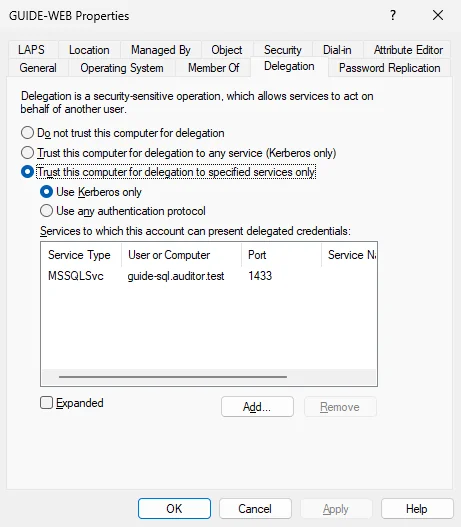
Replace unconstrained delegation with a short list of services
The Delegation tab appears in Active Directory Users and Computers only for user and computer accounts that have an SPN, and never for standalone or group managed service accounts. For a gMSA, Microsoft's Kerberos delegation page for group Managed Service Accounts maps each tab option to userAccountControl flags and msDS-AllowedToDelegateTo values.
To grant resource-based constrained delegation, run this against the back-end account. The example lets the web server WEB01 delegate to the SQL server SQL01; preview it first:
Set-ADComputer -Identity 'SQL01' -PrincipalsAllowedToDelegateToAccount (Get-ADComputer -Identity 'WEB01') -WhatIf
Microsoft's constrained delegation overview notes one trade-off: the Key Distribution Center (KDC) always allows protocol transition with RBCD. A back-end service that must know how the user authenticated can use the well-known SIDs S-1-18-1 (authentication authority asserted identity) and S-1-18-2 (service asserted identity) in its access control lists. Don't configure constrained delegation and RBCD on the same pair of servers: the KDC checks constrained delegation first, so it takes precedence.
When the replacement works, clear unconstrained delegation with the change script below. It finds each account by sAMAccountName or distinguished name, skips domain controllers, saves the current flags to a CSV file, and then calls Set-ADAccountControl. It changes configuration and supports -WhatIf and -Confirm. Run it as a member of Domain Admins on a management host with the ActiveDirectory module.
#Requires -Version 5.1
#Requires -Modules ActiveDirectory

<#
.SYNOPSIS
    Marks accounts as sensitive and cannot be delegated, or removes unconstrained delegation,
    after saving each account's current flags to a CSV file for rollback.

.DESCRIPTION
    Action MarkSensitive sets NOT_DELEGATED ("Account is sensitive and cannot be delegated")
    with Set-ADAccountControl -AccountNotDelegated $true.
    Action RemoveUnconstrained clears TRUSTED_FOR_DELEGATION with
    Set-ADAccountControl -TrustedForDelegation $false. It does not add constrained or
    resource-based constrained delegation: configure that first if the service needs it.
    Each account is found by sAMAccountName or distinguished name. Domain controllers are
    always skipped. Just before each change, the script appends the account's current flags to
    BackupPath. Run it with -WhatIf first; each change asks for confirmation unless you pass
    -Confirm:$false.

.PARAMETER Action
    MarkSensitive or RemoveUnconstrained.

.PARAMETER Identity
    sAMAccountName or distinguished name of each account, for example 'adm-alice' or
    'CN=APP01,OU=Servers,DC=corp,DC=example,DC=com'. Computer sAMAccountNames end with $.

.PARAMETER BackupPath
    CSV file that receives the flags each account had before the change, for example
    'C:\Reports\Delegation\before-change.csv'. Rows are appended, never overwritten.

.PARAMETER Server
    Optional writable domain controller, for example '<DomainController>'.

.EXAMPLE
    .\Set-DelegationHardening.ps1 -Action MarkSensitive -Identity 'adm-alice','adm-bob' -BackupPath 'C:\Reports\Delegation\before-change.csv' -WhatIf

.EXAMPLE
    .\Set-DelegationHardening.ps1 -Action RemoveUnconstrained -Identity 'APP01$' -BackupPath 'C:\Reports\Delegation\before-change.csv'

.NOTES
    Changes configuration. Writes userAccountControl flags with Set-ADAccountControl and
    appends the previous values to BackupPath. Under -WhatIf nothing is changed or written.
    Requires the ActiveDirectory module. Run it as a member of Domain Admins.
#>
[CmdletBinding(SupportsShouldProcess = $true, ConfirmImpact = 'High')]
param(
    [Parameter(Mandatory = $true)]
    [ValidateSet('MarkSensitive', 'RemoveUnconstrained')]
    [string]$Action,

    [Parameter(Mandatory = $true)]
    [ValidateNotNullOrEmpty()]
    [string[]]$Identity,

    [Parameter(Mandatory = $true)]
    [ValidateNotNullOrEmpty()]
    [string]$BackupPath,

    [string]$Server
)

Set-StrictMode -Version Latest
$ErrorActionPreference = 'Stop'

$adParams = @{}
if ($Server) { $adParams['Server'] = $Server }

$UF_SERVER_TRUST_ACCOUNT = 0x2000
$UF_TRUSTED_FOR_DELEGATION = 0x80000
$UF_NOT_DELEGATED = 0x100000
$UF_TRUSTED_TO_AUTH_FOR_DELEGATION = 0x1000000
$UF_PARTIAL_SECRETS_ACCOUNT = 0x4000000

$backupFolder = Split-Path -Path $BackupPath -Parent
if ($backupFolder -and -not (Test-Path -Path $backupFolder -PathType Container)) {
    throw "The folder for BackupPath does not exist: $backupFolder"
}

function Get-PropertyValue {
    param($InputObject, [string]$Name)
    $property = $InputObject.PSObject.Properties[$Name]
    if ($null -ne $property) { return $property.Value }
    return $null
}

function Test-Flag {
    param($Value, [int]$Flag)
    if ($null -eq $Value) { return $false }
    return (([int64]$Value -band $Flag) -ne 0)
}

function ConvertTo-LdapFilterValue {
    param([string]$Value)
    $builder = New-Object System.Text.StringBuilder
    foreach ($character in $Value.ToCharArray()) {
        switch ([int]$character) {
            0x5C { [void]$builder.Append('\5c') }
            0x2A { [void]$builder.Append('\2a') }
            0x28 { [void]$builder.Append('\28') }
            0x29 { [void]$builder.Append('\29') }
            0x2F { [void]$builder.Append('\2f') }
            0x00 { [void]$builder.Append('\00') }
            default { [void]$builder.Append($character) }
        }
    }
    return $builder.ToString()
}

$properties = @('sAMAccountName', 'userAccountControl', 'msDS-AllowedToDelegateTo')

foreach ($id in $Identity) {
    $found = @()
    if ($id -match '^(CN|OU)=') {
        try { $found = @(Get-ADObject @adParams -Identity $id -Properties $properties) }
        catch { $found = @() }
    }
    else {
        $filter = '(sAMAccountName={0})' -f (ConvertTo-LdapFilterValue -Value $id)
        $found = @(Get-ADObject @adParams -LDAPFilter $filter -Properties $properties)
    }

    if ($found.Count -ne 1) {
        $status = if ($found.Count -eq 0) { 'NotFound' } else { 'Ambiguous' }
        [pscustomobject]@{ Account = $id; Action = $Action; Status = $status; ConstrainedTargets = $null; DistinguishedName = $null }
        continue
    }

    $account = $found[0]
    $uac = Get-PropertyValue -InputObject $account -Name 'userAccountControl'
    $targets = @(Get-PropertyValue -InputObject $account -Name 'msDS-AllowedToDelegateTo' | Where-Object { $null -ne $_ })
    $isDc = (Test-Flag -Value $uac -Flag $UF_SERVER_TRUST_ACCOUNT) -or (Test-Flag -Value $uac -Flag $UF_PARTIAL_SECRETS_ACCOUNT)
    $notDelegated = Test-Flag -Value $uac -Flag $UF_NOT_DELEGATED
    $trustedForDelegation = Test-Flag -Value $uac -Flag $UF_TRUSTED_FOR_DELEGATION

    $status = $null
    if ($isDc) { $status = 'SkippedDomainController' }
    elseif ($Action -eq 'MarkSensitive' -and $notDelegated) { $status = 'AlreadySet' }
    elseif ($Action -eq 'RemoveUnconstrained' -and -not $trustedForDelegation) { $status = 'NotTrustedForDelegation' }

    if (-not $status) {
        if ($Action -eq 'MarkSensitive') { $operation = "Set 'Account is sensitive and cannot be delegated' (NOT_DELEGATED)" }
        else { $operation = 'Clear unconstrained delegation (TRUSTED_FOR_DELEGATION)' }

        if ($PSCmdlet.ShouldProcess($account.DistinguishedName, $operation)) {
            [pscustomobject]@{
                TimeUtc                    = [DateTime]::UtcNow.ToString('o')
                Action                     = $Action
                SamAccountName             = Get-PropertyValue -InputObject $account -Name 'sAMAccountName'
                DistinguishedName          = $account.DistinguishedName
                UserAccountControl         = $uac
                NotDelegated               = $notDelegated
                TrustedForDelegation       = $trustedForDelegation
                TrustedToAuthForDelegation = Test-Flag -Value $uac -Flag $UF_TRUSTED_TO_AUTH_FOR_DELEGATION
            } | Export-Csv -Path $BackupPath -Append -NoTypeInformation -Encoding UTF8 -Confirm:$false

            if ($Action -eq 'MarkSensitive') {
                Set-ADAccountControl @adParams -Identity $account.DistinguishedName -AccountNotDelegated $true -Confirm:$false
            }
            else {
                Set-ADAccountControl @adParams -Identity $account.DistinguishedName -TrustedForDelegation $false -Confirm:$false
            }
            $status = 'Applied'
        }
        else {
            $status = 'NotApplied'
        }
    }

    [pscustomobject]@{
        Account            = $id
        Action             = $Action
        Status             = $status
        ConstrainedTargets = $targets.Count
        DistinguishedName  = $account.DistinguishedName
    }
}
Preview the change for the two servers that the audit found:
.\Set-DelegationHardening.ps1 -Action RemoveUnconstrained -Identity 'APP01$','APP02$' -BackupPath 'C:\Reports\Delegation\before-change.csv' -WhatIf
What if: Performing the operation "Clear unconstrained delegation (TRUSTED_FOR_DELEGATION)" on target "CN=APP01,OU=Servers,DC=corp,DC=example,DC=com".
What if: Performing the operation "Clear unconstrained delegation (TRUSTED_FOR_DELEGATION)" on target "CN=APP02,OU=Servers,DC=corp,DC=example,DC=com".

Account Action              Status     ConstrainedTargets DistinguishedName
------- ------              ------     ------------------ -----------------
APP01$  RemoveUnconstrained NotApplied                  2 CN=APP01,OU=Servers,DC=corp,DC=example,DC=com
APP02$  RemoveUnconstrained NotApplied                  0 CN=APP02,OU=Servers,DC=corp,DC=example,DC=com

Preview every delegation change before you apply it
Run it again without -WhatIf. ConstrainedTargets : 0 means the server will have no delegation at all afterward, which is the right result only if nothing needs it. Each change writes event 4742 for computers or event 4738 for users, so expect your own change in the delegation change rules.
Step 3: Mark privileged accounts as sensitive and cannot be delegated
The "Account is sensitive and cannot be delegated" flag stops any service, trusted or not, from delegating the account. Microsoft Defender for Identity recommends it for Domain Admins, Enterprise Admins and service accounts with elevated privileges, and states that it doesn't affect the account's ability to sign in or its permissions.
Use the same script with the MarkSensitive action. Feed it the accounts that privileged-accounts.csv lists with Mark sensitive and cannot be delegated:
$accounts = Import-Csv -Path 'C:\Reports\Delegation\privileged-accounts.csv' |
    Where-Object { $_.Enabled -eq 'True' -and $_.AccountNotDelegated -eq 'False' } |
    Select-Object -ExpandProperty SamAccountName
.\Set-DelegationHardening.ps1 -Action MarkSensitive -Identity $accounts -BackupPath 'C:\Reports\Delegation\before-change.csv' -WhatIf
Check the list before you remove -WhatIf. Leave out any account that an application must still delegate, and fix that design instead. In the console, the same setting is the Account is sensitive and cannot be delegated check box under Account options on the Account tab. Monitor who clears it: the protection removed from a privileged account rules alert on that change.
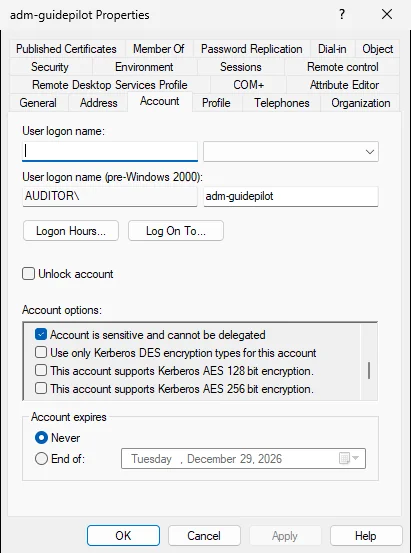
The sensitive flag on an administrator account
Step 4: Pilot the Protected Users group
Pilot with one administrator, watch the failure log until that account's daily work runs without refusals, and only then add others in small waves. Membership takes effect for device protections at the member's next sign-in, so plan each wave around a sign-out and sign-in.
Turn on the failure log on every domain controller. It's off by default, and the domain controller that refuses a request is the one that logs it:
wevtutil sl "Microsoft-Windows-Authentication/ProtectedUserFailures-DomainController" /e:trueTurn on
ProtectedUserSuccesses-DomainControllerthe same way if you also want event 303 for each TGT issued to a member. On the pilot admin's own device,Microsoft-Windows-Authentication/ProtectedUser-Clientrecords the client-side events 104 and 304.
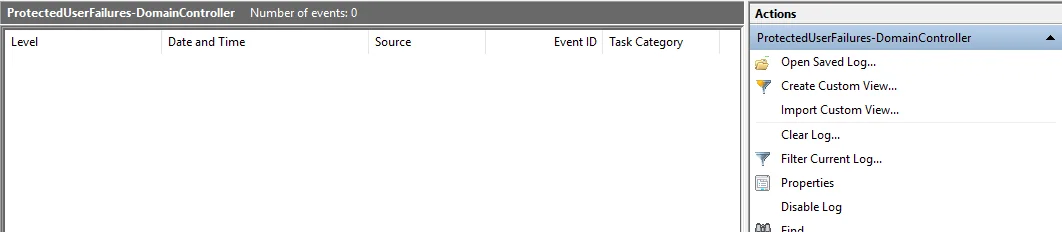
Turn on the Protected Users failure log on every domain controller
Make sure the pilot account has AES keys. If its
PasswordLastSetUtcin the audit predates your move to the Windows Server 2008 domain functional level, reset the password first.Add the pilot account. Preview the change, then run it without
-WhatIf:Add-ADGroupMember -Identity 'Protected Users' -Members 'adm-alice' -WhatIf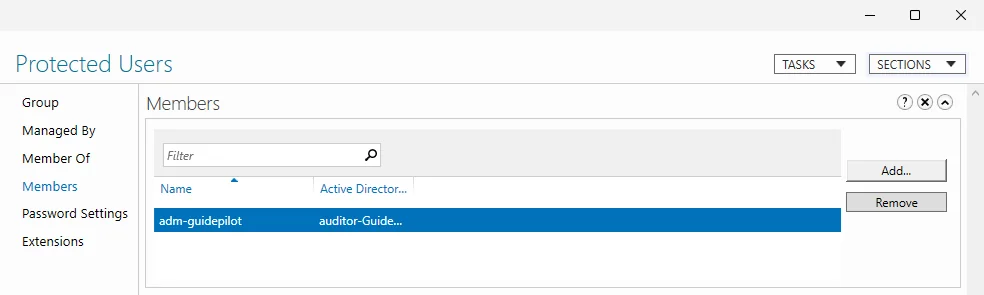
Start the pilot with a single administrator
Sign out and back in on the pilot admin's workstation. Use every daily tool: consoles, remote sessions, scripts and scheduled tasks that run as the account.
Review the failure log daily. Event 100 names the account and the device that tried NTLM; event 104 records a refused DES or RC4 pre-authentication. Fix the source, for example by connecting by name instead of IP address.
Add the next wave of named administrators. Keep the built-in Administrator and your break-glass account outside the group until all other administrators have worked in it without problems.
Microsoft's protected accounts guidance also changes how you troubleshoot. When delegation fails for an account, check its Protected Users membership as well as the "sensitive" check box, because a member is blocked even when the box is clear.
Step 5: Plan the next layer: authentication policies and silos
Authentication policies and authentication policy silos are the configurable companion to Protected Users. They restrict where an account can sign in and who can authenticate to the services that run as that account, and they apply to user, computer and managed service accounts alike. This guide covers them only as the next step.
What they add, according to Microsoft's authentication policies and silos overview:
- A non-renewable TGT lifetime that you choose, which can differ from the four hours of Protected Users.
- Access control conditions on the TGT request, such as Microsoft's example of a Forest Administrators silo whose members can sign in only from domain controllers and domain administrator consoles.
- Access control conditions on service tickets, which also cover services and computers that can't join Protected Users.
- An audit mode: a new silo only audits until you enforce it, and audit events such as event 305 show what enforcement would refuse.
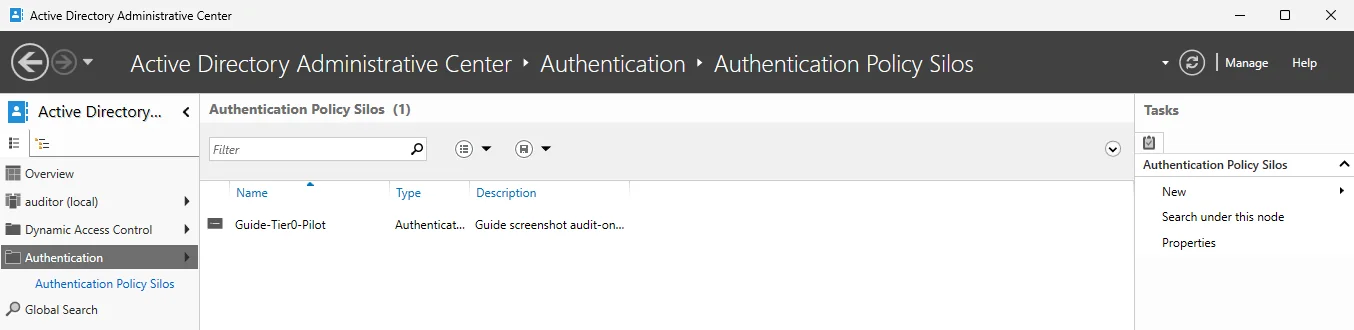
Authentication policy silos start in audit mode
They need the Windows Server 2012 R2 domain functional level. Device conditions also need Dynamic Access Control support: KDC support for claims, compound authentication and Kerberos armoring on domain controllers and Kerberos client support for claims, compound authentication and Kerberos armoring on devices. Remember that the built-in Administrator is exempt.
Verify
Verify on three levels: the directory, a member's own session and the domain controller logs. Run the audit script again first and compare its summary with the first run.
| Check | Command or source | Expected result |
|---|---|---|
| Unconstrained delegation | Audit script, UnconstrainedNonDc |
0 |
| Privileged accounts marked sensitive | Audit script, PrivilegedNotSensitive |
0, or only accounts you documented |
| No computer or service account in the group | Audit script, MembersToRemove |
0 |
| One account's settings | Get-ADUser -Identity 'adm-alice' -Properties AccountNotDelegated, MemberOf |
AccountNotDelegated : True and the Protected Users DN in MemberOf |
| Four-hour TGT | klist in the member's new session |
The krbtgt ticket's End Time and Renew Time are both four hours after its Start Time |
| DC refusals | ProtectedUserFailures-DomainController log |
No new events 100 or 104 after the dependencies are fixed |
Get-ADUser -Identity 'adm-alice' -Properties AccountNotDelegated, MemberOf |
    Select-Object SamAccountName, AccountNotDelegated, @{ Name = 'InProtectedUsers'; Expression = { [bool]($_.MemberOf -match '^CN=Protected Users,') } }
SamAccountName AccountNotDelegated InProtectedUsers
-------------- ------------------- ----------------
adm-alice                     True             True
To read the failure log on a domain controller without changing anything (an error that no events match means there were no refusals in that period):
Get-WinEvent -FilterHashtable @{ LogName = 'Microsoft-Windows-Authentication/ProtectedUserFailures-DomainController'; Id = 100, 104; StartTime = (Get-Date).AddDays(-1) } |
    Select-Object TimeCreated, Id, Message
Roll back
Every change in this guide can be reversed, but test the reversal before you need it. An account removed from Protected Users should sign out and back in, and restoring delegation needs the same user right that granted it.
| Change | How to roll back | Notes |
|---|---|---|
| Protected Users membership | Remove-ADGroupMember -Identity 'Protected Users' -Members 'adm-alice' (add -WhatIf first) |
The user signs out and back in to get a normal TGT and cached logon again |
| "Sensitive and cannot be delegated" | Restore from the backup CSV (below), or Set-ADAccountControl -Identity 'adm-alice' -AccountNotDelegated $false |
Writes 4738 with 'Not Delegated' - Disabled, which the safeguard removal rule flags |
| Unconstrained delegation removed | Restore from the backup CSV, or Set-ADAccountControl -Identity 'APP01$' -TrustedForDelegation $true |
Needs SeEnableDelegationPrivilege; prefer fixing the constrained delegation instead |
| RBCD added | Set-ADComputer -Identity 'SQL01' -PrincipalsAllowedToDelegateToAccount $null |
Clears the whole list, not one entry |
| Event log enabled | wevtutil sl "Microsoft-Windows-Authentication/ProtectedUserFailures-DomainController" /e:false |
You lose visibility; keep it on |
The backup file holds each account's flags from just before the change. Restore them newest first, so that an account changed twice ends in its original state:
$rows = @(Import-Csv -Path 'C:\Reports\Delegation\before-change.csv')
[array]::Reverse($rows)
foreach ($row in $rows) {
    Set-ADAccountControl -Identity $row.DistinguishedName `
        -AccountNotDelegated ([bool]::Parse($row.NotDelegated)) `
        -TrustedForDelegation ([bool]::Parse($row.TrustedForDelegation)) -WhatIf
}
Remove -WhatIf once the preview matches what you expect. Restoring unconstrained delegation brings the original risk back, so treat it as a temporary step while you fix the replacement.
Monitor and detect
Watch three things: refusals in the Protected Users log, changes to delegation settings, and changes to Protected Users membership. Most of these events need an audit subcategory on domain controllers; the Active Directory audit policy guide shows how to turn them on.
| Source | Event | What it tells you | Related page |
|---|---|---|---|
ProtectedUserFailures-DomainController |
100 | A member tried NTLM and the DC refused it | Protected account used outside its restrictions |
ProtectedUserFailures-DomainController |
104 | A member's Kerberos pre-authentication used DES or RC4 and failed | Same |
ProtectedUserSuccesses-DomainController |
303 | A TGT was issued to a member | No page; useful as a baseline |
| Security (DCs) | 4738, 4742 | Delegation flags or the service list changed on a user or computer | Trusted For Delegation enabled rules and the safeguard removal rules from Step 3 |
| Security (DCs) | 4728, 4729 | A member was added to or removed from a global group such as Protected Users | Privileged group membership change rules |
| Security (DCs) | 5136 | msDS-AllowedToActOnBehalfOfOtherIdentity was written (needs Audit Directory Service Changes and an auditing entry) |
RBCD rules |
| Security (DCs) | 4704 | A user right was assigned, for example SeEnableDelegationPrivilege | Delegation user right assigned |
In events 4738 and 4742, the UserAccountControl field holds one message code per changed flag, and the event text shows each code as a line such as 'Trusted For Delegation' - Enabled. Microsoft's event pages list those lines but not the codes behind them; the codes are entries in the Windows message file (msobjs.dll). %%2093 is 'Trusted For Delegation' - Enabled, %%2062 is 'Not Delegated' - Disabled and %%2098 is 'Trusted To Authenticate For Delegation' - Enabled, and the second query matches on them. The AllowedToDelegateTo field shows the new constrained delegation list whenever it changes.
The first query lists Protected Users refusals per domain controller. It needs a data collection rule that collects the log into the Event table, for example with the XPath Microsoft-Windows-Authentication/ProtectedUserFailures-DomainController!*.
// Protected Users refusals on domain controllers: event 100 (NTLM) and 104 (DES or RC4 pre-authentication).
// Needs the ProtectedUserFailures-DomainController log enabled on every DC and a data collection
// rule that collects it into the Event table.
Event
| where TimeGenerated > ago(7d)
| where EventLog == "Microsoft-Windows-Authentication/ProtectedUserFailures-DomainController"
| where EventID in (100, 104)
| summarize Events = count(), FirstSeen = min(TimeGenerated), LastSeen = max(TimeGenerated),
    Sample = take_any(RenderedDescription) by DomainController = Computer, EventID
| order by LastSeen desc
The second query catches delegation changes in the SecurityEvent table, including the reversal of the sensitive flag.
// Delegation settings changed on user (4738) and computer (4742) accounts.
// Needs Audit User Account Management and Audit Computer Account Management (Success) on DCs.
SecurityEvent
| where TimeGenerated > ago(7d)
| where EventID in (4738, 4742)
| where UserAccountControl contains "%%2093"
    or UserAccountControl contains "%%2062"
    or UserAccountControl contains "%%2098"
    or (isnotempty(AllowedToDelegateTo) and AllowedToDelegateTo != "-")
| extend Change = case(
    UserAccountControl contains "%%2093", "Trusted For Delegation enabled (unconstrained)",
    UserAccountControl contains "%%2062", "Not Delegated cleared (sensitive flag removed)",
    UserAccountControl contains "%%2098", "Trusted To Authenticate For Delegation enabled",
    "Constrained delegation service list changed")
| project TimeGenerated, DomainController = Computer, EventID, Change, TargetAccount,
    SubjectAccount, AllowedToDelegateTo, UserAccountControl
| order by TimeGenerated desc
The third query tracks membership changes of Protected Users itself. It matches the group by its RID, so a renamed group is still caught.
// Members added to (4728) or removed from (4729) Protected Users, matched on its well-known RID 525.
// Needs Audit Security Group Management (Success) on DCs.
SecurityEvent
| where TimeGenerated > ago(30d)
| where EventID in (4728, 4729)
| where TargetSid endswith "-525"
| extend Change = iff(EventID == 4728, "Added", "Removed")
| project TimeGenerated, DomainController = Computer, Change, MemberName, MemberSid, SubjectAccount
| order by TimeGenerated desc
A refusal right after you add a member usually points to a leftover dependency. A refusal weeks later, from a device the admin doesn't use, can mean someone is trying a stolen hash with pass-the-hash or an RC4 downgrade.
Troubleshooting
Most problems show up as a refusal event on a domain controller or as a delegation failure in an application.
| Symptom | Cause | Fix |
|---|---|---|
| Event 100 for a member, from a known server | The application or script uses NTLM, for example because it connects by IP address | Connect by DNS name so Kerberos is used, or move the task to another account |
| Event 104 for a member | The client asked for DES or RC4, or the account has no AES keys | Reset the account's password on a current domain controller; check the client's allowed encryption types |
| A member can't sign in at all after joining | The account has no AES keys, or the tool it uses supports only NTLM | Remove it from the group with another admin account, reset the password, and retry |
| "The user name or password is incorrect" for a service or computer | A service or computer account was added to Protected Users | Remove it; use an authentication policy for that account instead |
| An admin's laptop can't sign in away from the office | Protected Users members have no cached logon verifier | Expected; the device must reach a domain controller to sign in |
| An application fails after Step 2 | It relied on unconstrained delegation | Configure constrained delegation to the exact back-end SPN, or RBCD on the back-end account |
| RBCD still fails after you set it | The KDC caches the earlier denial for 15 minutes | Wait, or purge the front end's tickets with klist purge -li 0x3e7 |
| Delegation fails for one admin only | The account is in Protected Users or marked sensitive | Expected for admins; don't use privileged accounts through delegating applications |
DcSideProtections : False in the audit |
Domain functional level below Windows Server 2012 R2 | Upgrade the remaining old domain controllers and raise the level |
How Forestall helps
Forestall models delegation as attack path edges: ALLOWED_TO_DELEGATE for constrained delegation targets, and AllowedToAct for resource-based constrained delegation, with AddAllowedToAct and WriteAccountRestrictions for the accounts that can write it. In Search & Reports, the User entity exposes IsProtected, IsSensitive, HasUnconstrainedDelegation, HasConstrainedDelegation, HasResourceBasedConstrainedDelegation and HasProtocolTransition, so the Step 1 audit becomes a repeatable query, and Tier0 Analysis shows the direct or indirect relationships between these objects and Tier 0. Forestall Attack Path Management prioritizes remediation by the number of paths each fix eliminates, so you can start with the delegation settings that remove the most paths.
Frequently Asked Questions
What is the Protected Users group in Active Directory?
Protected Users is a built-in global security group, with the well-known RID 525, that Microsoft designed against credential theft. Its members' devices stop caching plaintext credentials, NT hashes and long-term Kerberos keys, and keep no cached logon. At the Windows Server 2012 R2 domain functional level or higher, domain controllers also refuse NTLM, DES and RC4 pre-authentication and delegation for members, and limit their TGTs to four hours.
How do I add users to the Protected Users security group?
To add a user to the Protected Users group, use Active Directory Users and Computers, Active Directory Administrative Center, or PowerShell with Add-ADGroupMember -Identity 'Protected Users' -Members '<account>'. Add one pilot administrator first, turn on the ProtectedUserFailures-DomainController log on every domain controller, and watch for events 100 and 104. The member's device protections start at the next sign-in, so the account should sign out and back in.
How do I remove a user from the Protected Users group?
To remove a user from the Protected Users group, run Remove-ADGroupMember -Identity 'Protected Users' -Members '<account>', or remove the account on the group's Members tab. The account must then sign out and back in to get a normal TGT lifetime and cached logon again. If the member is locked out because it lacks AES keys, use another administrator account to remove it, reset its password, and only then add it back.
What does "Account is sensitive and cannot be delegated" do?
The "Account is sensitive and cannot be delegated" check box sets the NOT_DELEGATED flag (0x100000) in userAccountControl. With it set, the account's security context isn't delegated to any service, even one trusted for unconstrained delegation. Microsoft Defender for Identity says it doesn't change the account's ability to sign in or its permissions. Set it on every administrative account and on privileged service accounts that no service needs to delegate.
Should service accounts and gMSAs be in Protected Users?
No, service accounts and gMSAs don't belong in the Protected Users group. Microsoft says computer and service accounts must not be members: their password or certificate is always available on the host, so membership adds no local protection, and their authentication fails. CISA adds that putting managed service accounts in the group breaks Kerberos constrained delegation. Protect them with the sensitive flag, gMSA passwords and authentication policies instead.
Is unconstrained delegation on domain controllers a problem?
Domain controllers are trusted for unconstrained delegation by default: their default userAccountControl value is 0x82000, which includes TRUSTED_FOR_DELEGATION. Don't remove it. Microsoft's Defender for Identity assessment for unsecure Kerberos delegation looks only at entities that aren't domain controllers. Focus on member servers and service accounts that have the flag, and protect the domain controllers themselves as Tier 0.
Related guides
- Active Directory hardening, every step in order: where Protected Users and delegation fit in the full roadmap.
- Enable LSA Protection and Credential Guard: device-side credential protection that complements Protected Users.
- Reset the krbtgt password safely: the recovery step if a delegated ticket was used to compromise the domain.
- Set ms-DS-MachineAccountQuota to 0: stop ordinary users from creating computer accounts in the domain.
- How to secure the Kerberos authentication protocol: the wider Kerberos settings behind these controls.
References
- Protected Users security group (Microsoft Learn)
- Guidance about how to configure protected accounts (Microsoft Learn)
- Authentication policies and authentication policy silos (Microsoft Learn)
- Use the UserAccountControl flags to manipulate user account properties (Microsoft Learn)
- Kerberos constrained delegation overview (Microsoft Learn)
- Configuring Kerberos delegation for group Managed Service Accounts (Microsoft Learn)
- Account security posture assessments, Microsoft Defender for Identity (Microsoft Learn)
- Appendix D: Securing built-in Administrator accounts in Active Directory (Microsoft Learn)
- Active Directory Domain Services functional levels (Microsoft Learn)
- Enable Active Directory Protected Users security group, CM0018 (CISA)
- Steal or Forge Kerberos Tickets, T1558 (MITRE ATT&CK)
- Forced Authentication, T1187 (MITRE ATT&CK)
See your identity exposure clearly.
Start with a 1-day Proof of Value in your own environment.