Enforce LDAP Signing and Channel Binding: A Step-by-Step Guide
Summary
LDAP signing protects SASL sessions on port 389 from tampering. LDAP channel binding ties authentication to the TLS session of an LDAPS connection, so an enforcing domain controller rejects a relayed NTLM bind. To enforce both, find unsigned and unbound clients in domain controller event logs, fix them, then require signing and channel binding through Group Policy.
Quick steps
- Run the read-only audit script to read each domain controller's LDAP settings and bind events.
- Set the
16 LDAP Interface Eventsdiagnostic level to 2 so domain controllers log each unsigned client. - Fix each client: request signing, move clear-text simple binds to LDAPS, and update software that can't send a channel binding token.
- Set Domain controller: LDAP server signing requirements to Require signing in the Default Domain Controllers Policy.
- Set Domain controller: LDAP server channel binding token requirements to When supported, then to Always after a clean audit window.
- Confirm the registry values, test with ldp.exe in a lab, and set the diagnostic level back to 0.
- Keep collecting the Directory Service log to catch new unsigned or unbound clients.
Applies to: Active Directory domain controllers that run Windows Server 2016, 2019, 2022 or 2025 with current updates, and the LDAP clients that bind to them (as of November 2026).
What are LDAP signing and LDAP channel binding?
LDAP signing is a protection that signs each message of an LDAP session that uses Simple Authentication and Security Layer (SASL) authentication without TLS, so the receiver can detect any change in transit. It provides integrity and authenticity, not confidentiality, and it doesn't protect simple binds. When the session already runs over TLS, TLS provides the integrity and signing doesn't apply separately.
LDAP channel binding is the LDAP implementation of Extended Protection for Authentication (EPA). On an LDAPS session (port 636) or a STARTTLS session, the client and the domain controller each derive a channel binding token (CBT) from the TLS session. The client sends its token inside the SASL bind, and the domain controller compares it with its own. A missing or different token means the authentication came from another TLS session, and an enforcing domain controller rejects it.
Why do LDAP signing and channel binding matter?
Both controls exist because of credential relay. NTLM doesn't tie authentication to a connection, so an attacker in the middle can forward a victim's NTLM exchange to a domain controller and receive an LDAP session as the victim. This is NTLM relay, a form of Adversary-in-the-Middle (MITRE ATT&CK T1557). Attackers can start it with authentication coercion or with name resolution poisoning, which the LLMNR and NBT-NS guide shows how to turn off.
A relayed LDAP session is valuable because the directory accepts writes. With the victim's rights, an attacker can create a computer account, write msDS-AllowedToActOnBehalfOfOtherIdentity to set up resource-based constrained delegation, or write msDS-KeyCredentialLink to add shadow credentials. The first lets the attacker impersonate users on that computer, and the second lets them sign in as the account without its password. The rules for computer accounts created by users and the MachineAccountQuota guide cover the computer account step.
What do signing, LDAPS and channel binding protect?
Each control covers a different session type, and none of them covers every case. Microsoft's LDAP channel binding overview breaks the protection down by session:
| Session | Integrity and confidentiality | Credential relay protection |
|---|---|---|
| Port 389, simple bind | None; the password crosses the network in clear text | None |
| Port 389, SASL bind with signing | Signing gives integrity; traffic stays readable | With NTLM, signing alone doesn't prevent relay |
| Port 389, SASL bind with sealing | Integrity and confidentiality for the session | With NTLM, not prevented; Kerberos mutual authentication helps |
| LDAPS or STARTTLS, simple bind | TLS | None; a simple bind carries no CBT |
| LDAPS or STARTTLS, SASL bind without CBT | TLS | Open to NTLM relay |
| LDAPS or STARTTLS, SASL bind with CBT | TLS | Relay rejected, because the token ties the bind to the TLS session |
The strongest combination is a Kerberos SASL bind over TLS with channel binding enforced. Certificate binds over TLS exchange no CBT; Microsoft states that client certificate authentication is enough to block relay. An older article written for ADV190023 calls signed or sealed SASL sessions safe from man-in-the-middle attacks, while the current overview says signing with NTLM doesn't prevent relay. This guide follows the current page: require signing for integrity, enforce channel binding for LDAPS, and reduce NTLM where Kerberos works.
How did Microsoft's guidance change, from ADV190023 to Windows Server 2025?
The updates listed in KB4520412 added controls and audit events but didn't change the defaults; new defaults came with Windows Server 2025. Microsoft security advisory ADV190023, "Microsoft Guidance for Enabling LDAP Channel Binding and LDAP Signing", asks administrators to harden both settings. KB4520412 explains why: the default configuration lets clients bind without signing or channel binding, which opens domain controllers to an elevation of privilege vulnerability.
| Date | Change | Applies to |
|---|---|---|
| March 10, 2020 | Added the Domain controller: LDAP server channel binding token requirements policy and events 3039 (failed validation), 3040 (daily count) and 3041 (reminder). Defaults unchanged. | Supported Windows versions; KB4520412 lists Windows Server 2008 SP2 (ESU) through Windows Server 2022 |
| August 8, 2023 | Added channel binding audit events 3074 (would fail) and 3075 (no token sent), disabled by default | Windows Server 2022 |
| October 10, 2023 | Added events 3074 and 3075, disabled by default | Windows Server 2019 |
| November 14, 2023 | Events 3074 and 3075 available without a manual enablement step | Windows Server 2022 |
| January 9, 2024 | Events 3074 and 3075 available without a manual enablement step | Windows Server 2019 |
| Windows Server 2025 | New Active Directory deployments require LDAP signing and default channel binding to When supported, with auditing | Windows Server 2025 |
What are the LDAP signing and channel binding defaults?
Defaults depend on the domain controller's version and on whether the forest is new. As of November 2026, Microsoft's LDAP signing overview and channel binding overview document these values:
| Domain controllers | LDAP signing | LDAP channel binding |
|---|---|---|
| Windows Server 2022 and earlier | Optional; the domain controller accepts signed and unsigned binds | Never: no token validation |
| Windows Server 2025, new Active Directory deployment | Required; Domain controller: LDAP server signing requirements enforcement is enabled | When supported, with audit events for clients that connect without a CBT |
| Upgraded to Windows Server 2025 | Existing policies are kept; with no server signing policy, signing is required | Microsoft documents a default only for new deployments; Step 1 shows the value each domain controller has |
On the client side, Windows Server 2025 and Windows 11 version 24H2 or later encrypt LDAP connections by default, and Windows Server 2025 requests signing on connections that aren't encrypted. Earlier Windows versions request signing by default but can fall back to unsigned connections. Every client that isn't Windows needs its own check.
Before you start
Plan for breakage before you enforce anything. Once a domain controller requires signing, clients that rely on SASL binds without signing or on simple binds without TLS stop working. Once it requires channel binding, LDAPS clients that send SASL binds without a CBT fail, and so do connections that a load balancer or proxy terminates and opens again toward the domain controller.
Test in a lab first. A lab with one domain controller per Windows Server version you run shows which defaults apply and how your applications react.
Check these points:
- Permissions: rights to edit the Default Domain Controllers Policy or another GPO linked to the Domain Controllers OU, and local administrator rights on the domain controllers for the registry and event logs. Members of Domain Admins have both.
- Remoting: the scripts below use PowerShell remoting (WinRM) to reach each domain controller.
- Diagnostic logging cost: level 2 of the
16 LDAP Interface Eventsdiagnostic setting writes one event per unsigned bind. Microsoft advises turning it off after the investigation and doesn't recommend levels 3 or higher. Check the size of the Directory Service log before you raise it. - LDAPS certificates: clients that move from clear-text simple binds to LDAPS need a valid certificate on every domain controller they use.
- Change window: the security policy changes take effect at the next Group Policy refresh without a restart. Agree on an audit window long enough to include monthly and quarterly jobs.
- Rollback: record the current values from Step 1, so you can set them back explicitly.
Step 1: Audit the current state
Start with a read-only inventory of every domain controller: its operating system, the two LDAP policy values in the registry, the diagnostic level and the LDAP bind events of the last day. The script doesn't change anything. It reads three registry values and the Directory Service event log over PowerShell remoting and writes two CSV files.
Run it on a management server with the ActiveDirectory module (RSAT), as an account that can read the Directory Service log and the NTDS registry keys on the domain controllers. It reads the client details from the English message text of the events, so the domain controllers must use English (en-US) messages.
<#
.SYNOPSIS
    Read-only audit of LDAP signing and LDAP channel binding on domain controllers.

.DESCRIPTION
    For each domain controller, the script uses PowerShell remoting to read:
      - LDAPServerIntegrity and LdapEnforceChannelBinding under
        HKLM\SYSTEM\CurrentControlSet\Services\NTDS\Parameters
      - "16 LDAP Interface Events" under HKLM\SYSTEM\CurrentControlSet\Services\NTDS\Diagnostics
      - Directory Service events 2886, 2887, 2888, 2889, 3039, 3040, 3041, 3074 and 3075
        written in the last Hours hours
    It reads the client address, identity and bind details from the message text of events
    2889, 3039, 3074 and 3075, and groups them by client. It adds up the bind counts that
    the daily summary event 2887 reports.

    Results go to two CSV files in OutputFolder. One summary object per domain controller
    is returned.

.PARAMETER OutputFolder
    Existing folder for the CSV reports, for example 'C:\Reports\LDAP'.

.PARAMETER DomainController
    Optional host names of the domain controllers to check, for example 'DC01.corp.example.com'.
    By default, every domain controller that Get-ADDomainController -Filter * returns for the
    current domain.

.PARAMETER Hours
    How many hours of events to read, from 1 to 720. The default is 24, which covers one
    daily summary event.

.PARAMETER MaxEvents
    Upper limit of events read from each domain controller, from 1 to 1000000. The default
    is 100000. Event 2889 is written once per bind, so busy domain controllers can reach it.

.EXAMPLE
    .\Get-LdapBindAudit.ps1 -OutputFolder 'C:\Reports\LDAP'

.EXAMPLE
    .\Get-LdapBindAudit.ps1 -OutputFolder 'C:\Reports\LDAP' -DomainController 'DC01.corp.example.com' -Hours 72

.NOTES
    Read-only. Makes no change to any domain controller, its registry or its event logs.
    Writes only ldap-dc-settings.csv and ldap-bind-clients.csv to OutputFolder.
    Needs the ActiveDirectory module (RSAT), PowerShell remoting (WinRM) to each domain
    controller, and an account that can read the Directory Service log and the NTDS
    registry keys there, for example a member of Domain Admins.
    The message parsing expects English (en-US) event messages on the domain controllers.
#>

#Requires -Version 5.1
#Requires -Modules ActiveDirectory
[CmdletBinding()]
param(
    [Parameter(Mandatory = $true)]
    [ValidateScript({ Test-Path -Path $_ -PathType Container })]
    [string]$OutputFolder,

    [string[]]$DomainController,

    [ValidateRange(1, 720)]
    [int]$Hours = 24,

    [ValidateRange(1, 1000000)]
    [int]$MaxEvents = 100000
)

Set-StrictMode -Version Latest
$ErrorActionPreference = 'Stop'

if (-not $DomainController) {
    $DomainController = @(Get-ADDomainController -Filter * | Select-Object -ExpandProperty HostName)
}

# Runs on each domain controller. Reads only.
$collect = {
    param([int]$Hours, [int]$MaxEvents)
    Set-StrictMode -Version Latest
    $ErrorActionPreference = 'Stop'

    function Get-RegistryDword {
        param([string]$Path, [string]$Name)
        $item = Get-ItemProperty -Path $Path -ErrorAction SilentlyContinue
        if ($null -ne $item -and $null -ne $item.PSObject.Properties[$Name]) { return [int]$item.$Name }
        return $null
    }

    $filter = @{
        LogName   = 'Directory Service'
        Id        = 2886, 2887, 2888, 2889, 3039, 3040, 3041, 3074, 3075
        StartTime = (Get-Date).AddHours(-$Hours)
    }
    try {
        $events = @(Get-WinEvent -FilterHashtable $filter -MaxEvents $MaxEvents)
    }
    catch {
        if ($_.FullyQualifiedErrorId -like 'NoMatchingEventsFound*') { $events = @() }
        else { throw }
    }

    $parameters = 'HKLM:\SYSTEM\CurrentControlSet\Services\NTDS\Parameters'
    $diagnostics = 'HKLM:\SYSTEM\CurrentControlSet\Services\NTDS\Diagnostics'

    [pscustomobject]@{
        OperatingSystem           = (Get-CimInstance -ClassName Win32_OperatingSystem).Caption
        LDAPServerIntegrity       = Get-RegistryDword -Path $parameters -Name 'LDAPServerIntegrity'
        LdapEnforceChannelBinding = Get-RegistryDword -Path $parameters -Name 'LdapEnforceChannelBinding'
        LdapInterfaceLogging      = Get-RegistryDword -Path $diagnostics -Name '16 LDAP Interface Events'
        Events                    = @($events | ForEach-Object {
            [pscustomobject]@{ Id = $_.Id; TimeCreated = $_.TimeCreated; Message = $_.Message }
        })
    }
}

function Get-MessageValue {
    param([string]$Message, [string]$Label, [string]$ValuePattern = '[^\r\n]+')
    if (-not $Message) { return $null }
    $match = [regex]::Match($Message, [regex]::Escape($Label) + '\s*(' + $ValuePattern + ')')
    if ($match.Success) { return $match.Groups[1].Value.Trim() }
    return $null
}

function Get-ClientAddress {
    param([string]$Endpoint)
    if (-not $Endpoint) { return $null }
    $match = [regex]::Match($Endpoint, '^\[?(.+?)\]?:\d+$')
    if ($match.Success) { return $match.Groups[1].Value }
    return $Endpoint
}

function Get-CountSum {
    param([object[]]$Events, [string]$Label)
    $sum = 0
    foreach ($item in $Events) {
        $text = Get-MessageValue -Message $item.Message -Label $Label -ValuePattern '\d+'
        $number = 0
        if ($text -and [int]::TryParse($text, [ref]$number)) { $sum += $number }
    }
    return $sum
}

function Format-Setting {
    param($Value)
    if ($null -eq $Value) { return 'NotSet' }
    return $Value
}

$eventIds = 2886, 2887, 2888, 2889, 3039, 3040, 3041, 3074, 3075
$settingRows = New-Object System.Collections.Generic.List[object]
$bindRows = New-Object System.Collections.Generic.List[object]

foreach ($dc in $DomainController) {
    $result = Invoke-Command -ComputerName $dc -ScriptBlock $collect -ArgumentList $Hours, $MaxEvents
    $events = @($result.Events)

    foreach ($item in @($events | Where-Object { 2889, 3039, 3074, 3075 -contains $_.Id })) {
        $endpoint = Get-MessageValue -Message $item.Message -Label 'Client IP address:' -ValuePattern '\S+'
        $bindRows.Add([pscustomobject]@{
            DomainController       = $dc
            EventId                = $item.Id
            TimeCreated            = $item.TimeCreated
            ClientAddress          = Get-ClientAddress -Endpoint $endpoint
            Identity               = Get-MessageValue -Message $item.Message -Label 'Identity the client attempted to authenticate as:'
            BindingType            = Get-MessageValue -Message $item.Message -Label 'Binding Type:' -ValuePattern '\d'
            SupportsChannelBinding = Get-MessageValue -Message $item.Message -Label 'Client supports channel binding:' -ValuePattern '\S+'
            AuditResultFlags       = Get-MessageValue -Message $item.Message -Label 'Audit result flags:' -ValuePattern '\S+'
        })
    }

    $summaryEvents = @($events | Where-Object { $_.Id -eq 2887 })
    $row = [ordered]@{
        DomainController          = $dc
        OperatingSystem           = $result.OperatingSystem
        LDAPServerIntegrity       = Format-Setting -Value $result.LDAPServerIntegrity
        LdapEnforceChannelBinding = Format-Setting -Value $result.LdapEnforceChannelBinding
        LdapInterfaceLogging      = Format-Setting -Value $result.LdapInterfaceLogging
        UnsignedSimpleBinds       = Get-CountSum -Events $summaryEvents -Label 'Number of simple binds performed without SSL/TLS:'
        UnsignedSaslBinds         = Get-CountSum -Events $summaryEvents -Label 'Number of Negotiate/Kerberos/NTLM/Digest binds performed without signing:'
    }
    foreach ($id in $eventIds) {
        $row["Event$id"] = @($events | Where-Object { $_.Id -eq $id }).Count
    }
    $row['UniqueClients'] = @($bindRows | Where-Object { $_.DomainController -eq $dc } |
        Select-Object -ExpandProperty ClientAddress -Unique).Count
    $row['HoursChecked'] = $Hours
    $settingRows.Add([pscustomobject]$row)
}

$clientRows = @($bindRows |
    Group-Object -Property DomainController, EventId, ClientAddress, Identity, BindingType, SupportsChannelBinding, AuditResultFlags |
    ForEach-Object {
        $times = @($_.Group | Sort-Object -Property TimeCreated)
        $first = $times[0]
        [pscustomobject]@{
            DomainController       = $first.DomainController
            EventId                = $first.EventId
            ClientAddress          = $first.ClientAddress
            Identity               = $first.Identity
            BindingType            = $first.BindingType
            SupportsChannelBinding = $first.SupportsChannelBinding
            AuditResultFlags       = $first.AuditResultFlags
            Binds                  = $times.Count
            FirstSeen              = $first.TimeCreated
            LastSeen               = $times[$times.Count - 1].TimeCreated
        }
    } | Sort-Object -Property Binds -Descending)

$settingRows | Export-Csv -Path (Join-Path -Path $OutputFolder -ChildPath 'ldap-dc-settings.csv') -NoTypeInformation -Encoding UTF8
$clientRows | Export-Csv -Path (Join-Path -Path $OutputFolder -ChildPath 'ldap-bind-clients.csv') -NoTypeInformation -Encoding UTF8

$settingRows
Run it for all domain controllers of the current domain:
.\Get-LdapBindAudit.ps1 -OutputFolder 'C:\Reports\LDAP'
Example output for one domain controller (the values are illustrative):
DomainController          : DC01.corp.example.com
OperatingSystem           : Microsoft Windows Server 2022 Datacenter
LDAPServerIntegrity       : 1
LdapEnforceChannelBinding : NotSet
LdapInterfaceLogging      : 0
UnsignedSimpleBinds       : 14
UnsignedSaslBinds         : 233
Event2886                 : 1
Event2887                 : 1
Event2888                 : 0
Event2889                 : 0
Event3039                 : 0
Event3040                 : 1
Event3041                 : 1
Event3074                 : 0
Event3075                 : 0
UniqueClients             : 0
HoursChecked              : 24
How to read the results:
- LDAPServerIntegrity:
1means None and2means Require signing.NotSeton Windows Server 2022 or earlier means the effective value is None. On Windows Server 2025, the separate enforcement policy can require signing even when this value is1, so check that policy in the GPO. - LdapEnforceChannelBinding:
0is Never,1is When supported and2is Always.NotSeton Windows Server 2022 or earlier means Never. - Event2886 and Event2887: the domain controller doesn't reject unsigned binds. Event 2887 is a daily summary, and
UnsignedSimpleBindsandUnsignedSaslBindsadd up its two counts. - Event2888: the domain controller requires signing and rejected unsigned binds. Event 2888 tracks how many still try.
- Event3040 and Event3041: the channel binding policy is Never. Event 3040 is the daily count of LDAPS binds without channel binding protection, and event 3041 is the reminder to enforce it.
- UniqueClients: stays 0 until Step 2 turns on per-client logging. The per-client events then fill
ldap-bind-clients.csv.
Step 2: Turn on per-client LDAP logging
The daily summaries tell you how many clients bind without signing; the diagnostic level tells you which ones. At level 2 of the 16 LDAP Interface Events value under HKLM\SYSTEM\CurrentControlSet\Services\NTDS\Diagnostics, a domain controller writes event 2889 for each such bind. The event records the client's IP address, the identity it used and the binding type (0 for a SASL bind without signing, 1 for a simple bind without TLS).
The same level turns on the per-client channel binding events 3039, 3074 and 3075. They appear only while the channel binding policy is When supported or Always, which Step 5 sets. On Windows Server 2022 and Windows Server 2019, events 3074 and 3075 also need the updates listed above; KB4520412 lists no 3074 or 3075 updates for Windows Server 2016.
The script below changes one registry value on each domain controller you name, and it supports -WhatIf and -Confirm. Run it from a management server as a member of Domain Admins or another account with local administrator rights on the domain controllers.
<#
.SYNOPSIS
    Sets the "16 LDAP Interface Events" diagnostic level on one or more domain controllers.

.DESCRIPTION
    At level 2, a domain controller logs event 2889 for each SASL bind that doesn't request
    signing and each simple bind over a clear-text connection, and events 3039, 3074 and 3075
    for LDAPS binds without a valid channel binding token. The last three appear only while
    the channel binding policy is When supported or Always. Level 0 is the default and turns
    the per-client events off again.

    For each domain controller, the script reads the current value, then writes the new one
    through PowerShell remoting. Run it with -WhatIf first. To roll back, run it with -Level 0.

.PARAMETER DomainController
    Host names of the domain controllers to change, for example 'DC01.corp.example.com'.

.PARAMETER Level
    The diagnostic level to set: 2 (Basic) to log the per-client events, or 0 (None) to stop.

.EXAMPLE
    .\Set-LdapInterfaceLogging.ps1 -DomainController 'DC01.corp.example.com', 'DC02.corp.example.com' -Level 2 -WhatIf

.EXAMPLE
    .\Set-LdapInterfaceLogging.ps1 -DomainController 'DC01.corp.example.com' -Level 0

.NOTES
    Changes configuration. Writes one REG_DWORD value, "16 LDAP Interface Events", under
    HKLM\SYSTEM\CurrentControlSet\Services\NTDS\Diagnostics on each domain controller.
    Needs PowerShell remoting (WinRM) to each domain controller and local administrator
    rights there, for example membership in Domain Admins.
#>

#Requires -Version 5.1
[CmdletBinding(SupportsShouldProcess = $true, ConfirmImpact = 'Medium')]
param(
    [Parameter(Mandatory = $true)]
    [ValidateNotNullOrEmpty()]
    [string[]]$DomainController,

    [Parameter(Mandatory = $true)]
    [ValidateSet(0, 2)]
    [int]$Level
)

Set-StrictMode -Version Latest
$ErrorActionPreference = 'Stop'

$path = 'HKLM:\SYSTEM\CurrentControlSet\Services\NTDS\Diagnostics'
$name = '16 LDAP Interface Events'

foreach ($dc in $DomainController) {
    $previous = Invoke-Command -ComputerName $dc -ArgumentList $path, $name -ScriptBlock {
        param([string]$Path, [string]$Name)
        $item = Get-ItemProperty -Path $Path -ErrorAction SilentlyContinue
        if ($null -ne $item -and $null -ne $item.PSObject.Properties[$Name]) { [int]$item.$Name }
        else { $null }
    }

    $from = if ($null -eq $previous) { 'not set' } else { [string]$previous }
    if ($PSCmdlet.ShouldProcess($dc, "Set '$name' from $from to $Level")) {
        Invoke-Command -ComputerName $dc -ArgumentList $path, $name, $Level -ScriptBlock {
            param([string]$Path, [string]$Name, [int]$Value)
            $item = Get-ItemProperty -Path $Path -ErrorAction SilentlyContinue
            if ($null -ne $item -and $null -ne $item.PSObject.Properties[$Name]) {
                Set-ItemProperty -Path $Path -Name $Name -Value $Value
            }
            else {
                New-ItemProperty -Path $Path -Name $Name -PropertyType DWord -Value $Value | Out-Null
            }
        }
        [pscustomobject]@{
            DomainController = $dc
            Setting          = $name
            Previous         = $from
            Current          = $Level
            Status           = 'Applied'
        }
    }
}
Preview the change:
.\Set-LdapInterfaceLogging.ps1 -DomainController 'DC01.corp.example.com', 'DC02.corp.example.com' -Level 2 -WhatIf
What if: Performing the operation "Set '16 LDAP Interface Events' from 0 to 2" on target "DC01.corp.example.com".
What if: Performing the operation "Set '16 LDAP Interface Events' from 0 to 2" on target "DC02.corp.example.com".
Run it again without -WhatIf to apply it. Microsoft's KB4520412 gives the equivalent command for a single domain controller:
reg add "HKLM\SYSTEM\CurrentControlSet\Services\NTDS\Diagnostics" /v "16 LDAP Interface Events" /t REG_DWORD /d 2
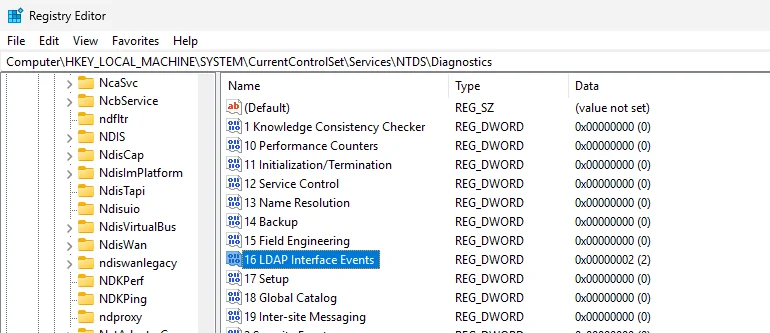
Level 2 turns on the per-client LDAP events
After a day, run the audit script again and open ldap-bind-clients.csv. Each row is one client, identity and event ID on one domain controller, with the number of binds and the first and last time seen.
Import-Csv -Path 'C:\Reports\LDAP\ldap-bind-clients.csv' | Format-Table -Property DomainController, EventId, ClientAddress, Identity, BindingType, Binds
DomainController      EventId ClientAddress Identity            BindingType Binds
----------------      ------- ------------- --------            ----------- -----
DC01.corp.example.com 2889    192.0.2.31    CORP\svc-app$       0           131
DC01.corp.example.com 2889    192.0.2.15    CORP\svc-scanner    1           96
DC02.corp.example.com 2889    192.0.2.40    CORP\svc-backup     0           12
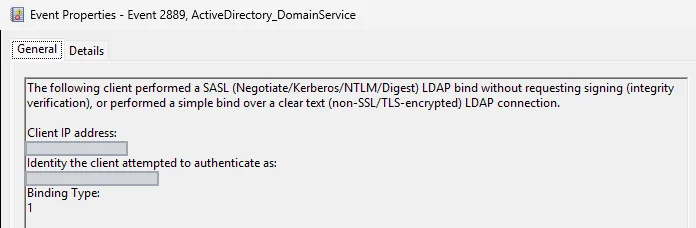
Event 2889 names each client that binds without signing
Keep the level at 2 only as long as you need it. Microsoft's diagnostic logging guidance keeps every category at 0 unless you're investigating an issue.
Step 3: Fix the clients
Work through ldap-bind-clients.csv one address at a time and find the device and the software behind it. KB4520412 sorts the results into three groups:
- Appliances and routers: ask the vendor for a firmware or configuration that supports signing or LDAPS.
- Devices that don't run Windows: confirm with the operating system and application vendors that they support LDAP signing and LDAP channel binding.
- Windows devices: every supported Windows version can use LDAP signing, so check the application's own settings. Channel binding on Windows needs the CVE-2017-8563 update, and Windows 10 supports CBT from version 1709.
Windows applications that use .NET Framework, ADSI or the WLDAP32 library get signing and channel binding from the platform, according to Microsoft's LDAP FAQ. For other operating systems, services and applications, Microsoft points to the vendor's own SDK.
Fix by binding type
| What the event shows | Problem | Fix |
|---|---|---|
Event 2889, binding type 1 |
Simple bind on port 389; the password is in clear text | Move the client to LDAPS (636) or STARTTLS and keep the simple bind, or switch to a SASL bind with Kerberos |
Event 2889, binding type 0 |
SASL bind that doesn't request signing | Configure the client to request signing, or to run the bind over TLS |
| Event 3039 or 3075 | LDAPS SASL bind without a valid CBT | Update the client so that it sends a CBT; connect it to the domain controller without a TLS-terminating device in between |
| Event 3074 | LDAPS bind with an improperly formatted CBT | Update the client library; the bind fails once the policy is Always |
Signing and channel binding don't protect simple binds; only TLS does. Moving a service account from a clear-text simple bind to LDAPS removes the clear-text password, but it doesn't add relay protection, because a simple bind carries no CBT.
Prepare LDAPS on the domain controllers
A domain controller accepts LDAPS on port 636, and on port 3269 for the global catalog, once a suitable certificate is installed, with no extra configuration; Microsoft's procedure restarts the domain controller afterward. Microsoft's LDAPS certificate guide lists the requirements:
- The Enhanced Key Usage includes Server Authentication (
1.3.6.1.5.5.7.3.1). - The domain controller's fully qualified domain name appears in the subject common name or as a DNS entry in the Subject Alternative Name.
- The private key is in the Local Computer store and has no strong private key protection.
- The key is generated with the Schannel cryptographic service provider.
- The issuing CA chains to a root that both the domain controller and the clients trust.
Channel binding doesn't need new certificates. It does need the client's TLS session to end on the domain controller itself.
Client signing policy
Windows clients take their signing behavior from Network security: LDAP client signing requirements. Its effective default is Negotiate signing, which requests signing when TLS isn't in use, and that's what Microsoft recommends during a gradual rollout. Require signing can make the client fail against a server that doesn't require signing, so set it only after every domain controller requires signing too.
Step 4: Require LDAP signing on domain controllers
Require signing once the 2889 events show no client you still need. The domain controller then rejects SASL binds that don't request signing and simple binds without TLS, and it counts each rejection in event 2888. Set it in the Default Domain Controllers Policy, or in another Group Policy Object linked to the Domain Controllers OU.
| Setting | Path (GPO / registry) | Value | Default | Effect |
|---|---|---|---|---|
| Domain controller: LDAP server signing requirements | Security Options; HKLM\SYSTEM\CurrentControlSet\Services\NTDS\Parameters\LDAPServerIntegrity |
Require signing (2) |
None (1) on Windows Server 2022 and earlier |
Rejects unsigned SASL binds and simple binds without TLS |
| Domain controller: LDAP server signing requirements enforcement | Security Options (Windows Server 2025) | Enabled, or Not Configured | Not Configured, which acts as Enabled on new deployments | Requires signing whatever the setting above says; Disabled hands the decision back to it |
| Domain controller: LDAP server channel binding token requirements | Security Options; HKLM\SYSTEM\CurrentControlSet\Services\NTDS\Parameters\LdapEnforceChannelBinding |
When supported (1), then Always (2) |
Never (0) on Windows Server 2022 and earlier; When supported on new Windows Server 2025 deployments |
Validates the CBT of SASL binds over LDAPS and STARTTLS |
| Network security: LDAP client signing requirements | Security Options; HKLM\SYSTEM\CurrentControlSet\Services\LDAP\LDAPClientIntegrity |
Negotiate signing (1), or Require signing |
Negotiate signing | Makes the client request signing when TLS isn't in use |
16 LDAP Interface Events |
HKLM\SYSTEM\CurrentControlSet\Services\NTDS\Diagnostics |
2 during discovery, 0 afterward |
0 |
Logs the per-client events 2889, 3039, 3074 and 3075 |
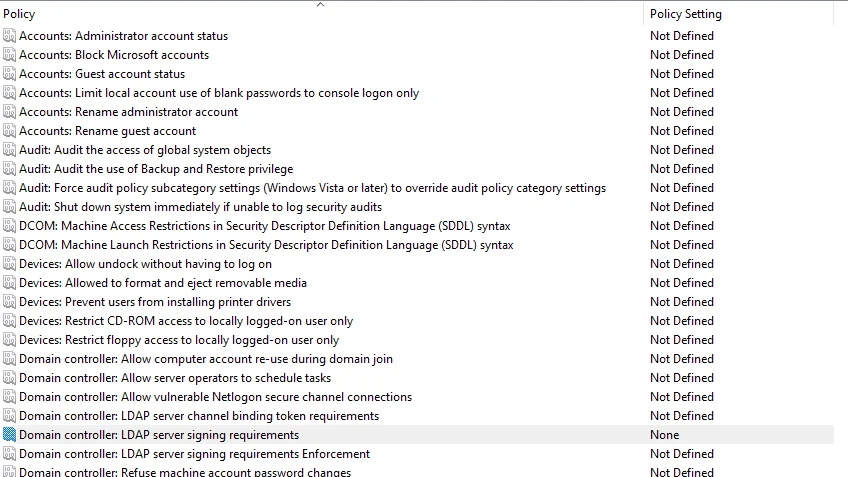
The LDAP settings in the Default Domain Controllers Policy
How do I set LDAP signing with a GPO?
Set the server requirement with these steps, based on How to enable LDAP signing in Windows Server and, for step 4, Microsoft's Group Policy guide for Windows Server 2025:
- Open the Group Policy Management Console and edit the Default Domain Controllers Policy.
- Go to Computer Configuration > Policies > Windows Settings > Security Settings > Local Policies > Security Options.
- Open Domain controller: LDAP server signing requirements, select Define this policy setting and choose Require signing.
- On Windows Server 2025 domain controllers, also open Domain controller: LDAP server signing requirements enforcement and set it to Enabled, which requires signing regardless of the setting in step 3.
- Select OK and confirm with Yes.
- Run
gpupdate /forceon a domain controller, or wait for the next refresh.
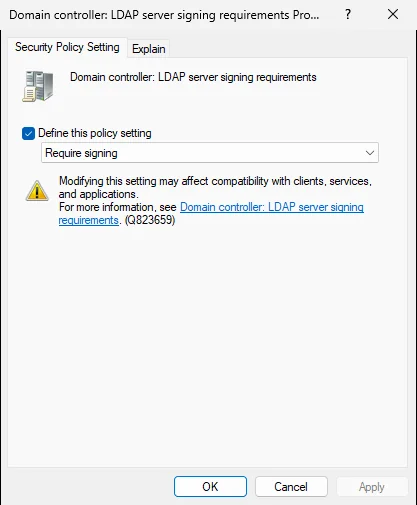
Require signing on domain controllers
Then confirm the value on each domain controller:
reg query "HKLM\SYSTEM\CurrentControlSet\Services\NTDS\Parameters" /v LDAPServerIntegrity
HKEY_LOCAL_MACHINE\SYSTEM\CurrentControlSet\Services\NTDS\Parameters
    LDAPServerIntegrity    REG_DWORD    0x2
Note: For AD LDS instances, Microsoft documents a registry setting instead of this Group Policy setting: a REG_DWORD
LDAPServerIntegrityunderHKLM\SYSTEM\CurrentControlSet\Services\<InstanceName>\Parameters, where2requires signing and0, the default, disables it. The change takes effect without a restart.
Step 5: Enforce LDAP channel binding in phases
Channel binding needs its own rollout, because it affects a different set of clients: those that send SASL binds over LDAPS or STARTTLS. Move the policy through three values, and stay on each one until its events are clean.
| Phase | Policy value | What the domain controller does | Events to watch |
|---|---|---|---|
| 1 | Never (0), the default through Windows Server 2022 |
No token validation | 3040: daily count of LDAPS binds without channel binding protection; 3041: reminder at startup and every 24 hours |
| 2 | When supported (1) |
Clients that support CBT must send a valid one; clients that don't support it are still allowed | 3039 (failed validation), 3074 (would fail under enforcement), 3075 (no CBT sent), all at diagnostic level 2 |
| 3 | Always (2) |
Every SASL bind over TLS must carry a valid CBT; the rest are rejected | 3039 for each rejected bind |
Phase 1 needs no change. If no event 3040 appears over a full audit window, the domain controller completed no LDAPS bind without channel binding protection in that time.
Phase 2 can already reject some clients: under When supported, KB4520412 lists an improperly formatted CBT and a client that is capable of channel binding but sends no CBT among the causes of event 3039. Watch 3039 closely in the first days, then use 3074 and 3075 to find the clients that would fail under Always. The audit script copies Client supports channel binding and Audit result flags from these events into the SupportsChannelBinding and AuditResultFlags columns.
To set the policy:
- Edit the same GPO and stay in Security Options.
- Open Domain controller: LDAP server channel binding token requirements, select Define this policy setting and choose When supported.
- Apply it, collect events 3039, 3074 and 3075 for the agreed window, and fix the clients they name.
- Change the value to Always once no client you still need appears.
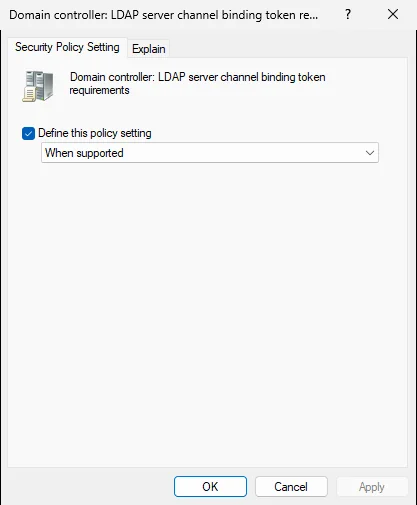
Start channel binding enforcement at When supported
On a new Windows Server 2025 deployment, Phase 2 is the starting point, because the policy defaults to When supported. Microsoft's channel binding overview documents this default for new deployments only, so on upgraded domain controllers start from the value that Step 1 reports.
Verify
Verify on three levels: the registry, a test bind and the events. Expect these results on every domain controller:
| Check | Expected result |
|---|---|
reg query for LDAPServerIntegrity |
0x2 |
reg query for LdapEnforceChannelBinding |
0x2 after Phase 3 (0x1 during Phase 2) |
Audit script, Event2887 and Event2886 |
0; the domain controller no longer accepts unsigned binds |
Audit script, Event2888 |
0 or falling; any count means a client still tries to bind without signing |
Audit script, Event3041 and Event3040 |
0; both are written only while the policy is Never |
Audit script, Event3039 |
0 or explained; each event is a rejected or failed LDAPS bind |
16 LDAP Interface Events |
Back to 0 after the investigation |
Read the channel binding value the same way as the signing value:
reg query "HKLM\SYSTEM\CurrentControlSet\Services\NTDS\Parameters" /v LdapEnforceChannelBinding
HKEY_LOCAL_MACHINE\SYSTEM\CurrentControlSet\Services\NTDS\Parameters
    LdapEnforceChannelBinding    REG_DWORD    0x2
Test with ldp.exe
Microsoft documents two ldp.exe tests, one in its Group Policy guide for LDAP signing and one in the LDAPS certificate guide. The first sends a simple bind without TLS, so the password crosses the network in clear text. Run it only in an isolated lab, with a nonprivileged, disposable test account, and never with production credentials.
- On a computer with the AD DS administration tools, run
ldp.exe. - Select Connection > Connect, type the domain controller name in Server and
389in Port, and select OK. - Select Connection > Bind, choose Simple bind, enter the test account and select OK.
- A domain controller that requires signing answers with
Ldap_simple_bind_s() failed: Strong Authentication Required.
The second test checks LDAPS. In Connection > Connect, type the domain controller name, port 636 and select the SSL check box. The RootDSE information in the right pane confirms that LDAPS works. Neither test covers channel binding, so verify it with the events above and with your own applications.
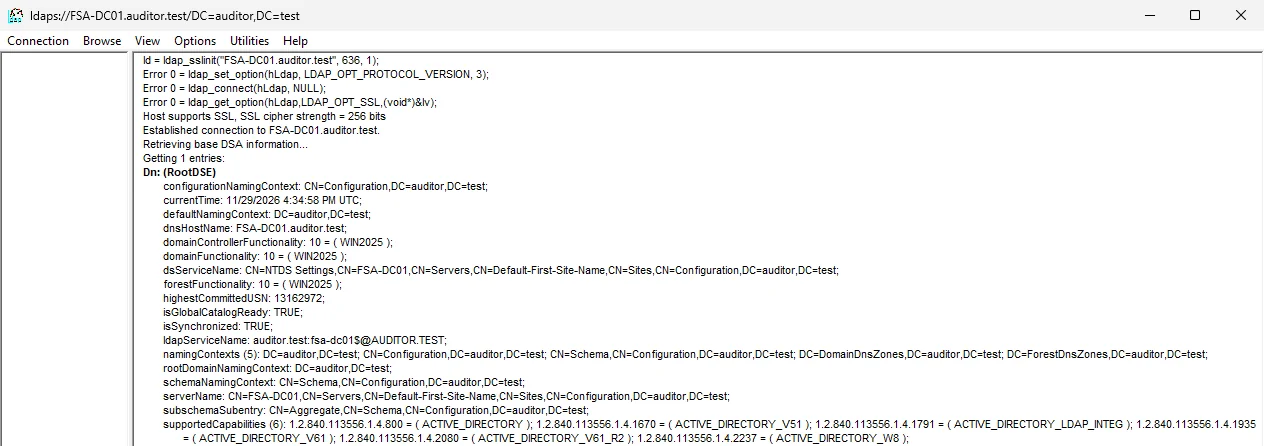
RootDSE output confirms that LDAPS works
Roll back
Each change in this guide can be reversed by setting the earlier value again. Set values explicitly rather than only clearing the policy definition, and confirm the registry value afterward with reg query.
| Change | How to roll back | Notes |
|---|---|---|
| Server signing requirement | Set Domain controller: LDAP server signing requirements to None | On Windows Server 2025, also set the enforcement policy to Disabled, or signing stays required |
| Channel binding requirement | Set Domain controller: LDAP server channel binding token requirements to When supported or Never | When supported keeps protection for clients that support CBT |
| Client signing requirement | Set Network security: LDAP client signing requirements back to Negotiate signing | Require signing on a client can fail against servers that don't require signing |
| Diagnostic level | Run Set-LdapInterfaceLogging.ps1 -Level 0 |
Microsoft recommends 0 outside investigations |
| AD LDS signing | Set LDAPServerIntegrity for the instance back to 0 |
Takes effect without a restart |
Roll back only the domain controller setting a broken client depends on, and set a date to enforce it again. A rollback removes the protection for every client, not just the broken one.
Monitor and detect
Keep collecting the Directory Service log of every domain controller after enforcement. The summary events show whether a new client binds without signing, and the per-client events name it when you turn diagnostic logging on again.
| Event | Logged when | Diagnostic level | What it tells you |
|---|---|---|---|
| 2886 | Directory Service startup and every 24 hours, while signing isn't required | 0 | The domain controller doesn't reject unsigned or clear-text binds |
| 2887 | Every 24 hours, if unsigned binds were accepted | 0 | Counts of simple binds without TLS and SASL binds without signing |
| 2888 | Every 24 hours, if unsigned binds were rejected | 0 | Signing is required; counts of rejected binds |
| 2889 | Each unsigned SASL bind or clear-text simple bind | 2 | Client IP address and port, identity, binding type |
| 3039 | An LDAPS bind fails channel binding validation (policy When supported or Always) | 2 | Client IP address of the failed bind |
| 3040 | Every 24 hours, if LDAPS binds without protection completed (policy Never) | 0 | Number of unprotected LDAPS binds |
| 3041 | Startup and every 24 hours, while the policy is Never | 0 | Channel binding isn't enforced |
| 3074 | An LDAPS bind would fail under enforcement (improperly formatted CBT) | 2 | Client, identity, CBT support and audit result flags |
| 3075 | A client that supports CBT didn't send one | 2 | Client, identity, CBT support and audit result flags |
The events are written to Applications and Services Logs > Directory Service with the source Microsoft-Windows-ActiveDirectory_DomainService. The NTLM relay detection rules match 2889, 3039, 3074 and 3075, and the RBCD, shadow credential and computer account rules linked earlier catch the directory changes described at the start of this guide. For the rest of the domain controller audit baseline, see the Active Directory audit policy guide.
To send these events to Microsoft Sentinel or a Log Analytics workspace, add a data collection rule with an XPath such as Directory Service!*[System[(EventID=2889 or EventID=3039 or EventID=3074 or EventID=3075)]]. They arrive in the Event table. The first query lists the clients behind event 2889:
// Unsigned SASL binds and clear-text simple binds per client (Directory Service event 2889).
// Needs "16 LDAP Interface Events" at 2 on the DCs and a data collection rule for the Directory Service log.
Event
| where TimeGenerated > ago(7d)
| where EventLog == "Directory Service" and EventID == 2889
| extend ClientEndpoint = extract(@"Client IP address:\s*(\S+)", 1, RenderedDescription)
| extend Identity = extract(@"Identity the client attempted to authenticate as:\s*([^\r\n]+)", 1, RenderedDescription)
| extend BindingType = extract(@"Binding Type:\s*(\d)", 1, RenderedDescription)
| extend ClientAddress = coalesce(extract(@"^\[?(.+?)\]?:\d+$", 1, ClientEndpoint), ClientEndpoint)
| summarize Binds = count(), FirstSeen = min(TimeGenerated), LastSeen = max(TimeGenerated),
    DomainControllers = make_set(Computer, 20) by ClientAddress, Identity, BindingType
| order by Binds desc
The second query lists the clients behind the channel binding events:
// LDAPS binds without a valid channel binding token (Directory Service events 3039, 3074, 3075).
// Needs the channel binding policy at When supported or Always and "16 LDAP Interface Events" at 2.
Event
| where TimeGenerated > ago(7d)
| where EventLog == "Directory Service" and EventID in (3039, 3074, 3075)
| extend ClientEndpoint = extract(@"Client IP address:\s*(\S+)", 1, RenderedDescription)
| extend Identity = extract(@"Identity the client attempted to authenticate as:\s*([^\r\n]+)", 1, RenderedDescription)
| extend SupportsChannelBinding = extract(@"Client supports channel binding:\s*(\S+)", 1, RenderedDescription)
| extend ClientAddress = coalesce(extract(@"^\[?(.+?)\]?:\d+$", 1, ClientEndpoint), ClientEndpoint)
| summarize Binds = count(), LastSeen = max(TimeGenerated), DomainControllers = make_set(Computer, 20)
    by EventID, ClientAddress, Identity, SupportsChannelBinding
| order by EventID asc, Binds desc
Both queries read the English message text in RenderedDescription. The labels they match are the ones Microsoft publishes for event 2889 in How to enable LDAP signing in Windows Server and for events 3074 and 3075 in KB4520412. For event 3039, KB4520412 documents only that the event cites the client's IP address, so use the address and the count of a 3039 row. A known application that binds without signing is a migration task. A computer account or an administrator that suddenly binds without signing from an address that isn't its own deserves an alert.
Troubleshooting
When something breaks after enforcement, check two causes first: a client that the audit window missed, and TLS that ends somewhere other than the domain controller.
| Symptom | Cause | Fix |
|---|---|---|
An application fails with Strong Authentication Required after Step 4 |
It binds with a simple bind on port 389 or with an unsigned SASL bind | Move it to LDAPS or STARTTLS, or make it request signing |
| No 2889 events, although 2887 reports binds | The diagnostic level is still 0 | Set 16 LDAP Interface Events to 2 with Set-LdapInterfaceLogging.ps1 |
| No 3039, 3074 or 3075 events | The channel binding policy is Never, or the domain controller lacks the updates that added 3074 and 3075 | Set When supported and install current updates; the 3074 and 3075 updates cover Windows Server 2022 and 2019 |
| LDAPS binds fail after Always, only through a load balancer | A device terminates TLS and opens a new connection to the domain controller | Let the client's TLS session end on the domain controller |
| ldp.exe can't connect on port 636 | No suitable certificate, or the domain controller wasn't restarted after the certificate was installed | Check the certificate requirements in Step 3 and restart the domain controller |
| A client set to Require signing loses its connection | The server doesn't require signing | Set the server requirement first, or keep the client at Negotiate signing |
On Windows Server 2025 domain controllers, older clients don't see confidential attributes in search results, or get INSUFF_ACCESS_RIGHTS when they change them |
Windows Server 2025 allows operations on confidential attributes only over an encrypted connection | Use a client that encrypts the session, such as Windows 11 version 24H2 or ldifde /h, as described in Microsoft's confidential attributes article |
| The audit script shows events but empty client columns | The domain controller writes event messages in a language other than English | Read the client details in Event Viewer, or adapt the labels in Get-MessageValue |
| A device can't sign or send a CBT and has no update | The vendor doesn't support it | Plan its replacement and keep the channel binding policy at When supported until then; Microsoft suggests isolating clients that can't sign on separate network segments |
How Forestall helps
Forestall shows who can write the attributes a relayed LDAP session targets as attack path edges: AddAllowedToAct for msDS-AllowedToActOnBehalfOfOtherIdentity and AddKeyCredentialLink for msDS-KeyCredentialLink. In GPO Audit, a custom baseline can hold Registry Settings checks, so you can add LDAPServerIntegrity and LdapEnforceChannelBinding to the baseline you compare your domain controller policy with. Forestall Identity Risk Assessment scores misconfigurations like these by exploitation certainty, required privilege and ease of mitigation.
Frequently Asked Questions
What is LDAP signing?
LDAP signing is a protection that cryptographically signs each LDAP message in a SASL session that doesn't use TLS, so a domain controller and its client can detect any change in transit. It provides integrity and authenticity, not confidentiality, and it doesn't protect simple binds. A domain controller that requires signing rejects SASL binds that don't request signing and simple binds over clear-text connections.
How do I check if LDAP signing is enabled?
To check LDAP signing, read LDAPServerIntegrity under HKLM\SYSTEM\CurrentControlSet\Services\NTDS\Parameters on each domain controller: 2 means Require signing, and 1 or no value means None on Windows Server 2022 and earlier. On Windows Server 2025, also check the enforcement policy. The Directory Service log confirms the result: event 2887 means unsigned binds were accepted, and event 2888 means they were rejected.
How do I enable LDAP signing in Windows Server?
To enable LDAP signing in Windows Server, edit the Default Domain Controllers Policy GPO and open Security Options under Computer Configuration, Policies, Windows Settings, Security Settings, Local Policies. Set Domain controller: LDAP server signing requirements to Require signing. On Windows Server 2025, keep Domain controller: LDAP server signing requirements enforcement enabled. Find and fix the clients that trigger event 2889 first, because they stop working once signing is required.
What is the difference between LDAP signing, LDAPS and LDAP channel binding?
LDAP signing protects the integrity of SASL sessions on port 389 that don't use TLS. LDAPS wraps the whole session in TLS on port 636, which gives integrity and confidentiality for every bind type, including simple binds. LDAP channel binding works inside TLS sessions: it ties a SASL bind to its TLS session with a token, so a domain controller that enforces it rejects NTLM authentication relayed over a different TLS session.
Does LDAP signing stop NTLM relay?
LDAP signing doesn't stop NTLM relay on its own. Microsoft's current channel binding overview states that LDAP signing detects tampering but, with NTLM, doesn't prevent relay, and signing doesn't apply to LDAPS at all. Channel binding closes the relay gap on LDAPS by tying each SASL bind to its TLS session. Combine both with Kerberos where possible, and reduce NTLM, to narrow the relay path to domain controllers.
Is LDAP signing required by default in Windows Server 2025?
Yes, Windows Server 2025 requires LDAP signing by default in new Active Directory deployments, because it enables Domain controller: LDAP server signing requirements enforcement there. On those deployments, LDAP channel binding defaults to When supported with auditing. An upgraded domain controller keeps its existing LDAP signing policies; if no server signing policy exists, Windows Server 2025 requires signing. Read the values on each domain controller before you plan the rollout.
Related guides
- Active Directory hardening, every step in order: where LDAP signing and channel binding fit in the full sequence.
- Require SMB signing and block NTLM relay: the same relay protection for SMB.
- Set ms-DS-MachineAccountQuota to 0: block the computer account step described above.
- Disable NTLMv1 step by step: audit and reduce the NTLM traffic that relay depends on.
- CVE-2025-33073 reflective NTLM relay: a recent relay technique and the SMB signing settings that block it.
References
- LDAP channel binding overview for Active Directory Domain Services (Microsoft Learn)
- LDAP signing overview for Active Directory Domain Services (Microsoft Learn)
- Configure LDAP signing by using Group Policy for Active Directory Domain Services (Microsoft Learn)
- How to enable LDAP signing in Windows Server (Microsoft Learn)
- 2020, 2023, and 2024 LDAP channel binding and LDAP signing requirements for Windows, KB4520412 (Microsoft Support)
- ADV190023: Microsoft Guidance for Enabling LDAP Channel Binding and LDAP Signing (Microsoft Security Response Center)
- LDAP session security settings and requirements after ADV190023 is installed (Microsoft Learn)
- Frequently asked questions about changes to Lightweight Directory Access Protocol (Microsoft Support)
- How to configure Active Directory and LDS diagnostic event logging (Microsoft Learn)
- Configure certificates for LDAP over SSL in Active Directory Domain Services (Microsoft Learn)
- Unexpected results for operations on confidential attributes on Windows Server 2025 DCs (Microsoft Learn)
- Adversary-in-the-Middle, T1557 (MITRE ATT&CK)
See your identity exposure clearly.
Start with a 1-day Proof of Value in your own environment.